What should you look for when choosing?
First, check that the keyboard connects to the device your notes are stored on. Then compare the power supply, key layout and size when in use with your needs on the go.
| What to consider |
What to look for |
Who is this important for? |
| Power without a socket |
Compare replaceable AAA or CR2032 batteries with a rechargeable battery. Check the battery type, how to replace it and what the manufacturer means by battery life. Logitech and HP describe models with replaceable batteries; Trust describes a rechargeable model. |
If you don’t expect to have access to a power socket during a study session, you’ll want to know how you can keep typing. Around 29% of consumers say power is their main consideration. |
| Connection and compatibility |
Check for Bluetooth support or a connection for a USB receiver, the operating system, device switching and the physical key layout. A USB receiver doesn’t connect via Bluetooth. Logitech, Trust and HP describe models with different connection options. |
If your notes are stored on a particular device, you’ll want to make sure the connection and controls are suitable. Around 29% of consumers prioritise compatibility with their note-taking device. |
| Typing comfort |
Compare the physical key layout and shape, and check whether the keyboard’s width when in use will fit your workspace. A number pad also takes up space. These features vary by model and don’t prove how comfortable a keyboard will be for you to type on. |
For longer sessions spent editing and organising your notes, you’ll want the keys and workspace to suit the way you type. Around 21% of consumers give typing comfort top priority. |
| Size and storage |
Compare the packed size with the dimensions when the keyboard is in use. Decide whether a key cover or folding mechanism suits both your bag and the place where you work. |
If you carry your keyboard around often, the space it takes up in your bag matters. You’ll also want to know whether the unfolded model will fit your workspace. Around 21% of consumers put portability first. |
Joybuy product picks
These Joybuy picks are keyboards for a range of compatible tablets and computers. The models differ in connection, design and device compatibility, so check that each version suits your note-taking device.
 Image unavailable
VoxorAI / Apple Magic Keyboard for iPad Pro 11-inch (M5/M4)
The product title mentions wireless operation and compatibility with 11-inch iPad Pro models with M5/M4 chips. Check that your iPad is compatible with this version.
View at Joybuy
 Image unavailable
NAXSIR foldable Bluetooth keyboard with magnetic stand
The product description mentions a rechargeable battery and a detachable magnetic stand for a phone or tablet. It also lists Type-C charging and Bluetooth pairing with up to three devices.
View at Joybuy
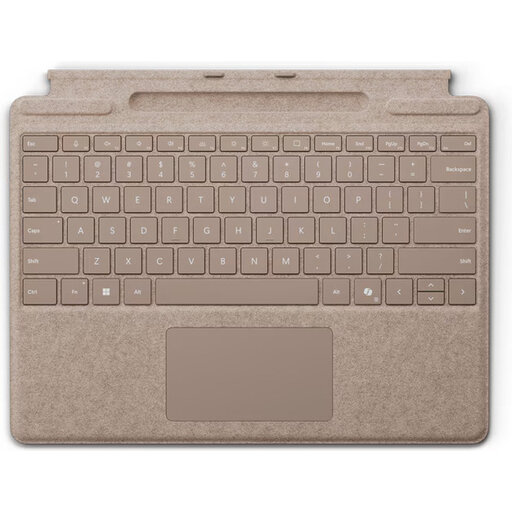 Image unavailable
Microsoft Surface Pro Keyboard QWERTY - Dune
This keyboard is designed for compatible Surface Pro models. Check your device generation and whether the magnetic connection is compatible.
The description lists compatibility with 8th- to 11th-generation Surface Pro models, a weight of 281 g and a thickness of 4,89 mm.
View at Joybuy
 Image unavailable
Ajazz AK820 Pro 75% - QWERTY US, Flying Fish Switch Purple
The title specifies a QWERTY US layout. Check that you’ll find it comfortable for organising your notes.
The product description lists 82 keys, Bluetooth 5.1, a 4000 mAh battery and a USB-C mode. The title also mentions wired, Bluetooth and 2.4G modes.
View at Joybuy
 Image unavailable
Ajazz AK820 Pro 75% - QWERTY US, Gift Switch Purple
The title specifies a QWERTY US layout. Check that you’ll find it comfortable for organising your notes.
The product description lists 82 keys, Bluetooth 5.1, a 4000 mAh battery and a USB-C mode. The title also mentions wired, Bluetooth and 2.4G modes.
View at Joybuy
Frequently asked questions
Will a portable keyboard work without a power socket and without another device?
No. The keyboards described here are input devices that connect to a phone, tablet or computer. Also check that your note-taking device has enough power and that the connection and note-taking app work with it. According to the specifications provided, the keyboards don’t store notes by themselves.
How do you prepare a keyboard for a study session without access to a power socket?
Check the power supply in advance and pair the keyboard with the device you’re taking with you. Logitech lists two CR2032 coin-cell batteries for the Keys-To-Go 2 and a T5 screwdriver for replacing them; according to Logitech, the Pebble Keys 2 K380s uses two replaceable AAA batteries. Charge a rechargeable model such as the Trust Lyra before you leave.
What are your rights when buying online in the Netherlands if you don’t like the layout or the keyboard breaks soon after purchase?
ACM ConsuWijzer states that for a standard online purchase of goods, you generally have a statutory cooling-off period of up to 14 days after delivery, subject to legal exceptions. This is separate from your rights if a product used normally doesn’t meet the expectations you were entitled to have: the seller is then responsible for providing an appropriate solution, such as a repair, replacement or refund.
Can a wireless keyboard be sold in the Netherlands without a CE mark?
The Dutch Authority for Digital Infrastructure states that electrical, electronic and radio equipment covered by the relevant European directives must comply with those rules; in Europe, only products with a CE mark may be sold. The Authority advises against using a device without the correct CE marking. Check the marking on the specific version.
Can you use a keyboard in every lecture?
Check the rules set by your course or lecturer, as permission can vary between educational institutions and classes. Radboud University generally allows laptops and tablets for taking notes, but states that a lecturer may decide otherwise; this isn’t a nationwide rule that applies to every lecture.


