What should you consider when buying?
Compare the station you want, how easy the radio is to use and the power option that suits moving it around.
| What to consider |
What should you check? |
Who is this important for? |
| Quick access to traffic updates |
Check how the station you want is broadcast and whether it’s easy to tune in or save the station. |
If I mainly want to quickly tune in to a familiar traffic station, I prioritise ease of tuning. Around 40% of consumers put quick access to traffic updates first. |
| Spoken updates and controls |
Check whether the volume control is easy to reach and whether the dial or display is easy for you to read. If possible, listen at a normal living-room volume. |
For spoken updates, I want a radio that’s easy to use and lets me adjust the volume quickly. Around 30% of consumers prioritise clear speech and easy controls. |
| Reception and station choice |
Check whether the station you want is available on FM or DAB+ and test the radio where you’ll usually keep it. |
If I want to choose between FM and digitally available stations, I also consider reception in my living room. Around 20% of consumers put station choice and reception first. |
| Power when moving the radio |
Check whether the model runs on mains power, replaceable batteries or a built-in rechargeable battery, and what’s included with the radio. |
If I want to use the radio in different places, I mainly look for a power option that doesn’t tie me to a spot near a socket. Around 10% of consumers prioritise portable power. |
Joybuy products for portable radios
This selection focuses on portable radios for FM traffic updates. Check whether the station you want to listen to can be received where you plan to use the radio.
 No image available
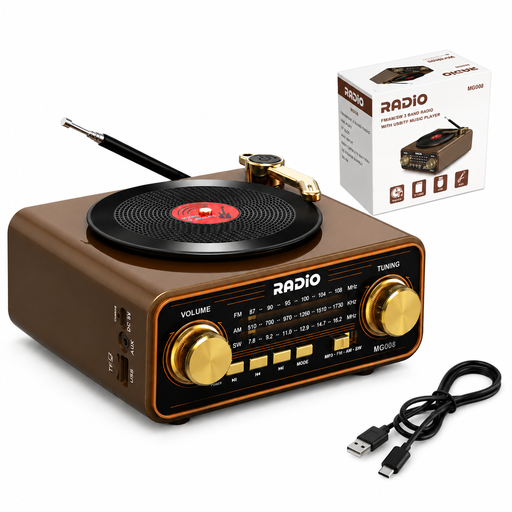
Wood-effect retro radio with Bluetooth 6.0, AM/FM and a 2000 mAh battery
This portable model with FM reception may suit you if the traffic station you want to listen to broadcasts on FM.
Features listed: AM/FM and shortwave reception, Bluetooth 6.0, USB-C, TF card and AUX connections, and a 2000 mAh battery.
View at Joybuy
Frequently asked questions
Which station can I tune in to for traffic information?
The ANWB lists NPO Radio 1, NPO Radio 2 and BNR, among others. According to the ANWB, NPO Radio 1 broadcasts traffic information every half-hour, and every 15 minutes during rush hour; the ANWB says NPO Radio 2 broadcasts it every half-hour. Broadcasts follow each station’s schedule.
What should I do if DAB+ stations are missing?
Digital Radio NL recommends running an automatic scan again to search for available stations. Reception can vary from one place in your home to another.
Do I need an emergency radio for traffic updates?
Not for listening to everyday traffic information. If you also want to use the radio when the power and internet are down, the Dutch government recommends a radio with an independent power source that receives FM and/or DAB. If so, find out in advance which regional emergency station to tune in to.
Who should I contact if the radio is faulty after purchase?
In the Netherlands, report a faulty product to the seller. The Dutch government makes clear that the legal guarantee isn’t the same as a fixed Dutch guarantee period. If there’s an additional guarantee, check what extra rights its terms and conditions provide.
Which legal product requirement should I check?
Radio equipment sold in the Netherlands must meet European product requirements. According to the Dutch Authority for Digital Infrastructure, only products with CE marking may be sold in Europe. Check this for the specific device or offer.


