Who is a portable monitor suitable for?

Developers who want to work with a single laptop cable

If you want to set up an extended desktop quickly while working away from your usual desk, it’s worth checking your laptop port’s video capabilities and the power supply first. Dell Support explains how to use an external monitor as an extension; also check that your laptop port supports video.

Readers of lengthy documentation

If you want to read code and documentation side by side, compare screen height, resolution and how the monitor sits on your desk. Lenovo lists a 16:10 aspect ratio for the ThinkVision M14t Gen 2; Dell gives the same aspect ratio for the P1425.

Travellers without a fixed workspace

If you’ll be carrying the monitor and setting it up in different locations, consider its weight, stand and available power supply. Lenovo lists the ThinkVision M14t Gen 2 at approximately 0.7 kg, including the stand.

What should you look for when buying?

What to consider What should you check? Who should prioritise this?
Connection and extended desktop Check whether your laptop port supports video, which input the monitor has and which cable you’ll need. Also consider how you’ll power it. If I want to use code and documentation side by side while working away from my usual desk, I first check whether my laptop can drive a second screen. Around 36% of consumers prioritise a working connection.
Room to read text Compare the screen size, aspect ratio and native resolution of the exact model; look for a text scaling setting that works for your layout. If I want to read lengthy documentation alongside my code, I look at the available screen height and a comfortable text size. Around 29% of consumers prioritise text readability above all else.
Portability and power Compare the weight of the screen and relevant accessories with the power source available and the stated power requirements. If I’m carrying the monitor between different workspaces, I want to know how heavy the setup is and where the monitor gets its power. Around 21% of consumers prioritise portability and power supply.
Lighting and positioning Check the stated brightness and anti-glare finish; also see whether the stand gives you a useful viewing angle at your workspace. If I work in locations with varying light levels, I want to be able to read text without awkward positioning. Around 14% of consumers prioritise lighting conditions and positioning.

Common pitfalls

  • Assuming every USB-C port supports video and power

    A laptop’s USB-C port doesn’t automatically support video. Even with a suitable video connection, you’ll still need to make sure the setup has an appropriate power supply.

    Check your laptop port’s specifications and the inputs on the exact monitor model before relying on a single cable.

    When using HDMI, you may need a separate cable or power source.

  • Comparing pixel counts alone

    A higher native resolution on a smaller screen doesn’t automatically mean text will be easier to read at the scaling setting you choose.

    Compare the screen size and aspect ratio too, and think about how you’ll arrange your editor and documentation.

  • Assuming specifications for normal lighting apply in direct sunlight

    MediaMarkt lists the ASUS ZenScreen MB16AHV at 250 nits and says this model is less suitable for bright sunlight.

    For outdoor use, choose a shaded spot where possible, and assess the brightness and reflections of the exact model.

Brands to compare

ASUS

According to ASUS, the ZenScreen MB16AHV is a 15.6-inch Full HD IPS monitor with USB-C and HDMI.

  • The HDMI connection offers an alternative way to connect video, provided your laptop, cable and monitor are compatible.
  • MediaMarkt lists the MB16AHV at 250 nits and warns that this model is less suitable for bright sunlight. Features vary by model.

Lenovo

The ThinkVision M14t Gen 2 is a compact 14-inch touchscreen with a 16:10 aspect ratio.

  • Lenovo specifies a resolution of 2240 × 1400 pixels, 10-point touch control and a weight of approximately 0.7 kg, including the stand.
  • Check whether you need the touchscreen and whether your laptop supports the USB-C connection you plan to use.

HP

The HP E14 G4 is a 14-inch portable monitor with Full HD resolution.

  • HP lists a sleeve, stand and single-cable USB-C connection.
  • Whether a single cable is enough for your laptop depends on its port and the power supply.

Dell

The Dell Pro 14 Plus P1425 is a 14-inch monitor with a 16:10 aspect ratio.

  • Dell specifies a resolution of 1920 × 1200 pixels, an anti-glare finish and a tilting stand.
  • These features alone don’t prove that the screen will be easy to read outdoors in bright light.

Portable monitors at Joybuy

These Joybuy picks are portable second screens for a laptop. For text-based work, compare the aspect ratio and resolution in particular, and check the video connection and power supply for your own setup before buying.

TECLAST V16H portable monitor, 16 inches, 16:10

TECLAST V16H 16-inch Portable Monitor

The 16:10 aspect ratio and built-in stand suit a setup with code alongside documentation; check whether you’re comfortable carrying the extra screen space.

The product name lists 144Hz, FHD IPS, two USB-C ports and mini-HDMI. USB-C video requires a laptop port that supports video, for example via DisplayPort Alt Mode or Thunderbolt.

Joybuy

TECLAST V16Q portable monitor, 16 inches, 16:10

TECLAST V16Q Portable Monitor

The 16:10 aspect ratio is worth considering if you want to view code and documents on one portable screen; also check which resolution and text scaling settings suit your work.

The product name lists 2.5K, 144Hz, IPS, two USB-C ports and mini-HDMI. USB-C video requires a laptop port that supports video, for example via DisplayPort Alt Mode or Thunderbolt.

Joybuy
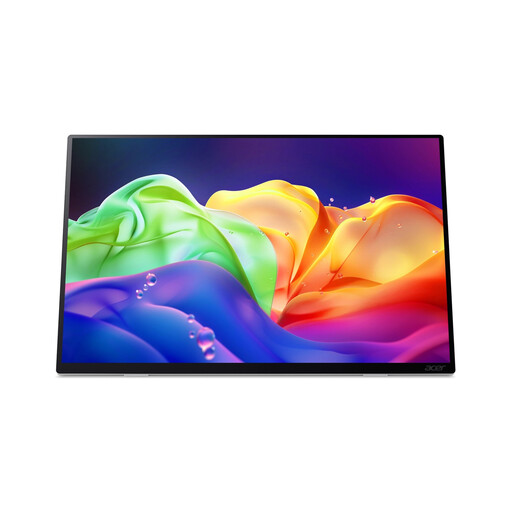
Acer ProDesigner PE160WUT portable OLED touchscreen monitor, 16 inches

Acer ProDesigner PE160WUT 16-inch Portable OLED Touch Monitor

This model may suit you if you’re looking for a touchscreen, but bear in mind that it needs a separate power supply.

The product name lists a resolution of 2880 × 1800 pixels and 120Hz. The monitor has no built-in battery and doesn’t support USB-C Power Delivery. USB-C video requires a compatible host device and connection.

Joybuy

UPERFECT portable monitor, 16 inches, 16:10

UPERFECT 16-inch 2K Portable Monitor

The 16:10 aspect ratio and stated resolution are worth considering if you’re looking for extra screen space for code and documentation; check that you can position the monitor comfortably in your workspace.

The product name lists 2560 × 1600, QLED, 450 nits, mini-HDMI, Type-C and VESA compatibility. USB-C video requires a laptop port that supports video, for example via DisplayPort Alt Mode or Thunderbolt.

Joybuy

ARZOPA Z1RC portable monitor, 16 inches, 16:10

ARZOPA Z1RC 16-inch 2.5K Portable Monitor

The product name mentions a built-in stand, which is useful if you want to set up the screen in different workspaces.

The product name lists 2560 × 1600, QHD IPS, 16:10, USB-C and HDMI. USB-C video requires a laptop port that supports video, for example via DisplayPort Alt Mode or Thunderbolt.

Joybuy

Frequently asked questions

Is a USB-C port on my laptop enough to display video on the monitor?

No, not automatically. Check your laptop’s specifications to see whether the port supports video via DisplayPort Alt Mode or Thunderbolt, then make sure the monitor’s input and power supply suit your setup.

How do I put documentation alongside my code instead of seeing the same image twice?

In your display settings, choose ‘extend’ rather than ‘duplicate’, then arrange the screens to match their physical positions. Dell Support describes these steps for Windows; if you use another operating system, check its relevant settings.

If I buy online in the Netherlands, do I have a cooling-off period, and what happens if the product is faulty?

ACM ConsuWijzer states that, for a standard online product purchase, you usually have up to 14 days after delivery to change your mind; exceptions apply. You’re also covered by the legal guarantee if a product used normally doesn’t meet what you could reasonably expect. Contact the seller if your product is faulty.

Does a CE mark prove that a screen is readable in bright sunlight?

No. A CE mark relates to applicable EU product requirements and doesn’t, by itself, say anything about how easy text is to read in bright sunlight. To assess that, consider the screen specifications and the conditions in which you work.
