
Student who often moves between classrooms
You want to be able to pack away and set up your second screen quickly. Compare the weight with the stand, case and cables you’ll actually be taking with you.


If you often move between study spaces, a portable monitor may suit you better, as long as its video connection and power requirements are compatible with your laptop. Around 14 inches is a more compact option; at 15.6–16 inches, you get more screen space but also have more to carry. If you usually study at the same desk, it may be worth comparing a desktop monitor such as the 27-inch UHD AOC U27B3AF with adjustable stand, according to AOC.
You want to be able to pack away and set up your second screen quickly. Compare the weight with the stand, case and cables you’ll actually be taking with you.
You want to view maps, tables or reports alongside your notes. The question is how much screen space you need, balanced against a size you can still carry around.
Check whether your laptop can output video through the port you’ve chosen and power the monitor, or whether you’ll need a different video input and a separate power supply.
Suitable for: anyone who often moves between classrooms and carries their screen in a bag.
Trade-off: compare the weight and physical screen space, and check that the connection works with your laptop.
Suitable for: anyone who usually works at the same desk and wants more room for maps or multiple windows.
Trade-off: a larger screen needs a permanent spot and is less practical to carry between classrooms.
| What to consider | What to check before buying | Who should consider this? |
|---|---|---|
| Carrying between classrooms | Compare the weight and dimensions, and consider what you’ll need in the way of a case, stand and cables. | If I carry my screen around often, I don’t want to take unnecessary extra kit with me. Around 28% of consumers give portability top priority. |
| Connection and power | Check the video capabilities of the specific laptop port, the monitor input, the power supply and the cables included. | I want to know before setting off whether my laptop can actually output video and power the screen. Around 28% of consumers prioritise connectivity and power. |
| Room to read | Compare the screen size, aspect ratio, resolution, text size and readability in the lighting conditions where you study. | When I’m looking at a map alongside a report, I want enough physical space to read both clearly. Around 22% of consumers give room to read top priority. |
| Positioning during long sessions | Check the tilt and height adjustment, stability and potential reflections. | I want to position my screen so that maps and small symbols are comfortable to view. Around 11% of consumers prioritise the setup. |
| Features and accessories needed | Check whether you’ll use touch or extra connections, and which cables or power accessories are included with the model. | I only want to pay for features that suit the way I study, and I want to know in advance what I’ll need. Around 11% of consumers give feature choice and required accessories top priority. |
USB-C describes the connector shape, but video and power capabilities depend on the laptop, monitor and cable you use.
Check the specifications for the specific laptop port and compare them with the monitor connection and the cables included.
A high resolution doesn’t tell you how much physical space a map takes up or how easy small text is to read in your study space.
Compare the screen size and aspect ratio too, and assess text size and reflections in the lighting where you work.
Positioning options vary by model, and a portable screen won’t automatically solve an awkward viewing angle.
Check the tilt range and stability on the type of table you study at.
Your statutory guarantee is separate from any commercial warranty. If a product doesn’t perform as you could reasonably expect under normal use, the retailer is responsible.
Check the terms of any additional cover and keep it separate from your statutory rights.
The ThinkVision M14d is a lightweight 14-inch option; the L16 offers a larger, portable 16-inch screen.
As well as USB-C, the ZenScreen MB16AHV has a mini-HDMI video input.
The Business Monitor 16B1P3302D/00 is a portable second screen with dual USB-C.
The TD1655 is a portable touchscreen option for anyone who wants to interact directly with a second screen.
The U27B3AF is a larger monitor to compare if portability isn’t your main concern.
This selection focuses on portable second screens for maps, tables and reports when moving between classrooms. Before buying, check that your laptop supports the video connection and power requirements you’ve chosen.
 No image available
The 16-inch portable model is an option if you want to carry a larger second screen.
FHD IPS screen with a 16:10 layout and 144 Hz; USB-C and mini-HDMI. The title also mentions FreeSync, HDR, stereo speakers and a built-in stand.
Check that your laptop’s video output and power supply are suitable for the connection you’ve chosen.
 No image available
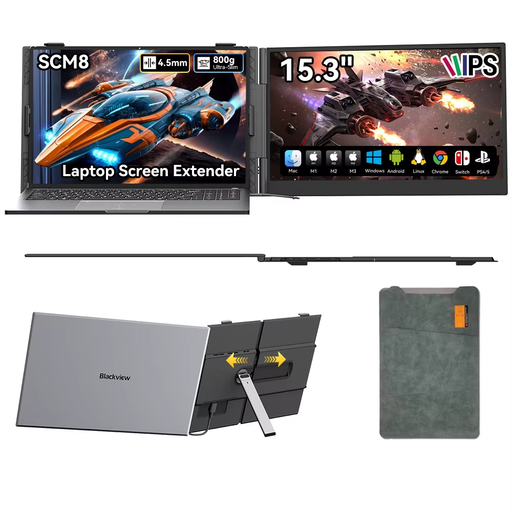
This 15.3-inch portable model is designed for use with devices such as laptops; the included case may come in handy when you’re carrying it around.
The product description mentions USB-C for video and power, a built-in speaker, a 180° adjustable stand and an included protective case.
Check compatibility with your specific laptop, and which connection and power supply your setup requires.
 No image available
The 16-inch model with a 16:10 layout is an option if you want more room for documents or maps while studying.
The description lists a weight of 650 g without the stand, dual USB-C ports, mini-HDMI and an adjustable, rotating stand.
Compare the weight including the stand, and check that the video connection works with your laptop.
 No image available
A portable touchscreen could be a good fit if you also want to interact directly with your second screen; check in advance that touch works with your device.
The description lists Full HD, USB-C and mini-HDMI. The protective case doubles as an adjustable stand.
Check which video connection, power supply and cables you need for your laptop.
No, it depends on the video capabilities of the specific laptop port. Philips lists DP Alt Mode for the 16B1P3302D/00; also check that your laptop, monitor and cable support the power requirements.
Adjust the viewing angle and text size so symbols are easy to read, watch out for reflections and take breaks from sitting for long periods. Arboportaal identifies small symbols, low contrast and reflections as factors that can reduce readability; this is a consideration for your workspace, not a statement about employment law requirements for students.
For a standard online purchase as a consumer in the Netherlands, you generally have a cooling-off period of up to 14 days after delivery; check the applicable exceptions and returns policy. If the screen is faulty under normal use, the retailer is responsible under the statutory guarantee. ACM ConsuWijzer explains these consumer rights.
Electrical and electronic equipment placed on the market must comply with the applicable European product rules. According to Ondernemersplein, the manufacturer must apply a CE mark and draw up an EU declaration of conformity when the applicable requirements call for it. If in doubt, check the details for the specific model; a CE logo alone isn’t an independent performance test.