A portable monitor is useful if you want to keep your book or notes beside your review as you write, and can set the screen up securely. Before choosing one, check whether your laptop can output video through the port you intend to use, how the monitor is powered, and whether the screen and stand will fit in your usual workspace on the train.
Who is a portable monitor on the train suitable for?
Writers who want to keep source material beside their text
If you want to keep a book, notes or quotations in view as you write, a second screen can reduce the need to switch between windows. Compare the available reading space with the room the screen and stand take up together. Dell, Philips and ViewSonic publish specifications for models that may suit this need.
Travellers with limited space to set up
When you’re using different seats, the key question is whether your laptop, screen and unfolded stand will fit on your work surface. A more compact model is a sensible place to start; check the overall dimensions as well as the screen size. Dell and Lenovo specify portable 14-inch models.
Travellers who don’t want to rely on mains power
If you’re not sure you’ll have access to a suitable charging point on every journey, check in advance how the monitor is powered and what your laptop port supports. NS notes that charging facilities can vary between train types.
What should you look for when choosing one?
Start with your laptop connection and the space available. Then choose the screen size and features you’ll actually use while writing.
| What to consider |
What to look for |
Which consumers does this matter to? |
| Reading and writing at the same time |
Compare screen size, aspect ratio and resolution. Check on your own laptop whether text is comfortable to read at your preferred scale. |
If I want to view my source material and review draft at the same time, I’m looking for a readable balance of text and workspace; around 33% of consumers put this need first. |
| Space at your seat |
Check the overall dimensions and how much room the unfolded stand needs. |
If I don’t know how much table space my seat will offer, I want my laptop, screen and stand to fit together; around 25% of consumers prioritise space. |
| Display and power |
Check whether your laptop port outputs video, which cable you’ll need and how the monitor is powered. NS says charging facilities can vary between train types. |
If I might not have access to a suitable charging point while travelling, I want to know before I set off whether my devices will work together and have enough power; around 25% of consumers prioritise connectivity and reliable power. |
| Portability and features |
Compare the weight and any included case or cable. Consider whether extra ports or touch controls suit the way you work. |
If I want to keep my bag light and only pay for features I’ll use, I focus on weight and what’s included; around 17% of consumers make this their top priority. |
Pitfalls to avoid
-
Assuming every USB-C port supports video output
A USB-C port doesn’t guarantee that your laptop can send video to a portable monitor. ASUS and Philips list DP Alt Mode as a requirement for video on the relevant models.
Before choosing a monitor, check the video specifications for the exact laptop port and the monitor’s connection requirements.
-
Relying on power from the train
NS says that power sockets and USB charging points can vary between train types. According to ViewSonic, the charging function on the ViewSonic VA1655 requires an external power adapter.
Check the facilities on your journey and consider how you’ll power your laptop and screen if no suitable charging point is available.
-
Assuming a related model number means it’s the same product
ASUS ZenScreen MB166C and MB166CR are different model names. Always compare the full model name and the specifications of the version you’re considering.
Check the model name and key specifications with the manufacturer before using a product description as evidence for a different version.
-
Confusing the manufacturer’s warranty with your statutory rights
According to the Dutch government, the Netherlands has no fixed statutory warranty period. If a product is faulty, the seller is responsible for putting things right.
Read any additional warranty terms carefully, and don’t automatically treat them as a replacement for your statutory rights.
Brands to compare
ASUS
According to ASUS, the ZenScreen MB166C is a 15.6-inch Full HD monitor with video over USB-C with DP Alt Mode.
- ASUS specifies an anti-glare IPS screen.
- According to ASUS, this model has one USB-C port and no built-in speakers. Check your laptop’s version and connection.
Dell
The Dell Pro 14 Plus P1425 is a 14-inch portable monitor with a 16:10 aspect ratio.
- Dell lists a resolution of 1920 × 1200 and a tilt-adjustable screen.
- Dell doesn’t list a touchscreen. The screen size alone won’t tell you whether the monitor and stand will fit in your workspace on the train.
Lenovo
The ThinkVision M14t Gen 2 combines a 14-inch screen with a 16:10 aspect ratio and touch controls.
- Lenovo lists a resolution of 2240 × 1400, two USB-C ports, and an included case and cable.
- Touch controls are only useful if your device and workflow support them.
Philips
The Philips 16B1P3302D/00 is a portable 15.6-inch Full HD monitor.
- Philips lists two USB-C ports and an adjustable stand.
- For video over USB-C, the connected device must support DP Alt Mode. Also check the requirements for power and charging.
ViewSonic
According to ViewSonic, the VA1655 has a 15.6-inch visible screen, a fold-out stand, USB-C and mini-HDMI.
- ViewSonic lists a weight of 0.7 kg and two types of connection for this model.
- The stated charging function requires an external power adapter. Certain mobile devices also have additional adapter and power requirements.
Arzopa
According to Arzopa, the Z1RC is a 16-inch screen with a 16:10 aspect ratio.
- Arzopa specifies a resolution of 2560 × 1600.
- When checking a product description or ranking, confirm the full model name and resolution before relying on the specifications.
Portable monitors at Joybuy
This selection includes 14- and 16-inch portable monitors for anyone who wants to view a book, notes or other source material beside a review draft. Compare the connection and the space the screen and stand take up.
 No image available
Blackview DCM6 PRO 14-inch portable monitor
A compact option for viewing a document or notes beside your review draft.
The product listing specifies a Full HD resolution of 1920 × 1080 and compatibility with 13–17.3-inch laptops. Also check that your laptop’s video output is suitable.
View at Joybuy
 No image available
PM14R 14-inch portable monitor
A 14-inch screen for placing a document beside your review when you want to work in a compact space.
The product details list an IPS screen with 1920 × 1200 resolution and a 16:10 aspect ratio, plus USB-C and mini-HDMI. The stated single-cable connection for video and power only works with supported devices.
View at Joybuy
 No image available
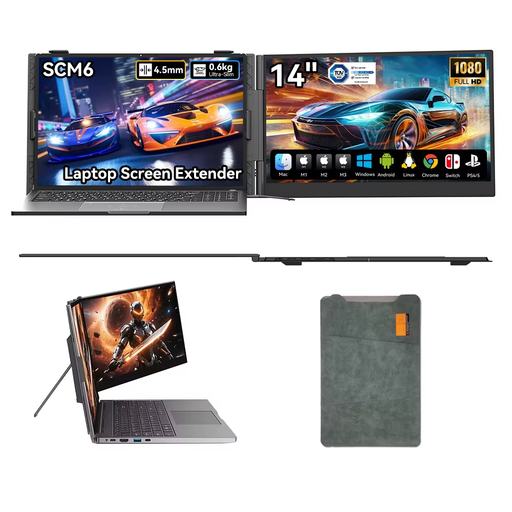
Blackview SCM6 14-inch portable monitor
A 14-inch option for a smaller workspace, with a stand to prop up the screen.
The product listing specifies Full HD 1080p and a 180° adjustable stand. The description mentions a single USB-C cable for video and power; check that your laptop supports this connection.
View at Joybuy
 No image available
TECLAST V16H 16-inch portable monitor
A larger screen for viewing more of a source document beside your draft. Bear in mind that it needs more space to set up than a 14-inch model.
The product details list a Full HD IPS screen with a 16:10 aspect ratio, two USB-C ports, mini-HDMI and a built-in stand.
View at Joybuy
 No image available
Lenovo L16 16-inch portable monitor
A 16-inch screen for anyone who wants more vertical document space while writing and has enough room to set it up.
The product details list a 1920 × 1200 WUXGA IPS screen with a 16:10 aspect ratio, two USB-C ports with DisplayPort Alt Mode, an adjustable stand and an included protective case. Your laptop must have a compatible video connection.
View at Joybuy
Frequently asked questions
Is a USB-C port on my laptop enough?
Not necessarily. Check whether the specific laptop port supports video over DP Alt Mode and whether the monitor receives enough power through that connection. Philips and ASUS explicitly list DP Alt Mode for the models reviewed.
Can I rely on a power socket on every train journey?
No. NS says that power sockets and USB charging points can vary between train types. Check the facilities for your journey, and don’t plan to power your laptop and monitor solely around an assumed charging point.
How do I use a second screen while writing?
Connect the monitor using a video connection supported by both your laptop and the screen, then set your computer to extend the desktop. You can put your draft on one screen and your book or notes on the other; check in advance that the cable, power supply and stand will all work together.
What are my rights when buying online in the Netherlands?
When you buy from a business online, you generally have a 14-day cooling-off period; the Dutch government notes that conditions and exceptions may apply. You’re also entitled to a product that meets the required standards. According to the Dutch government, the Netherlands has no fixed statutory warranty period, and the seller is your point of contact if a product is faulty.
Where can I compare a monitor’s energy consumption?
The European Commission explains energy labelling for computer monitors. Compare the label for the exact version; by itself, it won’t tell you how long your laptop and monitor will run on the available battery power during a train journey.


