
Laptop user checking an inventory
You want to view an inventory list alongside related information, and need to check first that your laptop can send video to a second screen.


First, choose a portable monitor that can receive video from your laptop or tablet: a USB-C port alone doesn’t guarantee compatibility. Then compare the monitor and stand with the space available, and decide whether powering it from your device will be enough or whether you’d prefer a model with its own battery. A larger or dual-screen model is worth considering if you need the extra workspace and have room to set it up.
You want to view an inventory list alongside related information, and need to check first that your laptop can send video to a second screen.
You want a clearer view, but need to fit the screen and stand into the space available without using a seat for your luggage.
You want to weigh up whether powering the screen from your laptop will be enough or whether a model with its own battery is better suited to your journey.
First, check your device’s video connection and the exact monitor model. Then compare the workspace and power options you’ll need with what’s available during your journey.
| What to consider | What should you check? | Who is this important for? |
|---|---|---|
| Video and power compatibility | Check the video mode supported by your device, as well as the inputs and power requirements of the exact monitor model. | If I want to view my inventory alongside my laptop, the second screen needs to receive video from my device. Around 31% of consumers put this connection first. |
| Size and setup space | Compare the screen’s dimensions and stand with the space where you plan to set it up. | I want a clearer view, but my screen and bag need to fit within my own space. Around 25% of consumers prioritise a compact setup. |
| Power during your journey | Check whether the screen needs power from your device or has its own battery, and look at the stated battery life too. | If I don’t want to rely on finding a socket, I want to know in advance how the screen will be powered. Around 25% of consumers make the power option a priority. |
| How clearly you can read lists and view photos | Compare the resolution and aspect ratio, and check whether text is comfortable to read at your chosen display scale. | I want to compare inventory entries, columns or photos easily without constantly switching between windows. Around 19% of consumers are mainly looking for a clearer view. |
Having the same connector shape doesn’t automatically mean your device supports a monitor’s video mode. For video over USB-C on the 16B1P3302D/00, Philips requires a source device with DP Alt Mode.
Before choosing a connection, check your own laptop or tablet’s video output and the requirements of the exact monitor model.
Depending on your devices and connections, you may need a different cable or a separate power supply.
Extra panels can give you more workspace, but the screen and your luggage need to fit in the space you’re using. According to NS’s house rules, hand luggage must not occupy a seat that another passenger could use.
Check the space needed when the stand is fully extended too, and choose a dual-screen model only if you need the extra workspace.
ASUS lists a built-in 7800 mAh battery for the ZenScreen Go MB16AHP. That figure alone doesn’t tell you how long it will last with your settings and connection.
Check the stated battery life and the conditions it applies to, and take the weight into account when making your choice.
The ZenScreen range includes several 15.6-inch monitors, a model with a built-in battery and a dual-panel model.
The ThinkVision M14t Gen 2 is a compact 14-inch model to compare if touch controls and the stated resolution matter to you.
The Pro 14 Plus P1425 is a 14-inch single-screen model without a touchscreen.
The Business Monitor 16B1P3302D/00 is a 15.6-inch model with two USB-C ports and a tilt-adjustable stand.
The E14 G4 is a 14-inch alternative, supplied with a case and stand for a setup with one extra screen.
These models are intended as one extra portable screen for viewing an inventory alongside your main display. Compare the size, connections and stand with your device and the space available.
 No image available
A larger single screen to consider if you want to view inventory entries alongside your main display and have enough space for it.
16-inch IPS screen, 16:10, FHD, 144 Hz, two USB-C ports, mini-HDMI and built-in stand.
 No image available
A compact single screen to compare if you want extra room for your inventory while keeping the space needed for the stand in mind.
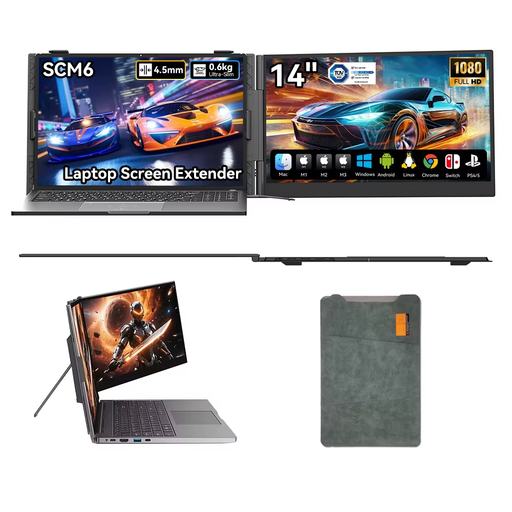
14-inch screen, 1080p, USB-C Plug & Play, built-in speaker and 180° adjustable stand.
 No image available
A larger single screen to consider for detailed inventories, provided it fits into your train setup.
16-inch IPS screen, 16:10, 2560 × 1600 pixels, USB-C, HDMI and built-in stand.
 No image available
A single screen to compare if you want extra room for your inventory and can set it up in the space available.
15.6-inch LCD screen, 1920 × 1080 pixels and Full HD.
 No image available
A compact single screen to compare if you want more room for your inventory without setting up a larger monitor.
14-inch IPS screen, Full HD 1080p, dual speakers and built-in stand.
No. Check that your device’s video output is compatible with the input on the exact monitor model. For video over USB-C on the 16B1P3302D/00, Philips requires a source device with DP Alt Mode; ASUS also specifies a device that supports this mode for the MB16AH.
Not on every train, in every class or at every seat. NS lists sockets with USB connections in first and second class on the ICNG, and sockets in first class on ICM rolling stock. So plan how you’ll power your screen and laptop without assuming there’ll be a socket at your seat.
According to NS’s house rules, hand luggage must not occupy a seat that another passenger could use. Choose a setup that fits within your available space; this doesn’t guarantee that there’ll be room for a screen at your seat.
For an online consumer purchase, you’ll often have a 14-day cooling-off period from the date of delivery; check the applicable terms and exceptions. If a product is faulty, you also have statutory rights. The Dutch government states that there is no fixed statutory warranty period in the Netherlands.
Adjust the text size and windows on your own device, and place the screen on a suitable surface within the space available. Check the cleaning and storage instructions for the specific model; a stated resolution alone doesn’t guarantee that the text will be comfortable for you to read.