
Storyboard reviewer with limited desk space
Wants to view their laptop and storyboard at the same time, and is looking for a second screen that fits neatly beside the computer.


For reviewing storyboards on a small desk, a 14-inch monitor will usually fit better beside a laptop. A 15.6-inch screen gives you more room for panels, but takes up more space. Then choose according to how you work: touch is only useful if your computer and software support annotation by touch, and stated colour figures are not independent measurements. Before buying, check that your computer can output video through the connection you choose and that the monitor receives enough power.
Wants to view their laptop and storyboard at the same time, and is looking for a second screen that fits neatly beside the computer.
Assesses colour blocks and dark scenes, weighing panel and colour specifications against screen size and any need for calibration.
May want to point things out or annotate images directly. Touch is only useful for this if the computer and software support that way of working.
Start with the space you have and your computer’s connections. Then compare display features and extras with the way you review storyboards.
| Priority | What to look for | Who is this important to? |
|---|---|---|
| Screen and stand fit on the desk | Measure the space available beside your laptop and input devices, and check how the stand positions the screen. Storyboard panels will appear smaller on a smaller screen. | I want to view my laptop and storyboard side by side without losing too much workspace. Around 33% of consumers prioritise their desk setup. |
| Colour, contrast and detail | Compare the resolution and stated colour gamut of the exact version; manufacturers’ figures are not a calibration or measurement report. | When I assess colour blocks, dark scenes or fine detail, I consider these specifications alongside screen size. Around 27% of consumers prioritise image quality. |
| Video and power connections | Check your computer’s video output, the monitor’s connections and its power requirements. ASUS requires USB-C with DisplayPort Alt Mode for the MB166CR. | I want to connect my existing computer without discovering afterwards that its USB-C port does not support video output. Around 20% of consumers prioritise a compatible connection. |
| Only the features you’ll use | Decide whether you want to annotate using touch, and check that your computer and software support it. Also check which cables or power supply your setup requires. | I’m looking for a practical second screen and don’t want to choose touch if I only edit my storyboard with a mouse or tablet. Around 20% of consumers mainly want the essentials. |
According to ASUS, the ZenScreen MB166CR requires USB-C video output via DisplayPort Alt Mode. A USB-C connection without this support is not sufficient for video transmission.
Before buying, check your computer’s video output and the connections on the exact monitor model.
Depending on your setup, you may need a different connection solution or power supply, so check this in advance.
Colour coverage in a manufacturer’s specifications does not mean that your individual unit has been calibrated or is suitable for final colour-critical approval.
Use the stated figures to compare models, but don’t treat them as proof of calibration status.
For a colour-critical final review, you may need to add calibration to your workflow.
A 15.6-inch screen may take up more desk space than the 14-inch models reviewed.
Measure the available space beside your laptop, keyboard and mouse, and check how the stand sits on your desk.
The ThinkVision M14t Gen 2 is a compact option if you want higher resolution and touch functionality.
The Pro 14 Plus P1425 is a 14-inch option for a compact second workspace without a touchscreen.
The ZenScreen MB166CR offers a larger IPS screen; the ZenScreen OLED MQ16AH is an option if colour and contrast are important.
The VG1655 is a 15.6-inch alternative with adjustable positioning and portrait mode.
The PRO MP165 E6 is a 15.6-inch Full HD IPS alternative if you also want HDMI.
These product picks focus mainly on 14-inch portable monitors for compact setups. There’s also a 15.6-inch IPS model for anyone looking for more screen space.
 No image available
The 14-inch size may suit a compact setup beside a laptop.
Full HD; listed for laptops from 13–17.3 inches.
 No image available
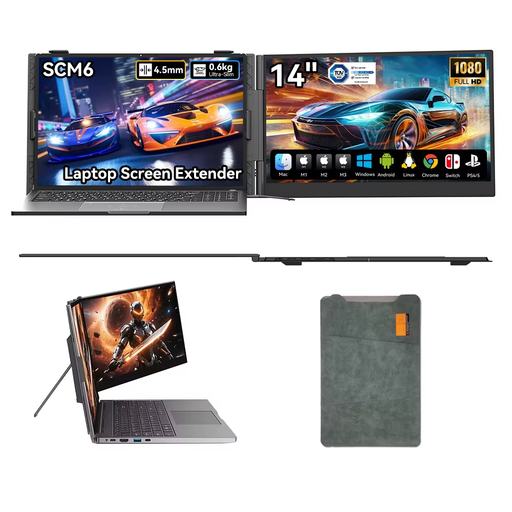
The 14-inch version is a compact option for a second screen beside your laptop.
1920 × 1200 pixels, 16:10, IPS; connections: Type-C and Mini-HDMI.
 No image available
The adjustable stand may come in handy if you want to change the viewing angle while reviewing.
1080p; USB-C; stand adjusts up to 180°; built-in speaker.
 No image available
The 14-inch size and built-in stand make this a good fit for anyone looking for a compact second screen.
Full HD 1080p; IPS; built-in stand.
 No image available
This larger screen may suit you if you want more room for storyboard panels and have space for a 15.6-inch monitor.
Full HD 1920 × 1080; IPS; 360° stand. DisplayPort Alt Mode is required for video via USB-C.
No, not every USB-C port can output video. ASUS requires USB-C with DisplayPort Alt Mode for the ZenScreen MB166CR, so check the specifications for your computer and the exact monitor model. Also check separately that the monitor receives enough power.
Check that the stand fits securely beside your laptop and that the chosen orientation suits your panels. ASUS lists a 360° stand and automatic orientation software for the MB166CR; don’t assume other models have the same features.
For a consumer purchase in the Netherlands, the product must meet reasonable expectations. According to the Dutch government, there is no fixed statutory guarantee period. If there’s a problem, contact the seller, even if a manufacturer’s guarantee is available.
For eligible distance purchases by consumers, the Dutch government states that you generally have 14 days to change your mind. Not every online transaction is covered by these rules; for example, a purchase from a private individual is not a distance purchase by a consumer.
The Netherlands Food and Consumer Product Safety Authority (NVWA) states that CE marking is mandatory for electrical products. This marking is not proof of an independent usability or colour test; check the information for the exact model on offer.