
Writer working with lots of sources
Wants to keep articles, quotes or notes open alongside a chapter. Screen space, resolution and screen position are important considerations.


Choose a portable monitor that you can confirm will receive a video signal from your laptop and that fits the space available on your shared table. Then weigh up how much screen space you need against the weight and setup you want to carry each day. A battery or extra panel may mean different requirements for power and table space.
Wants to keep articles, quotes or notes open alongside a chapter. Screen space, resolution and screen position are important considerations.
Takes their setup with them and needs to connect and pack it away quickly at a shared table. Weight, stand, cables and power all play a part.
Needs to leave room for documents or other people using the table, as well as their laptop. So compare the setup when it’s in use, not just its folded dimensions.
First, check that your laptop can output video through the connection you plan to use. Then compare the screen space, portability and setup with your everyday writing space.
| What to consider | What to look for when buying | Who is this important for? |
|---|---|---|
| Screen space | Compare screen size, resolution and aspect ratio; adjust the text size to suit your reading comfort. | If I want to keep sources and notes open alongside my text, I focus on screen space and text size. Around 31% of consumers say screen space is their top priority. |
| Connection and power | Check the video capabilities of your laptop port, the monitor input and the cable; check the power requirements separately. | If my laptop, cable and monitor all need to provide video and power, I want to check the connections in advance. Around 25% of consumers put connectivity first. |
| Carrying it every day | Compare the monitor’s weight with the weight of the case, adapter and cables you’ll need to carry. | If I need to pack the monitor away after every session, I want to factor in the weight of the whole setup. Around 19% of consumers say portability is their top priority. |
| Table setup | Check the dimensions when in use, the screen position and how much space the cables take up. | If I share a table with others, I want the screen to stand securely without taking over the space I need for my documents. Around 13% of consumers put the setup first. |
| Total cost | Check which cables and adapters are included and exactly what any additional cover includes. | If I want to avoid extra purchases, I first check what comes with the version I’ve chosen. Around 12% of consumers say total cost is their top priority. |
A USB-C port doesn’t automatically provide video. ASUS distinguishes between DisplayPort Alt Mode and a USB connection that requires a DisplayLink driver, among other things.
Before choosing a monitor, check the capabilities of the specific laptop port and compare them with the monitor input and cable.
According to ASUS, the ZenScreen MB16AHV can be tilted but doesn’t have built-in height adjustment. This may mean the screen doesn’t sit at the right height for you at a shared table.
Compare the screen position with where you sit and the table space available.
ASUS states that the ZenScreen Go MB16AHP lasts up to four hours under a specific test condition: DP Alt Mode and 100% brightness.
Plan for a power source during longer writing sessions, and don’t assume the battery will last through a full working day.
Paid-for cover is not the same as your right to a product that works properly. The Dutch government states that there is no fixed statutory guarantee period in the Netherlands and that the retailer must provide a solution if something goes wrong.
Read what additional cover includes and compare it with your statutory rights before paying for it.
ZenScreen models vary in screen size, connections, battery and number of panels. These differences don’t indicate a quality ranking for the brand.
The ThinkVision M14t Gen 2 is a 14-inch model to compare if you’re looking for a compact screen with touch control.
The HP E14 G4 is a 14-inch USB-C model to compare if you’re looking for an anti-glare screen.
This selection from Joybuy includes portable second screens for use alongside a laptop, from a dual-screen laptop extension to standalone monitors. Check the connection and how much table space each setup takes up before choosing a model.
 No image available
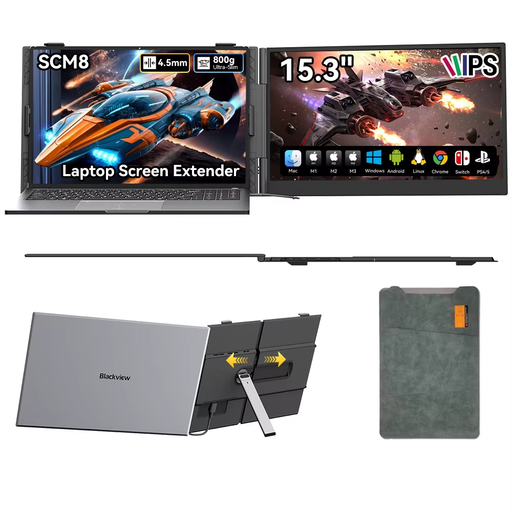
For anyone looking for a dual-screen extension for a laptop; the stated compatible laptop size is 13–17.3 inches.
14 inches; Full HD, 1920 × 1080 pixels; USB-C.
 No image available
For anyone who wants to use a portable 16-inch screen alongside a laptop and needs a built-in stand.
FHD IPS; 16:10 aspect ratio; 144 Hz; two USB-C ports, Mini HDMI and built-in stand.
 No image available
For anyone looking for a portable screen that, according to the product description, can be used alongside a laptop, among other things.
USB-C; according to the product description, the stand adjusts through 180° and a protective case is included.
 No image available
For anyone who wants to use a portable touchscreen as a second screen alongside a laptop.
1080P; USB-C video and power; Mini HDMI; VESA mounting.
 No image available
For anyone comparing portable 16-inch screens with a 16:10 aspect ratio for working with documents and sources.
2560 × 1600 pixels; 16:10; Mini HDMI and Type-C; VESA-compatible.
No, not every USB-C port supports video output. Check the capabilities of the specific laptop port and make sure the monitor and cable support the connection you need. ASUS describes DisplayPort Alt Mode and a separate USB connection that requires a DisplayLink driver, among other things.
Position the screen securely, adjust the text size and brightness to suit your reading needs, and check that the stand gives you the position you want. For employees who work with screens for more than two hours a day, Arboportaal outlines specific requirements, including being able to use a separate screen or keyboard. These employer regulations don’t automatically apply to every PhD student or university student.
Follow the instructions for your chosen model when cleaning and using it safely. Store the screen in a protective case and check in advance which case and accessories are included with the version you’re buying.
You don’t need to buy it to have statutory rights to a product that works properly: according to the Dutch government, there is no fixed statutory guarantee period in the Netherlands. Compare paid-for additional cover with those rights; if something goes wrong, the retailer must provide a solution.
For qualifying distance purchases from a business, you’ll often have a 14-day cooling-off period. Check who the seller is and which terms apply to your purchase; according to the Dutch government, buying online from a private individual doesn’t fall under the same definition of a distance purchase.