A monitor with its own battery is handy if you want to power the screen independently of your laptop or phone. A USB-powered screen can also work without a mains socket, provided the video source or a suitable portable power supply delivers enough power. You should also check the video connection, cables and setup for your workbench.
Who are these screens for?
Working without a mains socket
Want to read work instructions without plugging the monitor into the mains. Remember to plan how you’ll power the video source too. ASUS lists a built-in battery for the ZenScreen Go MB16AHP, while Philips describes the 16B1P3302D/00 as being powered via USB.
Switching between video sources
For example, you use a laptop and an HDMI device in turn. Check both the video connection and how the monitor will be powered for each source.
Reading from the workbench
Want to view text and diagrams at a practical angle and position the screen securely. Think about the space available too, and how you’ll protect the screen from dirt or moisture.
What should you look for when buying?
When displaying work instructions on a workbench, the power supply and connection determine whether an image appears in the first place. Readability, protection and positioning then determine how useful the screen will be there.
| What to consider |
What should you check? |
Who is this important for? |
| Running time without mains power |
Decide how long you want to display instructions for, and check the power supply for both the monitor and the video source. |
If I can’t use a mains socket during a work session, I want to know how long the screen and video source will last. Around 29% of consumers in this work situation prioritise independent screen power. |
| A working video connection |
Check the video output of the exact device. For USB-C video, the Philips 16B1P3302D/00 requires DP Alt Mode. If using HDMI, plan for the power supply too. |
I want to know in advance that my source can send a picture to the monitor and that the power supply is taken care of. For around 23% of consumers, a working combination of source, cable, video and power is the main priority. |
| Readable instructions |
Compare the screen size and stated resolution with your viewing distance and the space available on your workbench. |
If I need to read diagrams or small text at my workstation, I pay attention to the combination of screen size and resolution. Around 18% of consumers prioritise readability. |
| Protection at the workstation |
Keep the screen away from dust and splashes; don’t assume a carry case protects it while it’s in use. |
I want to keep dirt or moisture away from my screen, so I first choose a position outside the exposed work area. Around 18% of consumers prioritise protection at the workstation. |
| A stable setup |
Measure the available space and check the viewing angle, stand and any mounting options for the exact model. |
If I want to position the screen on a crowded workbench, it needs to sit securely in that spot. Around 12% of consumers choose mainly on the basis of a suitable setup. |
Common pitfalls
-
Confusing ‘without a mains socket’ with ‘without power’
A USB-powered monitor still needs power, for example from the video source or a separate portable power supply.
Before buying, map out the whole setup: the source of the instructions, video connection, monitor power and charging plan.
-
Assuming every USB-C port outputs video
For USB-C video, Philips requires a device with DP Alt Mode for the 16B1P3302D/00. The shape of the connector alone doesn’t confirm that it supports this feature.
Check the specifications for the exact laptop, phone or other video source.
-
Mistaking a carry case for protection during use
ASUS describes the MB16AHP’s case as protecting against dust and scratches during transport. This doesn’t prove the screen is dust- or splash-resistant when it’s set up on a workbench.
Position the screen outside the dirty or wet work area. If you’re using it in an exposed environment, rely only on product specifications that apply to that model and those conditions.
Brands to consider
ASUS
ASUS describes the ZenScreen Go MB16AHP as a portable monitor with a built-in battery. The ZenScreen MB16AHV is a separate model with a kickstand, two USB-C ports and mini-HDMI.
- ASUS specifies up to four hours of battery use for the MB16AHP under its stated test conditions.
- The stated maximum battery life isn’t guaranteed for every connection or work session. The MB16AHP’s battery features don’t automatically apply to other ZenScreen models.
Philips
The Philips Business Monitor 16B1P3302D/00 is a USB-powered portable monitor with two USB-C ports and an adjustable stand.
- Philips states that the stand is adjustable and the screen receives power via USB.
- For USB-C video, this model requires a connected device with DP Alt Mode. If you’re not using a mains socket, the USB power must come from a suitable portable source.
Lenovo
The ThinkVision M14t Gen 2 is a 14-inch portable monitor for anyone who values document detail and touch controls.
- Lenovo specifies a resolution of 2240 × 1400 pixels and two USB-C connections for this model.
- The stated power delivery doesn’t prove that the monitor has its own battery. Check how the screen will be powered in your setup.
Acer
The Acer PM161Q B is a 15.6-inch Full HD monitor for which Acer lists the connections, cables and stated power consumption.
- For this version, Acer lists USB-C, a mini-HDMI-to-HDMI cable and a stated operating power consumption of 10 W.
- If you’re using it without a mains socket, check that your chosen portable power supply is suitable. Specifications may vary between PM161Q versions.
Portable monitors at Joybuy
These portable monitor options are designed for displaying work instructions on a workbench. Before buying, check the CE marking for the specific version. The Dutch government states that electronic products on the EU market must carry a CE marking.
 No image available
Blackview DCM6 PRO 14-inch Full HD monitor
A 14-inch option for viewing work instructions from a compatible laptop.
Full HD; the product name states that it’s compatible with laptops from 13–17.3 inches.
Check that your laptop’s video connection and power supply are suitable for your intended setup.
View at Joybuy
 No image available
TECLAST V16H 16-inch FHD IPS monitor
The built-in kickstand can be useful if you want to position the monitor on a workbench.
16 inch, FHD IPS, 16:10, 144 Hz, two USB-C ports and mini-HDMI.
Check which video connection your source supports, and arrange a power supply for use without mains power.
View at Joybuy
 No image available
TECLAST V16Q 2.5K IPS monitor
A portable monitor for viewing detailed work instructions. Check in advance that the resolution suits your video source and how you plan to use it.
2.5K, 144 Hz, IPS, 16:10, two USB-C ports, mini-HDMI and kickstand.
If you’re using it without a mains socket, plan the power supply and check which video connection your device supports.
View at Joybuy
 No image available
Blackview SCM5 14-inch FHD IPS monitor
The adjustable stand can help you find the right viewing angle on a workbench.
14 inch, FHD IPS, 1.5 W speaker and adjustable stand; the product name states that it’s compatible with laptops from 13–17.3 inches.
Check the video connection and power supply required by your specific video source.
View at Joybuy
 No image available
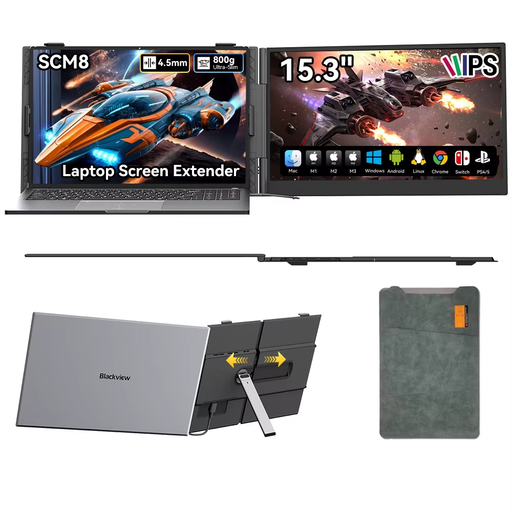
Blackview SCM8 15.3-inch monitor
The included protective case is handy for transport. Position the screen on the workbench away from dust and splashes.
15.3 inch, USB-C, built-in speaker and 180° adjustable stand; the product name lists use with a laptop, smartphone and tablet.
Check that your chosen device supports the required video connection and how the monitor will be powered.
View at Joybuy
Frequently asked questions
Can a single USB-C cable carry both video and power?
Yes, if both the monitor and the connected source support the required features. For USB-C video, Philips requires DP Alt Mode for the 16B1P3302D/00. Also check that the source meets the power requirements of your setup.
What can I do if HDMI displays a picture but the monitor won’t switch on?
Check whether the monitor needs a separate USB power supply in addition to HDMI. The c’t review notes that HDMI or DisplayPort setups require a separate USB connection for power.
What warranty and cancellation rights apply to an online purchase in the Netherlands?
According to the Dutch government, under the statutory guarantee a product must meet what you could reasonably expect from it; there is no fixed general guarantee period in the Netherlands. For online purchases from a business, you generally have 14 days to change your mind, subject to exceptions and conditions that may depend on the purchase.


