What should you look for in a monitor for photo previews?
First, decide whether the image will come from a laptop or a camera. Then check how the screen will be powered without a mains socket, and whether its resolution, colour specifications and physical features suit the way you review images on location.
| What to consider |
What should you check? |
Who is this important for? |
| Power without a mains socket |
Check whether the screen has a built-in battery or needs power from a laptop or external source. Find out how long it lasts at your intended brightness and with your chosen connection. |
If I don’t have a mains socket on location, I want to know whether the screen will drain my laptop battery or has one of its own. Around 31% of consumers rank power as their top priority. |
| Connection to the image source |
Compare your camera or laptop’s video output with the screen’s inputs. Also check the cable ends and whether a separate power supply is needed. For a single USB-C cable with the PA148CTV, ASUS requires DisplayPort Alt Mode and at least 10 W from the connected source. |
For a smooth workflow, I want a cable connection that works with my camera or laptop. Around 25% of consumers put connectivity first. |
| Colour and detail |
Check the resolution, colour gamut and any stated accuracy specifications for the exact model. Treat manufacturers’ claims separately from measurements of your own screen. |
If I’m assessing colours or fine detail, I want to know what specifications are listed for this exact model. Around 25% of consumers prioritise colour and detail assessment. |
| Portability and readability |
Compare the size, weight, mounting options and anti-glare features of the model. A stated brightness level alone won’t tell you how easy the screen will be to read in your lighting conditions. |
When I’m taking the screen with me and using it on location, ease of handling and readability affect my choice. Around 19% of consumers put these features first. |
Portable monitors on Joybuy
This selection focuses on portable screens for use with a laptop. Check whether your laptop provides the required video output and power for each model; a portable monitor doesn’t automatically have a built-in battery.
 No image available
TECLAST V16H 16-inch portable monitor
For extra screen space when selecting photos on a laptop. Check that your laptop outputs video through the connection you choose and find out how the screen is powered.
The product name lists FHD, a 16:10 aspect ratio, 144 Hz, two USB-C ports and Mini HDMI.
Joybuy
 No image available
TECLAST V16Q portable monitor
For anyone wanting to assess fine detail on a laptop screen. Check that your laptop supports the video connection you’ve chosen and provides enough power.
The product name lists 2.5K, 100% sRGB, a 16:10 aspect ratio, two USB-C ports and Mini HDMI.
Joybuy
 No image available
UPERFECT 16-inch 2K portable monitor
For extra space when previewing images on a laptop. Check that your source’s video output and power supply work with the connection you’ve chosen.
The product name lists 2560 × 1600 pixels, 16:10, 450 nits, Mini HDMI and Type-C.
Joybuy
 No image available
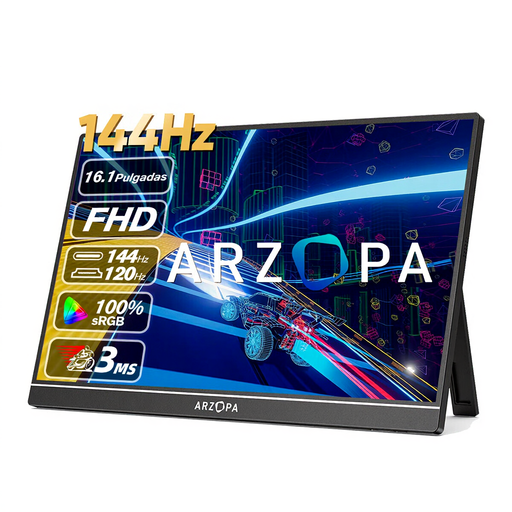
ARZOPA Z1FC 16.1-inch portable monitor
For anyone who wants a larger screen with a laptop. Check the video and power compatibility of your own setup.
The product name lists FHD, 106% sRGB and a built-in stand. The sRGB figure alone doesn’t prove colour accuracy in your setup.
Joybuy
 No image available
ARZOPA Z1RC 16-inch 2.5K portable monitor
For anyone who wants to view fine detail on a larger laptop screen. Check that the HDMI or USB-C connection you choose works with your image source.
The product name lists 2560 × 1600 pixels, 123% sRGB, USB-C and HDMI. The stated sRGB figure isn’t an independent measurement of colour reproduction.
Joybuy
Frequently asked questions
Can any USB-C port on my laptop send video and power to a portable monitor?
No. For the ASUS PA148CTV with a single USB-C cable, ASUS specifies DisplayPort Alt Mode and at least 10 W from the connected device. Check the specifications of both your laptop and the exact screen; this requirement doesn’t automatically apply to every model.
Can I view photos directly from an SD card on the FEELWORLD F6 PLUS?
The manufacturer describes the SD card slot as being for loading 3D LUTs, not as proof that it can display photos on its own. FEELWORLD lists HDMI as the video input, so check that your camera or another image source can provide a suitable signal.
How can I make sure a field monitor works on location?
First, check that your camera outputs a suitable HDMI signal and choose the right cable; then check the power supply and mounting. FEELWORLD says the F6 PLUS has a battery plate that supports Sony F970 and Canon LP-E6 types. Whether a battery is included depends on the version you choose.
What are my rights as a Dutch consumer if I’m unhappy with an online monitor purchase or it develops a fault?
For eligible distance purchases, the Dutch government generally provides a 14-day cooling-off period, with exceptions depending on the circumstances. If a product is faulty, you also have statutory rights and should contact the seller; the Netherlands doesn’t have a fixed statutory warranty period of two years.
Where can I take an old monitor or a flat camera-monitor battery?
According to the Dutch government, as a consumer you can use the old-for-new scheme when buying a new, similar electrical appliance to return the old one. Take loose, flat camera and video camera batteries to a suitable battery collection point, not general waste.


