What should you look for when choosing one?
Start with the connection on your source device, then decide whether colour reproduction, portability or on-screen controls matter most for your client meetings. A stated colour gamut is no guarantee of how the complete display chain will perform; EIZO Europe notes that calibration cannot expand a panel's limited gamut.
| What to consider |
What to look for |
Who will find this most important? |
| Colour reproduction |
Check the stated colour gamut and colour controls for the exact model; test your own files and settings. |
When discussing colours with a client, I want to know how my files will look on screen. Around 36% of consumers say colour reproduction is their most important selection criterion. |
| Video and power |
Check for video output via USB-C or the appropriate HDMI connection, as well as the required cable and power supply. |
When I use different devices, I want to know before the appointment that both the picture and power will work. Around 29% of consumers say a working connection is their top priority. |
| Weight and set-up |
Compare screen size and stated weight, and take the stand, case and cables into account. |
When travelling between client visits, I want to be able to carry and set up my kit quickly. Around 21% of consumers prioritise portability and quick set-up. |
| Touch or pen input |
Decide whether you want to point things out or make selections on screen together; check that your device and software support it. |
When I want to select photos together during a meeting, on-screen controls matter to me. Around 14% of consumers prioritise interactive presentations. |
Relevant brands and models
These model specifications can help you compare specific product ranges; they are not a general assessment of a brand or an independent hands-on test.
ASUS
ASUS offers both colour-focused ProArt models and more straightforward ZenScreen displays for presentations.
- ASUS Nederland lists, among other specifications, 4K, 100% sRGB, touch and HDMI and USB-C connections with DP Alt Mode for the ProArt PA169CDV. Its stated net weight is 1.07 kg.
- This makes the PA169CDV heavier than a compact portable monitor. These specifications are not an independent assessment of colour reproduction during your client meeting. The information on the ZenScreen MB169CK does not substantiate the same colour claims.
Lenovo
The ThinkVision M14d offers a compact USB-C option for presentations from a compatible laptop.
- Lenovo Nederland specifies a 14-inch screen, 2240 × 1400 resolution, 100% sRGB, a weight of 600 g and two USB-C ports with power pass-through.
- Check that your laptop can output video via USB-C. The stated colour coverage does not prove that the display is calibrated in your own set-up.
ViewSonic
ViewSonic describes the VP16-OLED as designed for colour-focused work on the move, with a folding stand and screen hood.
- ViewSonic Europe lists 100% DCI-P3 and ΔE < 2 for this model.
- These are manufacturer specifications, not independent confirmation of colour reproduction in your workflow. A listing at one Dutch retailer does not confirm availability from other sellers.
Philips
Philips describes the portable Business Monitor 16B1P3302D/00 as a screen for sharing content on the move via dual USB-C.
- Philips Nederland mentions the dual USB-C feature for displaying and sharing content on the move.
- Don't base a colour-critical choice solely on this product description; check the full specifications for the exact model.
Portable screens at Joybuy
This selection includes portable screens and a laptop screen extender for presenting photo portfolios. For each model, check that the connections and power supply suit the device you'll use for your presentation.
 Image unavailable
Blackview DCM6 PRO 14-inch Full HD laptop screen extender
Could suit you if you're using a compatible laptop as the source and want to add a second screen to your presentation.
The product title states that it's compatible with 13–17.3-inch laptops. Check your exact laptop and connections before use.
View at Joybuy
 Image unavailable
TECLAST V16H 16-inch Full HD IPS monitor
An option if you're looking for a portable screen with a built-in stand and several listed video connections.
The title lists a 16-inch IPS screen, Full HD, 16:10, two USB-C ports, Mini HDMI and a built-in stand. Check which port and power supply will work with your source device.
View at Joybuy
 Image unavailable
TECLAST V16Q 2.5K IPS monitor
Could suit you if the resolution and connection options listed in the product title matter when showing photos.
The title lists 2.5K, 144 Hz, 100% sRGB, 10-bit, 16:10, two USB-C ports and Mini HDMI. A stated colour gamut alone does not prove that the display chain is correctly set up for your files.
View at Joybuy
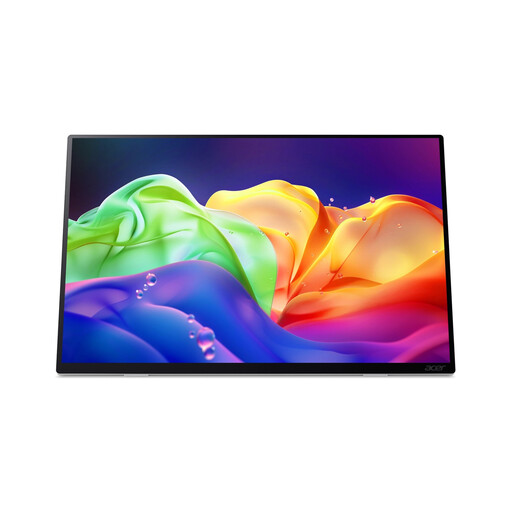 Image unavailable
Acer ProDesigner PE160WUT 16-inch OLED touch monitor
An option if you're looking for a portable screen with touch controls; check that your device and presentation software support them.
The product title lists 2880 × 1800 and 120 Hz. According to the product information, this model has no built-in battery and does not support charging via USB-C Power Delivery.
View at Joybuy
 Image unavailable
UPERFECT 16-inch QLED monitor, 2560 × 1600
Could suit you if you're looking for a portable screen with Mini HDMI and Type-C as possible connection options; check that it's compatible with your source device.
The title lists 2K, 144 Hz, 16:10, 1200:1, 450 nits and VESA compatibility. These stated features are no substitute for checking your colour workflow.
View at Joybuy
Frequently asked questions
Will every portable USB-C monitor work with my laptop?
No. Check that your laptop port supports video output and that the monitor, cable and power supply are suitable for the connection you're using. ASUS Nederland lists DP Alt Mode as something to check for USB-C video.
Is a screen with 100% sRGB automatically suitable for approving print colours?
No. A stated colour gamut alone doesn't tell you how accurately the complete display chain is set up. EIZO Europe describes calibration and suitable profiles as part of colour management, but calibration cannot restore a panel with too small a gamut.
How should I prepare the monitor for a short client visit?
Beforehand, test with your own files, source device, cable and power supply to make sure a picture appears. Also check the viewing angle and set-up; ViewSonic lists a screen hood for the VP16-OLED.
What warranty applies in the Netherlands?
For a consumer purchase, the product must meet reasonable expectations; there is no fixed statutory warranty period in the Netherlands. The Rijksoverheid and the Autoriteit Consument & Markt explain the seller's responsibilities for consumer purchases. Consumer rules do not automatically apply to your contract if you buy for business purposes.
Is CE marking a quality mark for a better monitor?
No, CE marking is not a quality mark. Business.gov.nl explains that the manufacturer applies the mark when it is required for the product and after the relevant conformity assessment has been carried out.


