First, choose a monitor that is confirmed to receive a video signal from your laptop, camera or other source. Then check colour reproduction, reflections, and how much room the screen and stand will take up. If you’re discussing colour with a client, pay attention to the stated colour gamut and any calibration claims. For a quick photo show, a simpler, lighter screen may be enough if you’re happy to accept its colour limitations. Manufacturer specifications can’t predict exactly how your photos will look in the lighting at your café table.
Who is a portable monitor for?
Photographers discussing colour
You’re discussing the look or editing of photos with a client and want to assess the stated colour gamut and any calibration claims. For the PA148CTV, ASUS mentions factory calibration, among other features; Lenovo states that the M14d covers 100% sRGB, which in itself doesn’t confirm that the individual unit has been calibrated.
Photographers with a small café table
You’re taking your portfolio with you and want the screen and stand to fit comfortably on the table available. Lenovo and Arzopa list a weight of 600 g for specific 14-inch models; also check how much space the stand takes up.
Photographers using different video sources
You want to present from a laptop or camera and know in advance which connection carries video and how the screen is powered. ASUS states that USB-C video on one ZenScreen model requires DP Alt Mode; connection requirements vary by model.
What should you look for when choosing one?
Check the connection and power requirements first, then weigh up colour reproduction, table space and the purpose of your presentation.
| What to consider |
What should you check? |
Who is this important for? |
| Colour reproduction |
Compare the stated colour gamut and any calibration claims for the exact model; also view your own photos in similar lighting. |
If I’m discussing colours or edits with a client, I want to know what colour information is stated and whether calibration is mentioned. Around 40% of consumers put colour reproduction first. |
| Portability and set-up |
Check the screen’s dimensions and weight, and see how the stand fits on the table available. |
If I’m taking the monitor to appointments and using a small café table, the whole set-up matters, not just the screen size. Around 30% of consumers prioritise portability and table set-up. |
| Video connection and power |
Check the video output on your laptop or camera, the monitor’s input and its power requirements; test the combination in advance. |
If I switch between a laptop and camera, I want to know before the appointment which cable carries video and how the monitor is powered. Around 20% of consumers put connection reliability first. |
| Simply showing photos |
Decide whether you’ll just be showing photos or asking for approval on colour choices too; then check the model’s colour specifications. |
If I mainly want to show a selection of photos and won’t be discussing colour accuracy, I can choose a simpler option and take its stated colour limitations into account. Around 10% of consumers prioritise this kind of straightforward presentation. |
Common buying mistakes
-
Assuming IPS or OLED guarantees accurate colour
Panel type, stated colour gamut and calibration are different things. The models listed have varying colour specifications.
Compare the specifications for the exact model and view your own portfolio photos before asking anyone to approve colours on screen.
-
Assuming one USB-C cable will always carry video and power
The shape of a USB-C port doesn’t prove that the laptop outputs video through it. For the ZenScreen MB169CK, ASUS states that USB-C video requires DP Alt Mode and describes a separate USB-C power input for HDMI.
Check the requirements for both devices and test the complete connection before your client appointment.
-
Comparing screen size alone
A stand or cover also takes up table space and affects how you can set up your presentation.
Consider the screen, stand and any cover together, ideally on a table similar to the one where you plan to present.
Brands to compare
ASUS
The ProArt PA148CTV is a portable model that ASUS targets at creative workflows. Other ZenScreen models may have different connections and features.
- For the PA148CTV, ASUS lists 100% sRGB, factory calibration and a metal kickstand.
- These features apply to this model; check that its connections suit your video source and presentation.
ViewSonic
ViewSonic positions the ColorPro VP16-OLED in part for creative presentations.
- For this model, ViewSonic lists OLED, 100% DCI-P3, a folding stand and a hood to shield the screen from ambient light.
- The manufacturer’s specifications don’t establish how photos will look in the lighting at a particular café table.
Lenovo
The ThinkVision M14d is a 14-inch option designed around USB-C.
- For the M14d, Lenovo lists a resolution of 2240 × 1400, 100% sRGB and a weight of 600 g.
- A stated colour gamut is not the same as confirmed calibration of the individual unit you buy.
Arzopa
The A1S is a compact option for showing images when precise colour assessment isn’t the main priority.
- The Dutch product page lists a built-in stand and a weight of 600 g for the A1S.
- It also lists 65% sRGB and 250 cd/m²; assess this specific version rather than other Arzopa models.
HP
The E14 G4 is a portable 14-inch option to consider when comparing models where stated brightness matters.
- For this model, HP lists an anti-glare 400-nit screen and video plus power over a single USB-C cable.
- These specifications don’t prove how visible the screen will be from a particular seat or how colour will look there.
Models for different presentation scenarios
This editorial order by scenario isn’t a sales ranking or performance test: the models are included to reflect different presentation needs.
| Rank |
Model |
Key specifications |
Why it’s included |
Retailer |
| 1 |
ASUS ProArt Display PA148CTV |
100% sRGB; factory calibration with Delta E < 2 according to ASUS. |
ASUS Netherlands lists sRGB coverage and factory calibration as features of this model to compare when discussing colour. |
ASUS Netherlands |
| 2 |
ViewSonic VP16-OLED |
OLED; 100% DCI-P3 and Delta E < 2 according to ViewSonic; hood to shield against ambient light. |
ViewSonic Netherlands lists this model for presentations where OLED and shielding from ambient light may be relevant. The colour specifications are manufacturer claims, not the results of an independent café test. |
ViewSonic Netherlands |
| 3 |
Lenovo ThinkVision M14d |
14 inches; 2240 × 1400; 100% sRGB; 600 g. |
Lenovo Netherlands lists these features for a compact model with stated sRGB coverage; this doesn’t demonstrate a comparable calibration claim. |
Lenovo Netherlands |
| 4 |
HP E14 G4 Portable Monitor |
14 inches; anti-glare 400-nit screen; video and power over USB-C. |
HP Netherlands lists brightness and anti-glare as features to consider when ambient light matters; the picture may look different from where you’re sitting. |
HP Netherlands |
| 5 |
Arzopa A1S |
14 inches; 1920 × 1080; IPS; 65% sRGB; 250 cd/m²; built-in stand; 600 g. |
Joybuy Netherlands lists these features for an option to show photos when colour assessment isn’t the main purpose; the stated colour gamut is worth considering for colour-critical use. |
Joybuy |
Portable monitors on Joybuy
These product picks are for portable screens you can use to show photos at a café table; check each model’s colour specifications, connections and space requirements.
 No image available
TECLAST V16H 16-inch portable monitor
A portable option for showing photos from a compatible video source, with a built-in stand.
16 inches; FHD; IPS; 16:10; 144 Hz; two USB-C ports and Mini HDMI.
Joybuy
 No image available
TECLAST V16Q portable monitor, 2.5K
An option for showing photos if you want to take the stated sRGB coverage into account when comparing models.
IPS; 2.5K; 100% sRGB; built-in stand; USB-C and Mini HDMI; stated weight 810 g.
Joybuy
 No image available
ASUS ZenScreen MB166CR
A portable screen for a table set-up where the anti-glare surface and adjustable stand are useful features.
15.6 inches; Full HD; IPS; anti-glare surface; USB-C; 360° kickstand.
Joybuy
 No image available
ASUS ProArt PA16USV 15.6-inch 4K
An option for presenting high-resolution photos if your video source supports 4K output.
15.6 inches; 4K IPS; stated 100% sRGB and factory calibration; dual stand system; tripod mount; stated weight 1.4 kg.
Joybuy
 No image available
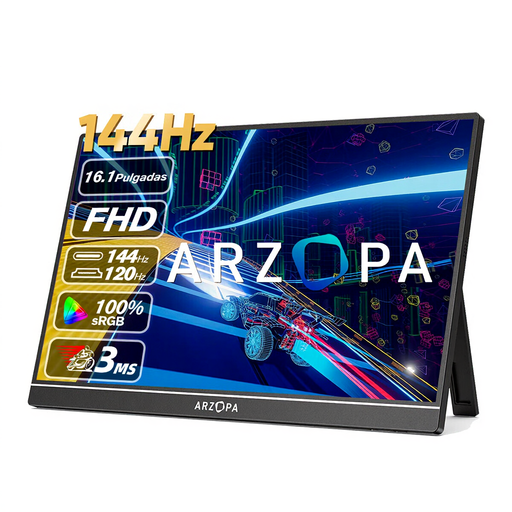
ARZOPA Z1FC 16.1-inch portable monitor
A portable option for showing photos with a built-in stand; check the colour specifications if discussing colour-critical work is important.
16.1 inches; FHD; IPS; stated 106% sRGB; built-in stand; USB-C and Mini HDMI; stated weight 780 g.
Joybuy
Frequently asked questions
Will every USB-C port on my laptop work with a portable monitor?
No. Check whether your laptop’s port supports video. For the ZenScreen MB169CK, ASUS states that USB-C video requires DP Alt Mode; for HDMI, ASUS describes a separate USB-C power input on that model. Check the requirements for the monitor you choose too.
How do I prepare the monitor for a presentation at a café table?
Test the complete set-up in advance, including the video source, cable, power supply and stand, and view your own photos in similar ambient light. ASUS lists a metal kickstand for the PA148CTV, while ViewSonic lists a hood for the VP16-OLED; check which accessories come with the exact model.
How should I carry the monitor and accessories?
Pack the screen, stand and required cables so you have everything you need for the complete set-up. Follow the manual for the model you’ve bought for cleaning and any other model-specific care.
What are my return and warranty rights when buying online in the Netherlands?
For an applicable online consumer purchase, there is generally a statutory cooling-off period that ends 14 days after delivery, according to ACM ConsuWijzer. The statutory guarantee is separate from any manufacturer’s warranty: ACM ConsuWijzer says the seller must resolve the issue if a product becomes faulty sooner than reasonably expected under normal use. Check which rules apply to your purchase; don’t assume that consumer rights apply to a business purchase.
Can I show photos of identifiable people in a business portfolio?
That depends on the circumstances and the applicable legal basis under the GDPR. The Dutch Data Protection Authority says that the exception for personal or household use doesn’t apply to professional or commercial use of images of people; consent may be one possible legal basis. Assess the specific photos and how you plan to show them separately.


