What should you look for when choosing one?
When showing a photo portfolio in a shared workspace, your choice mainly depends on what matters most to you: assessing colour, a reliable connection, portability or viewing together.
| What to consider |
What should you check? |
Who should consider this? |
| Colour reproduction |
Compare the stated colour gamut with your files and look for calibration information; resolution alone won't tell you this. |
If I want people to assess colour choices during a photo review, I compare colour coverage and calibration. Around 33% of consumers prioritise colour assessment. |
| Video connection and power |
Check the video output on your source, the monitor's port, the right cable and the power supply. |
I want to know in advance whether my laptop can provide a video signal and enough power. Around 27% of consumers prioritise connection reliability. |
| Portability and storage |
Compare the weight and dimensions of the complete set, including the stand, case and any adapter. |
After an appointment, I want to take the screen and everything I need with me, so the overall size matters. Around 20% of consumers give portability top priority. |
| Viewing and positioning |
Check the stand, tilt range and screen area against the available table space and viewing positions. |
When I'm discussing my photos with someone sitting beside me, I want to position the screen securely and at a good angle. Around 20% of consumers prioritise this shared viewing set-up. |
Portable monitors at Joybuy
This selection features portable monitors for showing a photo portfolio in a shared workspace. If colour choices are a priority, check separately whether the stated calibration and colour space suit your files.
 No image available
TECLAST V16H 16-inch portable monitor
The built-in kickstand is worth considering if you want to position the screen on a shared table.
16 inches; FHD IPS; 16:10; 144Hz; two USB-C ports and Mini HDMI. Check which port on your source outputs video and what power the set-up requires.
View at Joybuy
 No image available
Portable Monitor PM14R 14-inch
Its 14-inch size makes this an option to compare if you have less table space; check whether the screen is large enough for viewing photos together.
IPS; 1920 × 1200 pixels; 16:10; Type-C and Mini HDMI. A single USB-C cable for video and power will work only with devices that support it.
View at Joybuy
 No image available
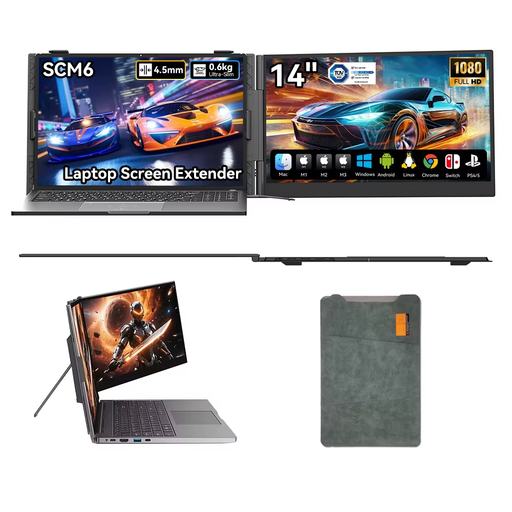
Blackview SCM6 14-inch portable monitor
The adjustable stand may be useful if you want to angle the screen towards different viewing positions during a discussion; check compatibility with your video source in advance.
14 inches; 1080p; USB-C; built-in speaker; stand adjusts up to 180°.
View at Joybuy
 No image available
ARZOPA Z1RC 16-inch portable monitor
The built-in stand and listed connections are worth comparing if you want to show photos in different workspaces.
16-inch IPS; 2560 × 1600 pixels; built-in stand; USB-C and HDMI. The title lists 123% sRGB; that alone isn't a calibration specification.
View at Joybuy
 No image available
ASUS ProArt PA16USV 15.6-inch 4K UHD monitor
Compare this model if you're considering a 15.6-inch 4K screen; your connected source must also support 4K output for 4K viewing.
15.6 inches; 3840 × 2160 pixels; 4K UHD; LCD.
View at Joybuy
Frequently asked questions
Can I use any USB-C port to show my photos on a monitor?
No. Check whether your video source supports video over DisplayPort Alternate Mode, and whether the port, cable and power supply are compatible with your chosen monitor. The shape of the USB-C connector alone doesn't prove this; VESA DisplayPort describes the support required for this video connection.
How should I set up the monitor for a discussion at a shared table?
Position the stand securely and angle the screen towards the viewers. Lenovo lists an adjustable stand for the ThinkVision M14t Gen 2, ASUS lists two kickstands for the PA169CDV, and ViewSonic lists a foldable stand with hood for the VP16-OLED.
How can I keep colours looking right during a review?
For a colour-critical review, choose a screen with specifications that suit your files, rather than looking only at wide colour coverage. ASUS lists colour presets and an included pre-calibration report for the PA169CDV; also assess the screen in the lighting conditions where you'll be using it.
What do the cooling-off period and warranty mean when buying online in the Netherlands?
When buying remotely from a business, you generally have a 14-day cooling-off period, although exceptions depend on the circumstances; the Dutch government explains this. According to ACM ConsuWijzer, the statutory warranty doesn't have a fixed general term of two years: what you can reasonably expect from a product under normal use also matters. An additional commercial warranty doesn't replace your statutory rights.
Can I display portfolio photos showing identifiable people at my workplace without permission?
First, check which privacy rules apply. The Dutch Data Protection Authority considers identifiable people in photographs to be personal data; business use requires a valid legal basis under the GDPR. Consent can be one legal basis, but it isn't automatically the only option.


