What should you consider when choosing one?
First, check that your laptop, cable and monitor can work together to display video. Then compare the screen space with your preferred setup, how much you’re willing to carry and how you work at the library.
The breakdown below relates to consumers considering a portable monitor for editing minutes alongside source documents in a library.
| What to consider |
What to look for |
Who is this important for? |
| A working video connection |
Check that your laptop’s USB-C port supports video and that the monitor and cable are compatible. For the ThinkVision M14, Lenovo lists DP 1.2 Alt Mode and PD 2.0 as requirements. If you’re using HDMI, check the power supply too. |
I want to know before I leave whether my laptop will work with the monitor, without having to find a different connection when I get there. Around 25% of consumers prioritise connectivity. |
| Space to compare text |
Compare the screen size, resolution, aspect ratio and possible screen orientation with the window layout and text size you want to use. |
If I want to read source documents and minutes at the same time, what matters most is whether both windows fit comfortably. Usable document space comes first for around 25% of consumers. |
| Portability and power |
Check the weight and included sleeve of the exact model, as well as its power requirements and the facilities available at your intended workspace. |
If you often move between desks or locations, you’ll want to be able to carry the screen and plan how to power it. This is the top priority for around 19% of consumers. |
| Privacy in a shared workspace |
Consider whether the minutes contain personal data, and position screens and windows so unauthorised people can’t read them. Don’t assume a privacy filter is included unless it’s listed for that model. |
When I bring confidential minutes with me, I want to reduce the chance of someone looking over my shoulder. Around 19% of consumers put privacy first. |
| Working posture |
Check whether the specific model tilts or offers height adjustment, and assess your entire workspace. Arboportaal outlines additional workplace requirements for employees who use a screen for more than two hours a day. |
During longer editing sessions, I want to be able to position the screen comfortably, not just have more desk space. Around 12% of consumers consider working posture the most important factor. |
Portable monitors at Joybuy
These portable monitors are designed for working with documents on the move, from a compact second screen to a larger display for viewing minutes and source documents side by side. For each version, check that its connections and power supply suit your laptop and workspace.
 Image unavailable
Blackview DCM6 PRO 14-inch portable monitor extender
A 14-inch second screen for working with documents on the move; the product description lists a USB-C connection. Check that your laptop’s USB-C port supports video.
Full HD (1920 × 1080); according to the product name, suitable for laptops from 13–17.3 inches.
View at Joybuy
 Image unavailable
TECLAST V16H 16-inch portable monitor
A larger screen for viewing documents side by side, if you have the extra desk space. If you’re using HDMI, check the power supply separately.
FHD IPS; 16:10; 144 Hz; two USB-C ports and Mini HDMI; built-in stand.
View at Joybuy
 Image unavailable
PM14R 14-inch portable monitor
A compact second screen with an alternative video input alongside Type-C. Check that your laptop port supports video, and bear the power supply in mind when using HDMI.
1920 × 1200 pixels; 16:10; IPS; Type-C and Mini-HDMI.
View at Joybuy
 Image unavailable
Blackview SCM5 14-inch FHD IPS monitor
A 14-inch portable screen with an adjustable stand. Check that the connections are compatible with your laptop before taking the monitor to your workspace.
FHD IPS; adjustable stand; according to the product name, suitable for laptops from 13–17.3 inches.
View at Joybuy
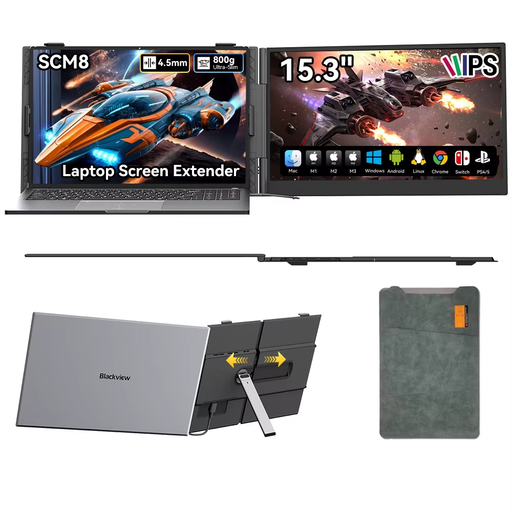 Image unavailable
Blackview SCM8 15.3-inch portable monitor
A portable screen for a mobile laptop setup. Video over USB-C depends on the video capabilities of your laptop’s port.
16:9 IPS LCD; USB-C; built-in speaker; 180° adjustable stand; protective case included.
View at Joybuy
Frequently asked questions
Is a USB-C connection on my laptop enough to display video?
No. The laptop’s USB-C port must support video, and the monitor and cable must also support the connection you choose. ASUS distinguishes between USB-C with DisplayPort Alt Mode and USB connections that require DisplayLink software on certain models. For the ThinkVision M14, Lenovo specifically lists DP 1.2 Alt Mode and PD 2.0.
Can I work in the library without a power socket?
It depends on the screen, the laptop and how much battery life is left. Compatible devices may be able to receive video and power through a single USB-C cable, but check the power requirements for the exact version. Bibliotheek West-Brabant reports that power sockets are available at almost all its locations; that doesn’t mean there’s a socket at every workspace.
How should I position a portable screen for working with longer documents?
Try portrait orientation for a long document and landscape orientation for side-by-side windows, if the model and your software support them. ASUS lists a stand for both orientations on the MB16AHV; Lenovo lists an adjustable stand for the ThinkVision M14. Also consider your keyboard height and the workspace as a whole.
What can I do if an online purchase isn’t compatible with my laptop?
According to the Dutch government, eligible distance purchases from a business generally come with a 14-day cooling-off period. Before ordering, check who the seller is and which terms apply; this rule doesn’t automatically apply to an online purchase from a private individual.
Which Dutch rules are relevant when taking minutes in a public workspace?
If an organisation processes minutes containing personal data, it must take appropriate measures to prevent unauthorised access. Whether this applies to your minutes depends on their content and context. Arboportaal also outlines specific workplace requirements for employees who work with screens for more than two hours a day. These aren’t general product specifications for every buyer.


