
Vandaag of morgen in huis

Kwaliteit gegarandeerd

Welkomstaanbiedingen ontgrendelen: GRATIS bezorging | Tot 80% korting | Gratis 30 dagen JoyPlus-proefperiode
Download de app
Working on a single small laptop screen can be cumbersome. Whether you're working from home, at a café, or on the go, extra screen real estate makes multitasking much easier. A portable monitor is a practical solution that instantly boosts your productivity. You just unfold it, plug it in, and you immediately have a full-fledged second screen for your laptop.
The market for portable displays is growing rapidly, with many different specifications and features. This article is intended as a clear guide. We'll skip the marketing jargon and focus on the specs that truly matter, so you can make an informed decision.
Before you make a choice, it's wise to consider a few key features. These will determine how well a mobile display fits into your daily routine.
Most modern portable monitors use USB-C. A portable USB-C monitor offers the major advantage of often requiring just one cable for both power and video. This works perfectly if your laptop has a USB-C port that supports DisplayPort Alt Mode. This is true for many recent laptops, including a monitor for MacBook. Do you have an older device? Then check if the monitor also has an HDMI port. In that case, you'll usually need a separate USB cable for power.
Most portable screens range in size from 13 to 17 inches, with a 15-inch monitor being a popular sweet spot. This size is large enough for comfortable work, yet still fits easily into a laptop bag.
In terms of resolution, Full HD (1920x1080) is the standard. This delivers a sharp and clear image for most applications, from spreadsheets to movies. Also, pay attention to the panel type. An IPS panel typically offers better viewing angles and color reproduction than older TN panels, which is nice if you're not always sitting directly in front of the screen.
Your intended use determines the features you'll need.
portable gaming monitor distinguishes itself with a high refresh rate (e.g., 144Hz) and a fast response time. This ensures smooth, stutter-free visuals, which is essential for fast-paced games.Based on specifications and functionality, we've highlighted a few interesting models for you.
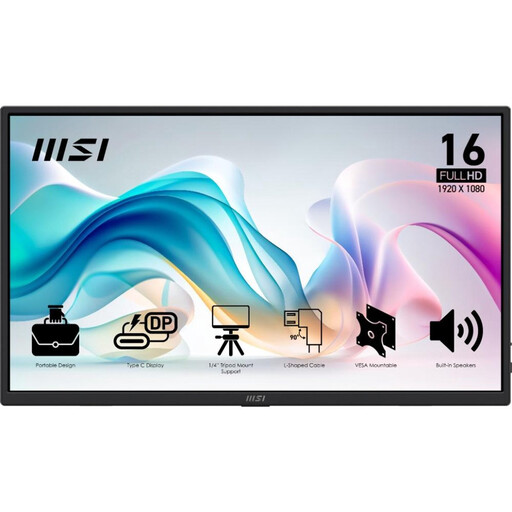
Why This Model Stands Out The MSI PRO MP165 E6 is designed for the mobile professional. Weighing just 0.78 kg and featuring an ultra-slim profile, this is an ideal travel monitor. MSI focuses on productivity with a bright Full HD IPS screen and features aimed at eye comfort, such as Anti-Flicker technology. According to the manufacturer, this helps reduce fatigue during long work sessions.
Pros
Who Is This For? For the professional, student, or freelancer who is often on the move and needs a reliable, lightweight external display for their laptop without unnecessary frills.
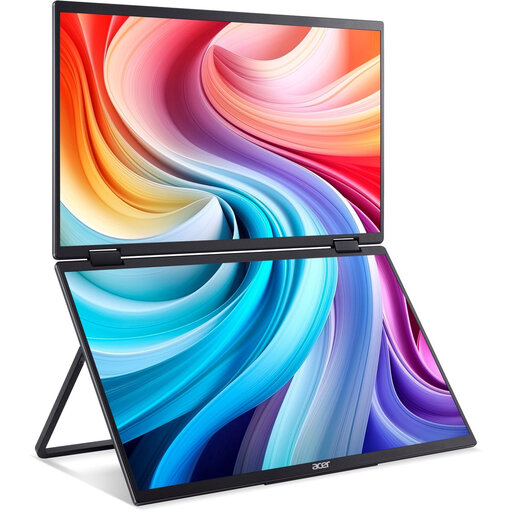
Why This Model Stands Out The Acer PD163QT is not your standard portable monitor. This model consists of two foldable 15.6-inch screens, allowing you to double your workspace in one go. The unique hinge design makes it possible to position the screens at different angles or even fold them over for a presentation. The addition of a touchscreen makes operation extra intuitive.
Pros
Who Is This For? For the serious multitasker, data analyst, or programmer who can't work without multiple screens on the go. Also ideal for those who regularly give presentations to small groups.
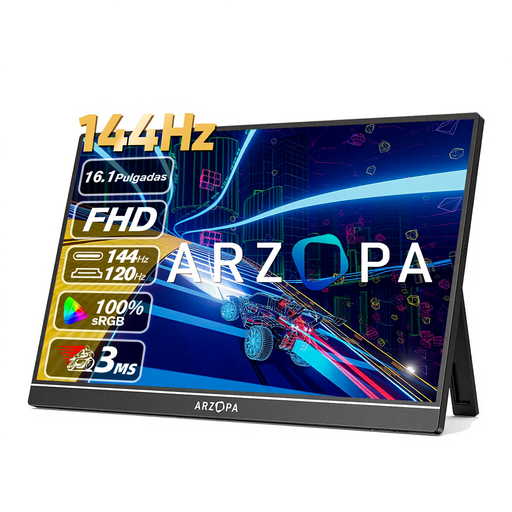
Why This Model Stands Out The ARZOPA Z1FC is specifically aimed at gamers. Its key feature is the high 144Hz refresh rate, which ensures extremely smooth visuals. This is a huge difference from the standard 60Hz found on most portable screens. The 16.1-inch screen is slightly larger than average, and with 106% sRGB coverage, the manufacturer claims its color reproduction is very vibrant.
Pros
Who Is This For? For the gamer who wants to take their setup with them. Whether you're at a LAN party or traveling, with this portable gaming monitor, you don't have to compromise on image quality and smoothness.
These recommendations are a starting point. Everyone has different needs for a mobile display. You might be looking for a different size, a 4K resolution, or a model with a built-in battery. The technology is evolving quickly, and many options are available.
Explore our full range and compare specifications on our portable PC monitor page.
Most modern models connect with a single USB-C cable that handles both power and the video signal. This only works if your laptop's USB-C port supports it (DisplayPort Alt Mode). Alternatively, you can use an HDMI cable for video and a separate USB cable for power. The necessary cables are usually included.
Most portable monitors do not have a built-in battery. They draw power directly from the laptop via the USB-C cable. This keeps the screens light and thin. There are some models on the market with a battery, but they are often heavier and more expensive.
Yes, but pay close attention to the specs. For a good gaming experience, a portable gaming monitor with a high refresh rate (at least 120Hz, ideally 144Hz) and a low response time (under 5ms) is recommended. A standard 60Hz monitor is fine for slower-paced games or casual gaming, but not for fast-paced, competitive titles.
