What should you look for when choosing one?
First decide how portable you need it to be and how much screen space you want. Then look separately at detail and colour, connections, and the lighting in your workspaces.
| What to consider |
What to check before buying |
Who it matters most to |
| Easy to carry and set up securely |
Weight and size of the screen and case; type of stand and preferred viewing position. |
If you often move between rooms, you’ll want to be able to carry and set up the screen quickly. Around 33% of consumers prioritise portability. |
| Reviewing lines, layouts and colours |
Compare the stated resolution; look at the manufacturer’s colour specifications and check whether they suit the way you work. |
When fine lines and colour choices are central to your work, display specifications matter more than screen size alone. Around 27% of consumers prioritise how sketches look. |
| Getting video, power and controls to work together |
Check the video mode required by the source port; see whether HDMI and a separate power supply are needed. |
If you want a hassle-free connection, check video and power compatibility with your own device in advance. Around 27% of consumers give connections top priority. |
| Readability in changing light |
Check the screen finish and compare stated brightness using the same unit. |
If you work in places with different lighting, you’ll want to know whether the screen will remain readable. Around 13% of consumers prioritise changing light conditions. |
Portable monitors at Joybuy
These portable monitors are designed to move between workspaces; the models vary in size, resolution, connections and stand, among other features.
 No image available
TECLAST V16Q 2.5K portable monitor
Could suit you if you’re looking for a portable screen with a built-in stand for viewing sketches between workspaces.
16:10; 2560 × 1600; 144 Hz; IPS; stated 100% sRGB and 10-bit colour; USB-C and mini-HDMI.
View at Joybuy
 No image available
Acer PM161QB1 15.6-inch portable monitor
Could suit you if you’re looking for a 15.6-inch screen with a stand and connections for different devices.
IPS; 60 Hz; 0.75 kg; HDMI and USB-C. According to the product description, the mains adapter isn’t included as standard and must be bought separately.
View at Joybuy
 No image available
UPERFECT 16-inch 2K portable monitor
Could suit you if you’re looking for a larger portable screen with a higher stated resolution and several connection options.
16 inch; 2560 × 1600; QLED; stated 450 nits; mini-HDMI and Type-C.
View at Joybuy
 No image available
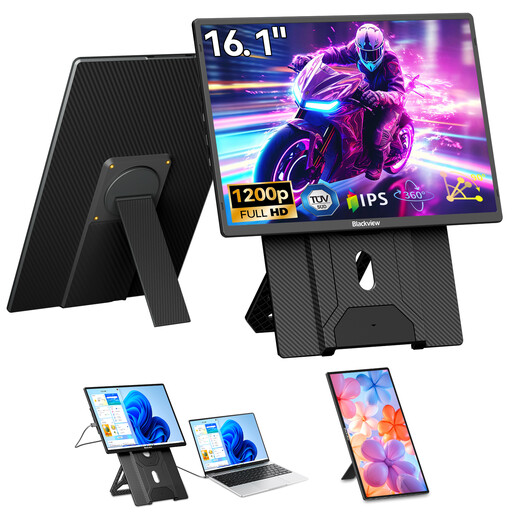
Blackview Table 9 16.1-inch portable monitor
Could suit you if you want to use a larger screen with a rotating stand for different viewing positions.
16.1 inch; 1200P FHD; IPS; 60 Hz; stand rotates up to 90°.
View at Joybuy
 No image available
ARZOPA Z1RC 16-inch 2.5K portable monitor
Could suit you if you’re looking for a portable screen with a built-in stand and stated colour specifications.
16 inch; 2560 × 1600; IPS; stated 123% sRGB; USB-C and HDMI; weight 810 g. The product description lists cables as included.
View at Joybuy
Frequently asked questions
Will one USB-C cable work with every laptop?
No. Your laptop’s USB-C port must support the video mode required by the screen you choose and provide enough power. ASUS explicitly lists DP Alt Mode for the MB169CK; if it isn’t available, ASUS describes using HDMI for video and USB-C as a separate power input. This connection setup applies to this model.
Can you annotate a garden sketch directly on a portable monitor?
Only if the screen supports touch and your device and software can handle the input you need. Lenovo lists 10-point touch for the ThinkVision M14t Gen 2; Dell says the P1425 doesn’t have a touchscreen. Check separately for any active pen requirements.
What should you consider when setting up and carrying a monitor?
Set the stand down securely, avoid putting strain on the cable or panel, and use a case that fits the screen. Lenovo lists a protective sleeve as included with the ThinkVision M14t Gen 2; this doesn’t tell you which accessories come with other models.
What if a monitor bought online isn’t right for you or develops a fault too soon?
For online consumer purchases, you’ll generally have a legal cooling-off period of up to 14 days after delivery, subject to legal exceptions; ACM ConsuWijzer explains this period. Dutch statutory warranty also applies: if the product breaks under normal use sooner than you could reasonably expect, the retailer is responsible for providing an appropriate solution. The duration isn’t automatically exactly two years for every monitor.
Which product regulations are relevant when buying in the Netherlands?
Electrical and electronic equipment sold in the Netherlands must comply with the applicable European safety rules; Business.gov.nl says that where CE marking is mandatory, the manufacturer must also provide an EU declaration of conformity. European energy labelling rules apply to electronic displays within their scope, as explained by the European Commission. Check the details for the exact model.


