What should you look for when choosing one?
For event notes on a small desk, the main things to consider are the total space needed for the setup, a working video connection, readability and how the monitor is powered.
| What to consider |
What should you look for? |
Who is this important for? |
| Space for the setup |
Compare the screen size, plus the space taken up by the stand and cables, with the room available beside your laptop. |
I want to fit my laptop and note screen on the desk without the stand and cables taking over the workspace. That’s why around 36% of consumers put the space needed for the setup first. |
| Video connection |
Check whether your laptop’s USB-C port supports DisplayPort Alt Mode video; for mini-HDMI, check which cable or adapter you need. |
If I switch between laptops, I want to know which port actually outputs video. Around 29% of consumers prioritise connection compatibility for this reason. |
| Readability |
Consider the resolution, screen finish and adjustability together with the text size and viewing distance. |
I want to read running-order details and changes during the event without distracting reflections. Readability is the main concern when choosing a monitor for around 21% of consumers. |
| Power |
Check how the screen is powered and compare the battery life with the stated usage conditions and the length of your planned shift. |
If a mains socket is difficult to reach at the venue, I want to know in advance how long the screen will work without one. Around 14% of consumers prioritise having power available at the venue. |
Portable monitors at Joybuy
This selection includes portable monitors for use as a second screen with a laptop, including compact 14-inch options and models with USB-C and/or mini-HDMI. Before choosing, check which video connection and power options your laptop and event venue support.
 Image unavailable
Blackview DCM6 PRO portable monitor, 14-inch Full HD
A 14-inch second screen for notes beside a laptop; check in advance that your laptop falls within the stated compatibility range.
Full HD; compatible with laptops from 13 to 17.3 inches.
USB-C for video and power over a single cable, according to the product description.
View at Joybuy
 Image unavailable
TECLAST V16Q portable monitor, 2.5K IPS, 144Hz
An option to consider if you want to compare USB-C and mini-HDMI connections for use with a laptop.
2.5K resolution, IPS screen and 144Hz.
Two USB-C ports, mini-HDMI and a built-in kickstand.
View at Joybuy
 Image unavailable
PM14R portable monitor, 14-inch, 1920 × 1200 IPS
A 14-inch screen for a compact second-screen setup; check which connection and cable are suitable for your laptop.
1920 × 1200 pixels, IPS and a 16:10 aspect ratio.
Type-C and mini-HDMI connections.
View at Joybuy
 Image unavailable
Blackview DCM5 portable IPS monitor, 14-inch, 16:9
A compact second-screen option; check in advance that your laptop falls within the stated compatibility range.
14-inch IPS LCD screen with a 16:9 aspect ratio; stated compatibility range: laptops from 13 to 17 inches.
The product description lists compatibility with Windows and Mac.
View at Joybuy
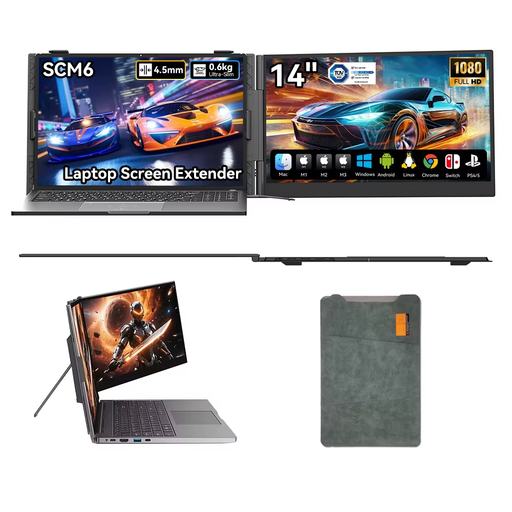 Image unavailable
Blackview SCM6 portable monitor, 14-inch, 1080p
A 14-inch second screen for notes, with a built-in stand to help you adjust the setup.
1080p resolution and USB-C.
Built-in speaker and stand adjustable through 180°.
View at Joybuy
Frequently asked questions
Will every USB-C port on my laptop send video to a portable monitor?
No, the connector shape alone doesn’t guarantee video. For USB-C video on the Philips 16B1P3302D/00, the connected device must support DisplayPort Alt Mode; check the specifications for your exact laptop port and the cable you’re using.
How can I make notes easy to read during a longer shift?
Adjust the text size, viewing angle and lighting to suit your workspace, and avoid distracting reflections. Arboportaal identifies small symbols, low contrast and glare as factors that can reduce readability. Rules for working with screens may also apply during extended use, depending on your working situation.
How should I look after a portable monitor?
Follow the chosen model’s manual for cleaning and safe positioning. Before using it at the venue, also check that the stand is stable and the cables aren’t under strain; model-specific instructions take precedence over general advice.
What rights do I have as a Dutch consumer when buying online?
For many qualifying distance purchases from a business, you have a 14-day cooling-off period, according to the Dutch Government. If a product is faulty on delivery, you may also have statutory rights, such as repair or replacement. The exact rights that apply depend on the purchase and the seller.


