What should you consider when choosing?
First, check that your source device can output video through the connection you’ve chosen, and how the monitor is powered. Then compare the screen size and positioning with the viewing distance and the space available on the table.
| What to consider |
What should you check? |
Who should consider this? |
| Video connection and power |
Check the exact video output on your device, the monitor’s input and the power it requires. Lenovo lists DP 1.2 Alt Mode and PD 2.0 as requirements for the ThinkVision M14. |
If I want to show notes from a laptop, I first need to know whether the port I’ve chosen outputs video and how the screen is powered. Around 40% of consumers in this buying context are most concerned about connectivity and power. |
| Readability from your seat |
Compare screen size and aspect ratio, and check how text looks from the distance people will be sitting at the table. ASUS specifies 15.6 inches and 1920 × 1080 for the MB16AHV; Lenovo lists 14 inches and 2240 × 1400 for the M14d. |
If other people need to read the notes from a different seat, I want the text to be easy to see from there. Around 30% of consumers prioritise readability from the intended viewing position. |
| Positioning on the table |
Measure the available width and depth, and allow for the stand, cables and seating. Lenovo specifies a tilt range of 0° to +90° and height adjustment of up to 11 mm for the M14d. |
If I want to put the screen away after the event, I don’t want it to take up too much space while in use. Around 20% of consumers are most concerned about temporary table setups. |
| Power without a mains socket |
Check whether you need a built-in battery and how the video signal is supplied. ASUS lists a built-in 7800 mAh battery for the ZenScreen MB16AHP; this figure alone doesn’t tell you how long the screen will last. |
If I don’t want to rely on power from my laptop or a mains socket, I need to know whether a battery-powered model will suit my setup. Around 10% of consumers are most concerned about independent power. |
Portable monitors at Joybuy
These portable monitors are designed for displaying notes around a table, from compact single-screen models to larger options and a touchscreen version. For each model, check that the video connection, power supply and stand suit your source device and table setup.
 No image available
TECLAST V16H 16-inch portable monitor
A larger single screen for displaying notes around a table. Check that your source device supports the video input you’ve chosen and how the screen is powered.
16 inches; Full HD IPS; 16:10; 144 Hz; 2 USB-C ports and Mini HDMI; built-in stand.
View at Joybuy
 No image available
TECLAST V16Q portable monitor
A portable screen for displaying notes. Check that your source device supports USB-C video or Mini HDMI, and what power supply is needed.
2.5K; IPS; 16:10; 144 Hz; 2 USB-C ports and Mini HDMI; speakers and stand.
View at Joybuy
 No image available
Blackview SCM5 14-inch Full HD IPS monitor
A compact single screen for notes alongside a laptop. Check in advance which video connection and power supply your source device requires.
14 inches; Full HD IPS; 18.2 mm thick; 1.5 W speaker; adjustable stand.
View at Joybuy
 No image available
UPERFECT 15.6-inch touchscreen monitor
A good option if you also want to interact with notes on the external screen. Check that your source device and chosen connection support touch.
15.6 inches; Full HD; USB-C and Mini HDMI. The product description lists USB-C for video and power, and a stand built into the protective case.
View at Joybuy
 No image available
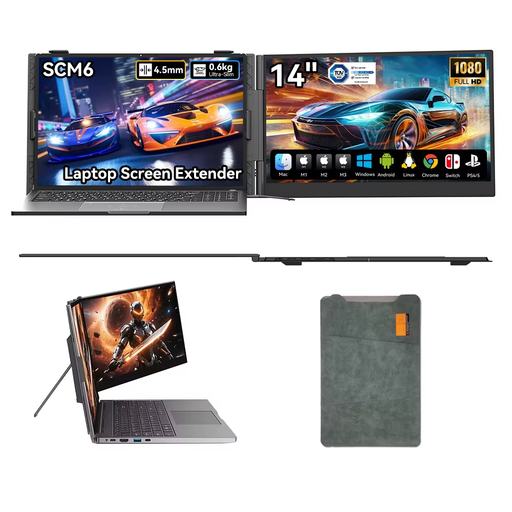
Blackview SCM6 14-inch 1080p monitor
A compact screen for displaying notes alongside a laptop. Check that your source device’s video output is compatible with the connection you’ve chosen.
14 inches; 1080p; USB-C Plug & Play; built-in speaker; 180° adjustable stand.
View at Joybuy
Frequently asked questions
Can I use any USB-C port to display my notes?
No. The specific port must support the video output required by the monitor. Lenovo lists DP 1.2 Alt Mode and PD 2.0 for the ThinkVision M14; these requirements don’t automatically apply to every other model.
How do I clean a portable monitor after use?
Follow the instructions for the exact model. ASUS recommends switching off its LCD and OLED monitors, disconnecting the cables and using a soft microfibre cloth. Apply a small amount of suitable water to the cloth, not directly to the screen.
Should I buy an extended warranty?
You don’t need one to have statutory rights: these apply from the moment you buy the product. According to the Dutch government, the Netherlands has no fixed statutory guarantee period, and the seller must provide a solution if a product is faulty. Check what additional rights an extended warranty actually gives you.
Can I return a monitor bought online if it doesn’t suit my setup?
According to the Dutch government, when you buy from a business at a distance, you’ll often have a 14-day cooling-off period. Check the terms and exceptions that apply to your purchase. This is separate from your statutory rights if a product is faulty.
What should I know about product regulations and disposing of a monitor?
According to Business.gov.nl, CE marking isn’t an independent quality mark; it’s a declaration made by the manufacturer. EU energy labelling rules generally cover computer monitors, subject to exceptions that need to be checked for each screen. Business.gov.nl also states that when a retailer sells a similar new electrical appliance, it must take back a discarded appliance free of charge. This also applies to online shops.


