First, check whether the laptop you’re bringing can output video via USB-C. If not, choose a monitor with a suitable video input and arrange the necessary power supply. Then choose according to the event: a compact screen for your own planning, more screen space for viewing documents with a few people around a table, or touch functionality if attendees need to work directly on the screen. A portable monitor isn’t automatically suitable for viewing from the back of a hall.
Who is a portable monitor suitable for?
Organiser using different laptops
Wants to connect a second screen during preparation, even if the laptop changes from one event to the next. Dell Support describes USB-C with DisplayPort or Thunderbolt support as a way to deliver video and power through that connection.
Planner sharing documents
Discusses schedules, floor plans or presentations with a few people around a table, so screen space and viewing position matter.
Volunteer carrying everything
Carries a laptop, cables and monitor between events, so weight, a useful stand and protection in transit are important.
What should you look for when choosing one?
First, check that the laptop can provide the required video signal and how the monitor is powered. Then consider whether screen size, portability or touch functionality matters most for your event.
| What to consider |
What should you check? |
Who is this important for? |
| Connection and power |
Check the laptop’s video output, the monitor’s inputs, the cable and how it is powered; test the setup in advance. |
If the laptop might change at the venue, I want to know it can send a picture to the monitor. Around 36% of consumers say connection and power are their main reason for buying. |
| Viewing together around a table |
Compare screen size, aspect ratio, resolution and viewing angle; check how text looks from the intended viewing distance. |
If a few attendees need to follow a schedule or floor plan, I want the screen to be easy for them to view. Around 29% of consumers prioritise readability for shared viewing. |
| Transport and set-up |
Check the stated weight, any protective features and the type of stand; also allow space for cables on the table. |
If I’m taking the monitor between events, its weight and how practical it is to position both matter. Around 21% of consumers prioritise portability. |
| Touch and annotation |
Check that the laptop and software you use support the touch or pen functions you need. |
If attendees need to point things out or write directly on a document, I want to know that the controls will work with my setup. Around 14% of consumers choose interaction as their main requirement. |
Common pitfalls
-
Assuming every USB-C port supports video
The shape of a USB-C connector doesn’t confirm that the laptop can send a video signal through that port.
Check your laptop’s manual and test the laptop, cable and monitor together before the event.
-
Choosing a portable monitor as a presentation screen for a hall
A stated screen size or resolution doesn’t prove that text will be readable from every spot in a hall.
Use the monitor for close-up discussions, and check visibility from the actual viewing distance before relying on it for a presentation to a larger group.
-
Comparing only the weight of the screen
The stand, cables and protective cover all affect how easy the complete set is to carry and set up.
Check what’s included with the exact model and take any accessories you need into account.
Brands to consider
ASUS
The ZenScreen MB16AHV is a 15.6-inch option for sharing documents around a table, with USB-C video inputs and mini-HDMI.
- ASUS Netherlands lists a matt IPS screen, a folding stand and a tripod socket.
- This model doesn’t have a built-in speaker. Check that your laptop can output video through the connection you choose, and how the monitor is powered.
Lenovo
The ThinkVision M14t Gen 2 is a compact option if touch or pen input would be useful for planning.
- Lenovo Netherlands lists a 14-inch screen with a resolution of 2240 × 1400 pixels, 10-point touch and two USB-C ports.
- The benefits of touch depend on the application, so check compatibility with your laptop and software.
MSI
According to MSI, the PRO MP165 E6 has a 15.6-inch screen with USB-C video and HDMI to suit different laptop setups.
- MSI lists a resolution of 1920 × 1080 pixels, a net weight of 0.78 kg, a stand and a protective cover.
- The model and accessories may vary by country, so check what’s included in the Dutch package.
Dell
The Pro 14 Plus P1425 is a compact, non-touch monitor for viewing documents alongside your laptop.
- Dell Netherlands specifies a 14-inch screen with a resolution of 1920 × 1200 pixels, a 16:10 aspect ratio and an adjustable tilt.
- A smaller physical screen may be a compromise if several people need to view it at once.
AOC
According to AOC Netherlands, the 16T3EA is a 15.6-inch monitor with USB-C power and an integrated stand.
- AOC lists a resolution of 1920 × 1080 pixels and a refresh rate of 60 Hz for this model.
- Software needs to be enabled for automatic screen orientation. Check the features and accessories of the exact model before relying on them.
Portable monitors at Joybuy
These portable monitors are designed to work as a second screen with a laptop, for example for viewing planning documents around a table. They differ in screen size, connections and touch functionality, among other features. Always check the video output and power requirements for your setup.
 Image unavailable
TECLAST V16H 16-inch portable monitor, FHD, 16:10
A second screen for viewing planning documents alongside your laptop. The product name lists a 16-inch FHD IPS screen with a 16:10 aspect ratio, two USB-C ports, mini-HDMI and a built-in stand. USB-C video requires a laptop port that supports video output; check the power requirements too.
View at Joybuy
 Image unavailable
TECLAST V16Q 2.5K portable monitor, 16:10
A second screen for documents and planning alongside your laptop. The product name lists a 2.5K IPS screen with a 16:10 aspect ratio, two USB-C ports and mini-HDMI. Check that your laptop can output video via USB-C and what power the connection you choose requires.
View at Joybuy
 Image unavailable
UPERFECT 15.6-inch touchscreen monitor, 1080P
An option for pointing to or interacting with a document directly on the second screen. The product name specifies a 15.6-inch touchscreen with 1080P; check that your laptop and software support touch functionality. USB-C video requires a compatible video output on the laptop.
View at Joybuy
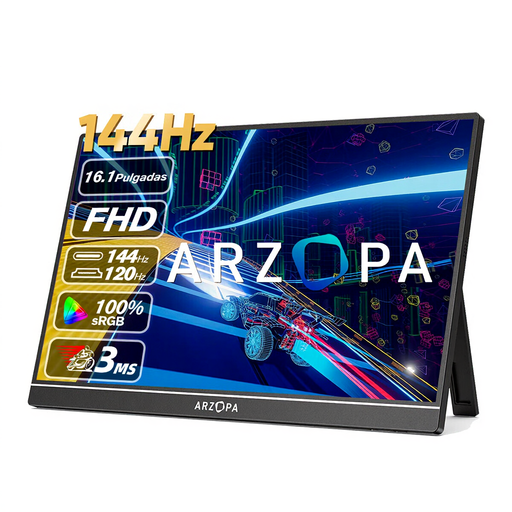 Image unavailable
ARZOPA Z1FC 16.1-inch portable monitor, 1080P FHD
A second screen for a laptop setup with an HDMI video connection. The product name specifies a 16.1-inch FHD screen; check that your laptop has a compatible video output and how the monitor is powered.
View at Joybuy
 Image unavailable
ARZOPA Z1RC 16-inch 2.5K portable monitor
A second screen for documents and planning, with USB-C and HDMI listed as connection options in the product name. It also specifies a 16-inch 2.5K IPS screen and a built-in stand. Check which video cables you need and whether your laptop supports USB-C video.
View at Joybuy
Frequently asked questions
Will every USB-C port on my laptop work with a portable monitor?
No. Check your laptop’s documentation to see whether the port you’re using supports DisplayPort Alt Mode or Thunderbolt for video. Also check separately how the monitor is powered, and test the complete cable setup.
How do I set up a portable screen for a planning session?
Connect the appropriate video cable and power supply, then choose on your laptop whether to mirror the display or extend your desktop. Test your preferred setting in advance with the document you’ll use during the event.
Is a manufacturer’s warranty the same as my statutory rights?
No. If you buy as a consumer in the Netherlands, the seller must provide a solution under ACM ConsuWijzer guidance if a product doesn’t do what you could reasonably expect when used normally. A manufacturer’s warranty doesn’t replace this right. If you’re buying on behalf of an organisation, check the applicable contract terms.
What product regulations apply to monitors in the Netherlands?
Electrical and electronic equipment sold in the Netherlands is subject to applicable European safety requirements, as described by Business.gov.nl. The European Commission also refers to computer monitors in connection with ecodesign and energy labelling rules. This alone doesn’t mean that an individual item offered for sale meets all applicable requirements.


