
Designers presenting colours for review
You want to discuss a digital colour proof in your hotel room and need to be able to account for the colour space and colour settings on both the display and the computer.


For a colour-critical design review, choose a portable monitor with stated coverage of the colour space your proof requires. However, that specification alone doesn’t guarantee accurate colour reproduction: also check the display settings and the ICC profile on your working system. If the focus is mainly on layout and detail, consider readability, a stable setup and suitable connections. Before you travel, check whether your laptop can deliver video and enough power over USB-C, or whether you’ll need an HDMI connection and a separate power supply.
You want to discuss a digital colour proof in your hotel room and need to be able to account for the colour space and colour settings on both the display and the computer.
You mainly need a clear second screen and a practical viewing angle to discuss the layout and details with a client. Lenovo lists a 14-inch display with 2240 × 1400 pixels and an adjustable stand for the ThinkVision M14t Gen 2.
You want to check before setting off which video connection and power supply will work with your laptop. According to ASUS, the ZenScreen MB16AHV has USB-C and mini-HDMI connections.
First, decide whether your client needs to assess colours or mainly view the layout and details. Then check the video connection and power supply, and make sure the screen size and stand suit your temporary workspace.
| What to consider | What should you check? | Who is this important for? |
|---|---|---|
| Colour reproduction | Determine the target colour space and check the specifications for the exact model, the active display setting and the corresponding ICC profile. | If I’m asking a client to assess colours, I want to be able to account for the target colour space and settings; around 36% of consumers put colour first when buying. |
| Connection and power | Check whether your laptop supports USB-C video, how much power is available, and whether you need an HDMI cable or a separate power supply. | When I take my laptop with me, I want to be able to connect video and power on site without any surprises; around 29% of consumers prioritise certainty about connections. |
| Readability and setup | Compare the screen size, resolution and aspect ratio. Check that the stand holds the display securely on the available table space. | If a client needs to look at details with me, I want to position the screen well and view it together; around 21% of consumers prioritise being able to see the screen together. |
| Features and cost | First decide whether the proof is colour-critical, then compare only the connections and features you need. | When I’m mainly discussing the layout, I don’t want to pay for features the presentation doesn’t need; around 14% of consumers prioritise value for money. |
A colour-space specification alone doesn’t tell you how the entire colour chain will display your design. Adobe points out that the display setting and ICC profile for the active configuration also matter.
Match the stated colour space to your proof, then check the active display setting and profile before meeting with your client.
For a single USB-C cable connection to the PA148CTV, ASUS specifies DisplayPort Alt Mode and at least 10 W of output power from the connected device as requirements.
Before you travel, check your laptop’s video output and power supply with the monitor you intend to use. If in doubt, see whether an HDMI connection will work with the display and allow for the power supply you’ll need.
ACM ConsuWijzer distinguishes between statutory rights and any manufacturer’s or seller’s warranty.
First check what rights you have in relation to the seller, then decide whether an additional warranty is right for your purchase.
ASUS offers portable displays for colour-focused reviews and a range of connection needs.
The ThinkVision M14t Gen 2 is a compact option for discussing details with a client, when paired with a compatible USB-C laptop.
The VP16-OLED could suit a review where its stated DCI-P3 coverage and physical setup are relevant.
The 16T3EA is a portable Full HD option for presentations where a properly supported colour-critical proof isn’t essential.
This selection features portable displays for showing and discussing designs on the go. For each model, check that its connections are compatible with your laptop and that its listed display features suit your proof.
 No image available
An option for discussing a design from a compatible laptop.
14 inches; Full HD, 1920 × 1080 pixels; the product title says it’s suitable for 13–17.3-inch laptops.
 No image available
Could suit you if you want to look at details together and need a built-in stand.
16 inches; Full HD IPS; 16:10 aspect ratio; USB-C and mini-HDMI; built-in stand; 144 Hz.
 No image available
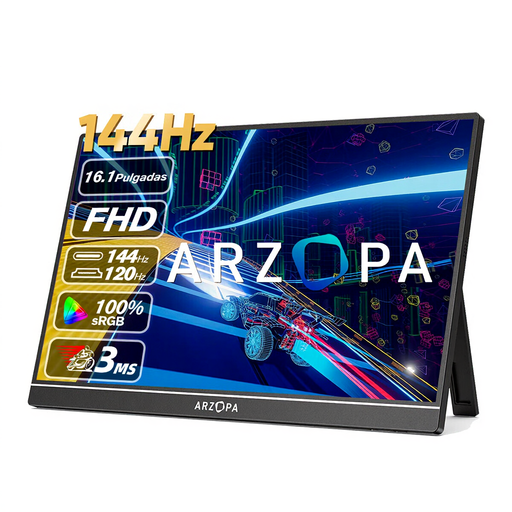
An option for discussing a design on a portable display and setting it up in a temporary workspace.
16.1 inches; Full HD, 1920 × 1080 pixels; IPS; built-in kickstand; USB-C and HDMI. The product description states a 178° viewing angle.
 No image available
Could suit you if you want to discuss details on a portable display and need a built-in stand.
16 inches; 2560 × 1600 pixels; 16:10; IPS; USB-C and HDMI; built-in stand. The product description states a weight of 810 g.
 No image available
An option to compare if a colour-critical design review and a 4K display fit your workflow.
15.6 inches; 4K, 3840 × 2160 pixels; HDMI and USB-C. The product description states 100% sRGB and Calman verification with ΔE < 2. These are product specifications, not an independent measurement of the unit on offer. The description also mentions a dual stand and tripod mount. According to the instructions, the connected device must support 4K output to display in 4K.
No. Check whether the port supports both the required video output and enough power. For a single USB-C cable connection to the PA148CTV, ASUS specifies DisplayPort Alt Mode and at least 10 W of output power from the connected device.
First determine the target colour space and use the matching display setting and ICC profile for the active display configuration. Adobe says that simply connecting a calibrated display isn’t enough to ensure you see the right colours automatically in Creative Cloud.
Before the review, check that the video and power are working, position the display securely and view the design from where your client will be sitting. Stands and connections vary between models, so test your chosen setup with your laptop.
For a consumer online purchase, you’ll generally have a statutory cancellation period of up to 14 days after delivery, with some exceptions. ACM ConsuWijzer also distinguishes between statutory rights and any seller’s or manufacturer’s warranty; the seller is responsible for statutory rights. Check the terms that apply separately if you’re buying for business.
The Dutch government states that electronic devices placed on the market in the EU must carry a CE marking. According to the European Commission, energy labelling and ecodesign rules generally also apply to electronic displays, subject to specified exceptions. A product listing alone doesn’t confirm that a particular unit meets all applicable requirements.