What should you look for in a portable monitor for coding and documentation?
First check that your laptop can send a video signal to the screen. Then work out how much table space and independent power you need.
| What to consider |
What should you check? |
Who is this important for? |
| Connection and video |
Check whether your laptop’s USB-C port and the monitor support video via DisplayPort Alt Mode. Also check how the monitor is powered and whether another video input is available. |
I want to use my laptop without a complicated connection and know in advance whether the port I’ve chosen outputs video. Connectivity is the top priority for around 31% of consumers. |
| Portability and setup |
Compare the dimensions, weight, stand and position of the cable ports for the specific model. |
I want to fit my laptop and screen side by side on a small café table and carry them easily. Portability and setup come first for around 31% of consumers. |
| Text readability |
Look at the aspect ratio, resolution and anti-glare finish. Also check whether code and documentation are readable at your usual font size and display scaling. |
When viewing code alongside documentation, I want to be able to read text at my usual scaling, rather than relying on the pixel count alone. Readability is the top priority for around 23% of consumers. |
| Power without a mains socket |
Check whether the model has its own battery or draws power from your laptop. Battery capacity alone doesn’t tell you how long the screen will last in your setup. |
If I’m not sure there’ll be a mains socket, I want to know whether the screen has its own power source or draws power from my laptop. Around 15% of consumers prioritise having their own power source. |
Brands to consider as a point of reference
These brand and model examples can help you identify differences in size, connections and power. The features listed apply to the specific models named.
ASUS
The ZenScreen range includes models with different connection and power options, including the MB16AH and ZenScreen Go MB16AHP.
- ASUS lists USB-C video via DisplayPort Alternate Mode for the MB16AH, provided the source device supports it.
- According to ASUS, the MB16AHP has a 7800 mAh battery and weighs around 0.86 kg. Don’t assume these features apply to other ZenScreen models.
Dell
The Pro 14 Plus P1425 is a portable 14-inch option with a 16:10 aspect ratio.
- Dell specifies a resolution of 1920 × 1200 pixels and an anti-glare surface for the P1425.
- Check that its physical screen size and connections suit your laptop and text scaling.
Lenovo
According to Lenovo, the ThinkVision M14t Gen 2 combines a 14-inch 16:10 screen with touch controls.
- Lenovo lists a resolution of 2240 × 1400, two USB-C ports and a weight of 700 g for product 63FDUAT6WL.
- Touch controls and resolution matter most if you plan to use those features. Check the model and regional code for the version you’re considering.
HP
The HP E14 G4 is a portable 14-inch monitor for a compact second display.
- HP describes this model as connecting with a single USB-C cable and including a soft case and stand.
- A USB-C port on your laptop won’t automatically output video; check whether it supports video.
Acer
The Acer PM161Q, product UM.ZP1EE.001, is a 15.6-inch Full HD model that, according to Acer, is powered by the laptop.
- Acer lists one USB-C input and a brightness of 220 cd/m² for this version.
- These specifications apply to product UM.ZP1EE.001. Check them separately for other PM161Q versions.
Portable monitors at Joybuy
These portable monitors are designed to work as a second screen for a laptop. The selection includes a compact 14-inch model and several 16-inch versions.
 No image available
Dell Pro Plus P1425, 14 inch
A compact second display for viewing code or documentation alongside your laptop.
1920 × 1200 pixels; 16:10 aspect ratio; anti-glare surface. Dell lists these features for the P1425.
View at Joybuy
 No image available
TECLAST V16H, 16 inch
A portable second screen with a built-in stand for use alongside a laptop.
16:10 screen; 144 Hz; FHD IPS; two USB-C ports; Mini HDMI; built-in stand.
View at Joybuy
 No image available
TECLAST V16Q, 16 inch
A portable second screen for viewing code and documentation side by side.
2.5K IPS screen; 16:10 aspect ratio; 144 Hz; two USB-C ports; Mini HDMI; stand.
View at Joybuy
 No image available
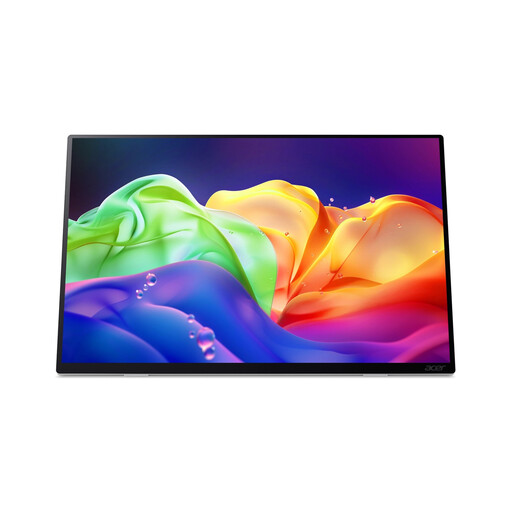
Acer ProDesigner PE160WUT, 16 inch
A portable OLED touchscreen for a laptop setup with room for a second display.
2880 × 1800 pixels; 120 Hz; 16:10; two USB-C ports and HDMI 2.1. According to the product description, this model has no internal battery and does not support USB-C Power Delivery charging.
View at Joybuy
 No image available
UPERFECT portable monitor, 16 inch
A 16-inch second screen with connections for use with a laptop or another compatible device.
2560 × 1600 pixels; 16:10 aspect ratio; anti-glare screen; Type-C and Mini HDMI; VESA-compatible.
View at Joybuy
Frequently asked questions
Will every USB-C port on my laptop display video on a portable monitor?
No, not every USB-C port supports video output. ASUS Support distinguishes between DisplayPort Alt Mode and a USB video solution that may require DisplayLink and a driver. Check your laptop’s port, along with the connections and power requirements of the exact monitor model.
Can I use a portable monitor in portrait orientation for coding?
It depends on the model and stand. ASUS says the MB16AH has a sleeve that can be used as a stand in either landscape or portrait orientation. According to ASUS, automatic rotation using the specified software only works on Windows and requires a driver.
How should I plan for power when using a monitor in a café?
Check whether the monitor is powered by your laptop, an adapter or a built-in battery. ASUS lists a battery capacity of 7800 mAh for the MB16AHP; that figure alone doesn’t indicate how long it will last in your setup.
Can I return a monitor bought online within 14 days?
If you buy online from a business as a consumer, you generally have a 14-day cooling-off period for distance purchases, according to the Dutch government. This is separate from your rights if a product is faulty. Before you buy, check the returns information and any applicable exceptions.
What warranty applies to a monitor I buy as a consumer in the Netherlands?
You’re entitled to a product that meets the standards you can reasonably expect; if a product is faulty, contact the seller. According to the Dutch government, the Netherlands has no fixed statutory warranty period. Any manufacturer’s or retailer’s warranty is in addition to your statutory rights.


