What should you look for when choosing one?
First, assess the privacy of your workspace and your laptop’s connectivity. Then compare screen size and how the monitor is powered.
| What to consider |
What to look for |
Who is this important for? |
| Data privacy |
Check whether other people can see your screen. Safe Internetting suggests a suitable privacy filter as a possible extra; it cannot guarantee that nobody will look at your screen. |
I don’t want other café visitors to be able to read amounts or personal information, so I’d rather choose a spot where people are less likely to see my screen. Around 26% of consumers put privacy at the top of their list when buying. |
| Connecting to your laptop |
Check whether the USB-C port supports video, for example through DisplayPort Alternate Mode, and review the requirements for the exact monitor model. ASUS Netherlands points out that USB-C describes the connector, but does not automatically mean it supports video. |
I want to make sure the screen works with my laptop before taking it with me. Around 21% of consumers prioritise a working connection to their laptop. |
| Reading space |
Compare the size and resolution of the exact models, and check whether text is comfortable to read at your preferred scaling. Dell lists the P1425 as 14 inches with a resolution of 1920 × 1200; ASUS lists the MB16AHV as 15.6 inches. |
I want to read a bill and my budget side by side without constantly switching between windows. Around 21% of consumers give usable reading space their highest priority. |
| Portability and positioning |
Check the dimensions, weight, stand and any protective cover included with the exact version. A larger screen also needs enough room on the table. |
I want the screen to fit in my bag and stand securely on a café table. Around 16% of consumers mainly choose based on portability and positioning. |
| Power |
Check whether the monitor needs power from your laptop, a mains socket or its own battery. ASUS lists a maximum of four hours for the MB16AHP in DP Alt Mode at 100% brightness; this figure applies to this model only. |
I want to be able to work when there’s no mains socket available, without assuming a particular battery life. Around 16% of consumers prioritise not needing a mains socket. |
Portable monitors at Joybuy
These Joybuy products are portable second screens for use with a laptop, with models ranging from 14 to 15.3 inches.
 No image available
Blackview DCM6 PRO, 14 inches
A second screen to use alongside your laptop when you want to view bills and your budget at the same time.
The product name lists a 14-inch screen and Full HD.
View at Joybuy
 No image available
PM14R, 14 inches
A portable second screen for anyone who wants to view a bill and a budget side by side.
The product name lists 1920 × 1200, IPS, a 16:10 aspect ratio, Type-C and Mini-HDMI.
View at Joybuy
 No image available
Blackview SCM5, 14 inches
A compact second screen to take with your laptop when you work somewhere else.
The product name lists FHD, IPS and compatibility with laptops from 13 to 17.3 inches.
View at Joybuy
 No image available
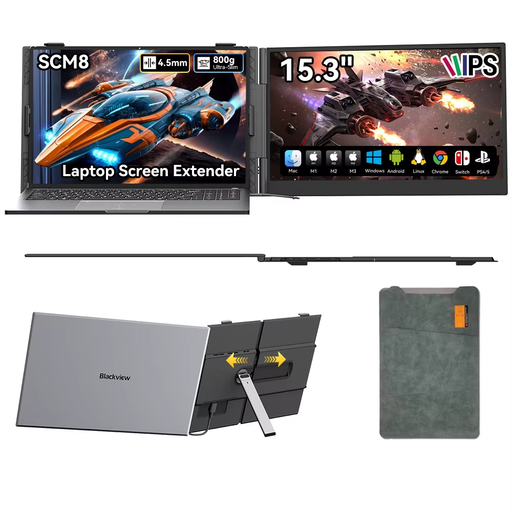
Blackview SCM8, 15.3 inches
A larger second screen for anyone with enough room on a café table to set it up alongside their laptop.
The product name lists USB-C Plug-and-Play, an adjustable stand and an included protective case.
View at Joybuy
 No image available
Blackview DCM5, 14 inches
A portable second screen for anyone who wants to use a laptop alongside a bill or household budget.
The product name lists IPS LCD, a 16:9 aspect ratio and compatibility with laptops from 13 to 17 inches.
View at Joybuy
Frequently asked questions
Will every USB-C laptop work straight away with a portable monitor?
No. The laptop’s USB-C port must support the video feature required by the screen you choose. ASUS Netherlands lists DisplayPort Alternate Mode as a feature to check; a USB-C port may support power only.
How can I use a second screen discreetly in a café?
Position the screen so people nearby have as little chance as possible of seeing it, and keep sensitive information off-screen if you can’t prevent others from looking. Safe Internetting suggests a suitable privacy filter as a possible extra, but it doesn’t replace careful positioning.
Can I safely check my bank details in a café?
If you’re unsure whether the connection is secure, don’t use public Wi-Fi for online banking. Safe Banking advises using your bank’s app on a smartphone or tablet instead. Screen privacy and network security are separate things to consider.
What should I check if the monitor doesn’t display an image after I connect it?
First, check whether your laptop port supports video and whether the cable, connection and power supply are suitable for the exact monitor model. A USB-C connector alone doesn’t guarantee a video signal.
What are my rights when buying online in the Netherlands?
For a standard online consumer purchase, you generally have a statutory cooling-off period of up to 14 days after delivery, unless a legal exception applies. ACM ConsuWijzer also explains that statutory guarantees apply if a product does not meet what you could reasonably expect under normal use. In that case, the seller must offer an appropriate solution. This is separate from any fixed warranty period for a particular product.


