What should you look for when choosing one?
First check that your laptop can send video through the connection you plan to use. Then consider readability, power, table space and who can see the content.
| What to consider |
What should you check? |
Who is this important for? |
| Connection |
Check whether the USB-C port you plan to use supports video via DisplayPort Alt Mode, or find out which HDMI output your laptop has. Also check which cables you’ll need and how the monitor is powered. |
If I want to be sure my presentation displays straight away, I check my laptop’s video output. Around 31% of consumers say connectivity is their top priority. |
| Readability |
Compare the screen diagonal, anti-glare finish and stated brightness. Consider how the presentation will look in the expected lighting and at your chosen text size. |
If my client needs to follow text and images from the same table, I focus on screen readability. Around 25% of consumers put visibility first. |
| Power |
Check whether the exact model has a battery and what power supply the video connection you’ve chosen requires. A stated battery capacity doesn’t tell you how long the monitor will last in your situation. |
If I’m not sure there’ll be a socket, I want to know in advance how the monitor is powered. Around 19% of consumers say freedom from mains power is their top priority. |
| Size and set-up |
Compare the dimensions, weight, protective case and the space the stand takes up when the screen is set up. |
If my café table also needs to make room for my laptop and our conversation, I look for a screen that’s practical to set up there. Around 13% of consumers prioritise a compact set-up. |
| Confidentiality |
Decide which windows will be visible when you mirror or extend your screen. If necessary, prepare a separate client-facing version of your presentation. |
If my presentation contains confidential information, I want to control what the client and anyone nearby can see. Around 12% of consumers say control over visible content is their top priority. |
Brands to compare
These brands and models give you a starting point for comparing connections, size and suitability for your needs; their inclusion doesn’t in itself indicate availability.
ASUS
The ZenScreen range includes models with different connection and power options, including the MB16AHV, MB16AHP and foldable MB14FCD.
- ASUS lists USB-C and mini-HDMI for the MB16AHV; the HDMI connection also requires USB-C power.
- Don’t confuse the MB16AHV with the MB16AHP, which ASUS says has a built-in battery. If you want a battery-powered model, check the Dutch model variant and how long you need it to run.
Lenovo
The ThinkVision M14t Gen 2 is a 14-inch USB-C touchscreen monitor, designed for a compact set-up and annotation.
- Lenovo lists a 2240 × 1400 resolution, 16:10 aspect ratio, two USB-C ports and a weight of 700 g for this model.
- Check that video output and the touchscreen function work with your device and the way you plan to use it.
HP
The HP E14 G4 is a 14-inch Full HD USB-C monitor supplied with a case and stand.
- HP describes it as connecting with a single USB-C cable.
- Don’t assume it has a built-in battery or HDMI input; check which connections and power options come with the version you’re considering.
Dell
The Dell P1424H is a 14-inch Full HD IPS monitor with two USB-C/DisplayPort Alt Mode ports.
- Dell lists a weight of 590 g, a case and an included USB-C cable for this model.
- Dell reported that the P1424H is currently unavailable on the Dutch product page consulted; this doesn’t say anything about availability from other retailers.
Portable monitors at Joybuy
These product picks focus on portable screens for laptop presentations, with connections, size and use at a café table in mind.
 No image available
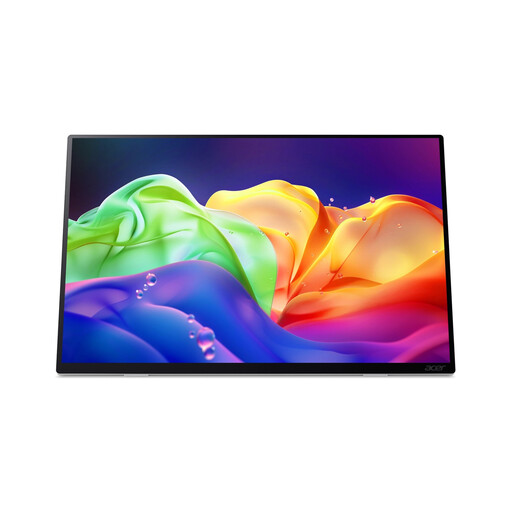
Acer ProDesigner PE160WUT 16-inch OLED Touch Monitor
Worth considering if you’re looking for a portable 16-inch screen for laptop presentations; check the connections and power requirements for your laptop first.
OLED touchscreen monitor; 2880 × 1800; 120Hz.
No built-in battery; external power required.
View at Joybuy
 No image available
MSI PRO MP165 E6 15,6-inch Full HD-monitor
An option to consider if you’re looking for a portable presentation screen; check that your laptop’s video output is compatible with the connection required.
15.6 inches; Full HD; speakers.
View at Joybuy
 No image available
ARZOPA Z1RC 16-inch 2.5K-monitor
An option to consider if you’re looking for a portable screen with a built-in stand; check which connection your laptop needs first.
16 inches; 2560 × 1600; IPS; built-in stand.
View at Joybuy
 No image available
Dell Pro Plus P1425 14-inch WUXGA-monitor
An option to consider if you’re looking for a compact monitor for laptop presentations; check that your laptop supports USB-C video output.
14 inches; 1920 × 1200; WUXGA.
View at Joybuy
 No image available
ASUS ZenScreen MB16ACV 15,6-inch Full HD-monitor
An option to consider if you’re looking for a portable screen for a laptop meeting; check that your laptop’s USB-C port supports video.
15.6 inches; 1920 × 1080; Full HD.
View at Joybuy
Frequently asked questions
Can every USB-C port on a laptop send a picture to a portable monitor?
No, not every USB-C port supports video output. Check whether the port you plan to use supports video output, such as DisplayPort Alt Mode. ASUS describes HDMI as an alternative video connection for the MB16AHV, with USB-C power.
How do I set up a portable screen for a client?
Before the meeting, test with the same laptop and cables to make sure the presentation appears in the mirroring or extended-screen mode you want. ASUS also describes a tent mode for the MB14FCD, where both sides of the screen can show the same content; check what’s visible on the client-facing side.
What should I check after a meeting and before the next one?
Store the monitor safely and check the cables before your next meeting. If it has a battery, check its charge too. HP lists a case for the E14 G4; ASUS says the MB16AHP has a battery.
Do I have a cooling-off period and a guarantee when I buy online?
For consumer purchases made at a distance, the Netherlands Authority for Consumers and Markets says you generally have a cooling-off period of up to and including 14 days after delivery, subject to legal exceptions. The ACM also says the seller is responsible for the legal guarantee if a product doesn’t meet what the consumer is entitled to expect. These rules don’t necessarily apply to business purchases.
Can I show personal data in my presentation at a café in the Netherlands?
The rules consulted don’t give a general yes or no for every café presentation. If your organisation processes personal data, the Dutch Data Protection Authority says it must protect that data properly. Consider who is allowed to see the information and avoid exposing it unnecessarily to people nearby.


