Portable monitors at Joybuy
This selection includes portable monitors that give you an extra screen for managing membership records. Above all, compare the stated screen sizes and connections with your laptop and workspace.
 Image unavailable
Blackview DCM6 PRO 14-inch portable monitor
The 14-inch size may suit a compact admin setup. Check in advance which video connection and power supply your laptop requires.
The product title lists Full HD and compatibility with laptops measuring 13–17.3 inches.
View at Joybuy
 Image unavailable
TECLAST V16H 16-inch portable monitor
The 16-inch screen gives you more physical screen space for viewing lists alongside a laptop. Check that your laptop, cable and power supply suit the connection method you choose.
The product title lists an IPS screen, FHD, 16:10, 144 Hz, two USB-C connections, mini-HDMI and a built-in stand.
View at Joybuy
 Image unavailable
TECLAST V16Q portable monitor
This model may be worth considering if you’re looking for a portable second screen with the listed connections. Check your laptop’s video mode and power supply.
The product title lists 2.5K, 144 Hz, 16:10, two USB-C connections, mini-HDMI and a stand.
View at Joybuy
 Image unavailable
PM14R portable 14-inch monitor
The 14-inch size and 16:10 aspect ratio may suit a compact setup for viewing lists. Check that the listed connections work with your laptop.
The product title lists 1920 × 1200, IPS, Type-C and mini-HDMI.
View at Joybuy
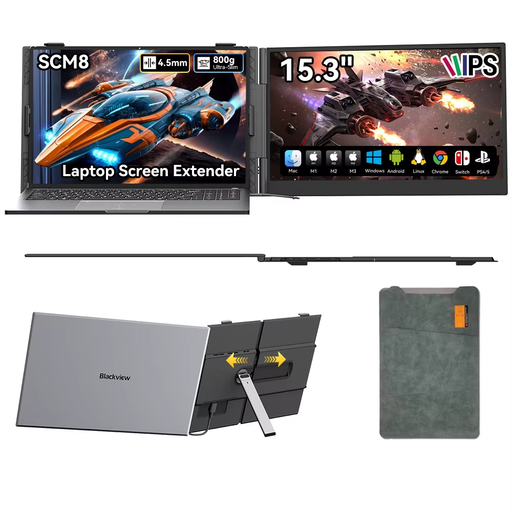 Image unavailable
Blackview SCM8 15.3-inch portable monitor
The adjustable stand may be useful if you want to set up the screen in different workspaces. Consider your viewing position and the space available.
The product title lists USB-C, a stand that adjusts through 180° and an included protective case.
View at Joybuy
Frequently asked questions
Is a USB-C port on my laptop enough for a portable monitor?
No. For standard USB-C video, your laptop needs to support the required DP Alt Mode. Philips also describes a separate USB-A/DisplayLink option for the 16B1P3302/00. Check the cable, power supply and any software requirements for each model.
Where should I position a monitor when entering members’ details?
Position the screen so guests and other unauthorised people can’t see it, and consider which additional access and security measures are appropriate for the data you process. The Dutch Data Protection Authority says security should match the risks. A monitor model won’t automatically make your admin GDPR-compliant.
Is a portable monitor enough for long admin sessions?
Not necessarily. Your viewing position, lighting and workspace setup also matter. The Arboportaal outlines requirements for employees who work at a screen for more than two hours a day, including the need to consider a separate screen or keyboard when using a laptop.
Which cables and service terms should I check?
Check which cables and power supply the exact model requires, and whether they’re included. On its Dutch product page for the MB16FC, ASUS lists a USB-C cable, a mini-HDMI-to-HDMI cable and a three-year manufacturer’s warranty. Check the terms for the model and the seller you buy from.
Can a café display members’ details on a second monitor?
It depends on more than whether you use a second monitor: the café needs to decide why it processes personal data and what security measures are appropriate for the risks. The Dutch Data Protection Authority emphasises that the possibility of unauthorised access must also be considered.


