
Vandaag of morgen in huis

Kwaliteit gegarandeerd

Welkomstaanbiedingen ontgrendelen: GRATIS bezorging | Tot 80% korting | Gratis 30 dagen JoyPlus-proefperiode
Download de app
A portable monitor can turn your laptop into a dual-screen workstation without having to bring a full-sized monitor with you. It’s useful for people working from home, students, business travellers and gamers. Many models look similar, though, while differences in connectivity, power consumption and image quality can be significant.
So don’t focus only on terms such as “2K”, “144Hz” or “slim design”. Above all, check that the monitor is compatible with your laptop, phone or console, and that you have the right cables and power supply.
A USB-C port doesn’t automatically support DisplayPort Alt Mode. Some laptops use USB-C for data or charging only. So check your laptop and monitor specifications before buying a USB-C monitor.
Also check the difference between:
So an external monitor for a laptop won’t always work with a single cable. If your laptop has limited power output, you may need an extra adapter.
A 144Hz monitor can display motion more smoothly than a 60Hz model, but only if your laptop, games console, cable and graphics hardware support it. The maximum refresh rate may be lower with certain connections or settings.
For word processing and spreadsheets, 60Hz is often enough. For fast-paced games, 120Hz or 144Hz may be worth considering. Resolution matters too: Full HD at a higher refresh rate is generally less demanding than 2K at 144Hz.
A screen just a few millimetres thick is easy to carry, but a separate protective case or built-in stand becomes especially important. Check:
A monitor with a kickstand is handy on a train, in a hotel room or at a flexible workspace. Use it on a flat, sturdy surface and keep the ventilation openings clear.
A portable laptop monitor measuring 14 to 16.1 inches will usually fit nicely next to or behind a laptop. A 16:10 screen gives you slightly more vertical workspace than a 16:9 screen. This can be useful for documents, code and web pages.
A smaller 14-inch screen often weighs less. A 16-inch screen gives you more room for windows, but also takes up more space in your bag.
Full HD (1920 × 1080) is suitable for everyday office work, streaming and many consoles. A 2K portable monitor, with a resolution of 2560 × 1600, for example, offers more pixels. This can make small text and fine details look sharper, provided your laptop supports the resolution correctly.
An IPS monitor is known for its wide viewing angles. Also check the brightness, contrast, matt finish and colour coverage. Higher sRGB coverage can be useful for photo editing and graphic design, but check whether the stated figure is a factory rating or a measured result.
Before buying, check which device you want to connect:
Remember to check the audio too. Built-in speakers are handy for videos and games, but sound quality and volume vary between models. A headphone socket may be more practical in public places.
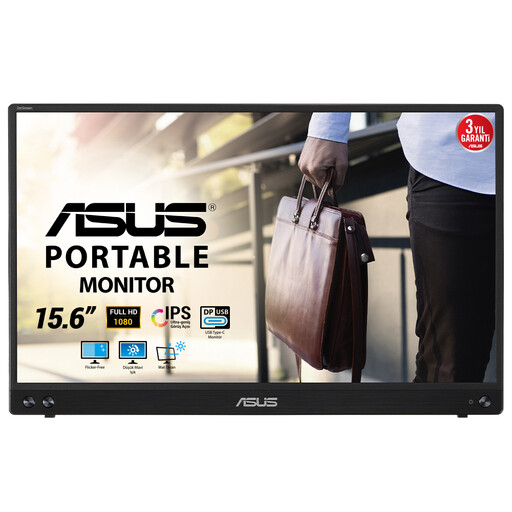
Why it suits this user: This 15.6-inch portable monitor is designed for mobile office work and weighs 0.83 kg according to the product specifications. Its Full HD resolution and hybrid USB-C connection make setup straightforward with compatible devices.
The product specifications clearly state 1920 × 1080, 60Hz and one USB-C video input. Do check that your device’s USB-C port supports video.
IPS panel, matt finish, 5ms response time and a weight of 830 grams.
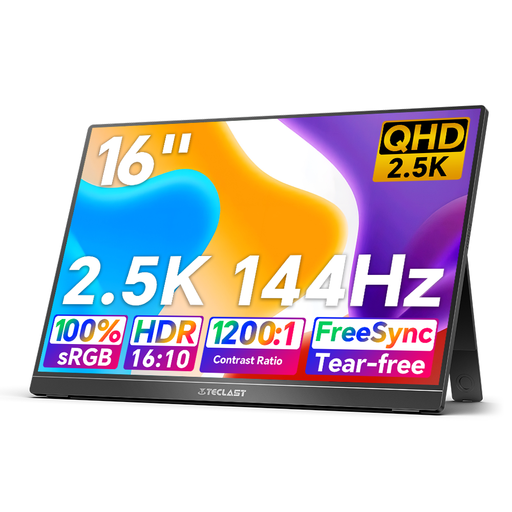
Why it suits this user: This model combines a 16-inch 16:10 screen with 2.5K resolution and a stated refresh rate of 144Hz. It’s a good fit for users who want to view detailed work and fast-moving images on the same screen.
The connections are listed as two USB-C ports and mini HDMI. Check which cable you need in advance, and whether your device can output the stated resolution and refresh rate.
2.5K resolution, IPS panel, 144Hz according to the product specifications, built-in kickstand and speakers.
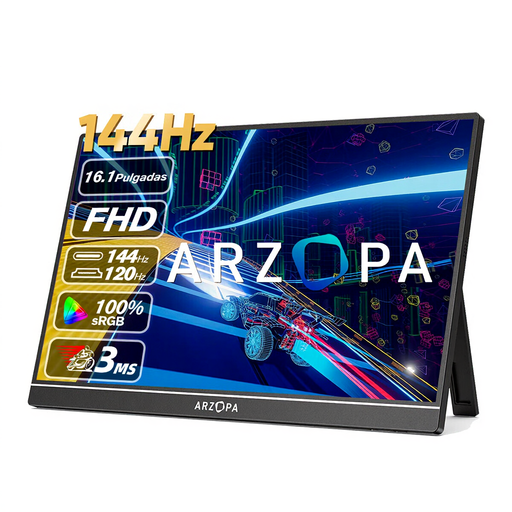
Why it suits this user: The combination of Full HD, 144Hz and a stated brightness of 300 cd/m² is designed for gaming on laptops, PCs and consoles. Its 16.1-inch size also gives you more screen space than a more compact model.
The product information lists two USB-C ports and HDMI. A separate power connection may still be needed when using a console, so check this for your console and cable setup.
144Hz, IPS panel, 106% sRGB according to the product specifications, built-in stand and two speakers.
We’ve put together a complete, up-to-date list of products that meet these strict selection criteria and the applicable European safety regulations.
A portable monitor usually doesn’t have a built-in battery, so it draws power from the connected device or an adapter. This affects your laptop or phone’s battery life.
No. Your laptop needs a suitable video output, such as USB-C with DisplayPort Alt Mode, HDMI or a compatible adapter. Also check whether your laptop can supply enough power through USB-C.
It can be, particularly for documents, spreadsheets and creative applications. You get more pixels than with Full HD. However, check your operating system’s scaling settings and your laptop’s graphics support.
It depends on the model, brightness and connection. A monitor without a battery draws power via USB-C or an adapter. Higher brightness and a higher refresh rate can increase power consumption. A separate power adapter is useful if you don’t want your laptop battery to run down quickly.
