
Vandaag of morgen in huis

Kwaliteit gegarandeerd

Welkomstaanbiedingen ontgrendelen: GRATIS bezorging | Tot 80% korting | Gratis 30 dagen JoyPlus-proefperiode
Download de app
Working on a single, small laptop screen often feels restrictive. Whether you're working from home, studying in the library, or on the go, an extra screen can significantly boost your productivity. A portable monitor seems like the perfect solution. However, the market is flooded with models that overpromise and underdeliver. Before you make a choice, it's crucial to know where the pitfalls lie.
Many buyers fall into the same traps:
To avoid a bad purchase, it helps to understand a few technical specifications. These aren't complex details, but practical features that determine if a monitor is right for you.
Most portable monitors have a Full HD (1920x1080) resolution, which is sharp enough for most tasks. If you work extensively with graphic design programs or want to watch movies in high quality, a 2K (QHD) or 4K (UHD) screen is worth considering. Keep in mind that a higher resolution consumes more power.
The size, typically between 14 and 17 inches, is a matter of personal preference. A model with a size similar to your laptop screen creates a comfortable, seamless experience. Also, pay attention to the panel type: an IPS panel generally offers better viewing angles and colour reproduction than older panel technologies.
The connections determine how easily you can use the monitor.
A laptop screen extender is a specific type that clips directly onto your laptop, providing a stable and integrated solution.
For everyday work and browsing, a refresh rate of 60Hz is perfectly fine. However, if you're a gamer, a higher refresh rate makes a huge difference. A portable gaming monitor with 120Hz or 144Hz provides much smoother visuals in fast-paced games, allowing you to react faster. This is an objective specification that directly enhances the gaming experience.
Below are some popular choices, tailored to different use cases.
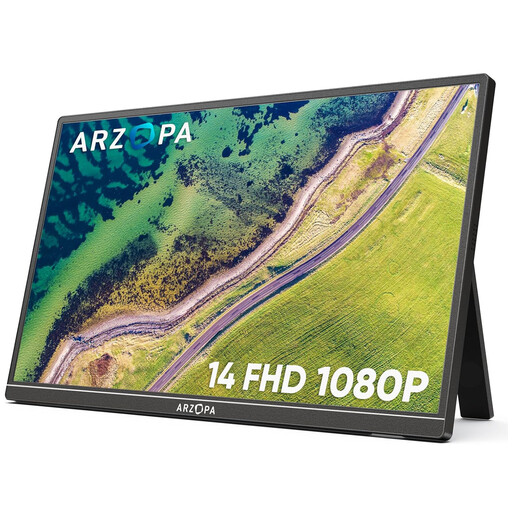
Why This Fits Their Persona: Ideal for those who are always on the go. Weighing just 600 grams with a slim profile, this screen fits easily into any laptop bag. Perfect for students and professionals who work in various locations and need a second screen at a moment's notice.
The built-in, adjustable stand ensures stability, avoiding the pitfall of a flimsy build. The specifications are clear: plug-and-play with a full-function USB-C port.
Extremely light and thin (600g). FHD IPS panel for good viewing angles. Both USB-C and mini-HDMI ports for broad compatibility.
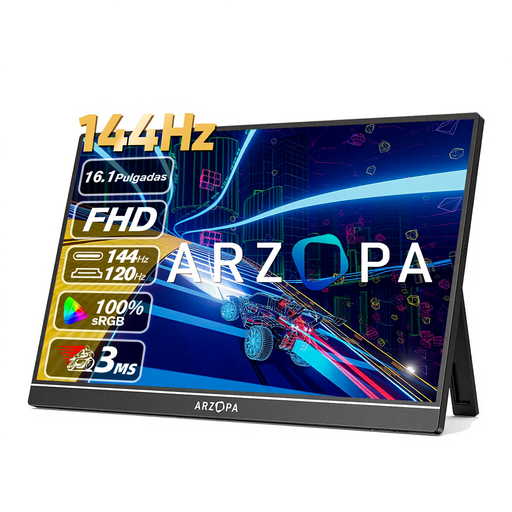
Why This Fits Their Persona: For gamers who refuse to compromise on speed, even on the go. This screen is designed for smooth gameplay on a laptop, PS5, Xbox, or Switch, wherever you are.
Instead of vague marketing claims, this model focuses on a hard, measurable specification: the 144Hz refresh rate. This is an objective advantage for gaming that is immediately noticeable.
The 144Hz refresh rate provides extremely smooth visuals. The 16.1-inch size offers an immersive experience, and the 106% sRGB color gamut ensures vibrant colors.
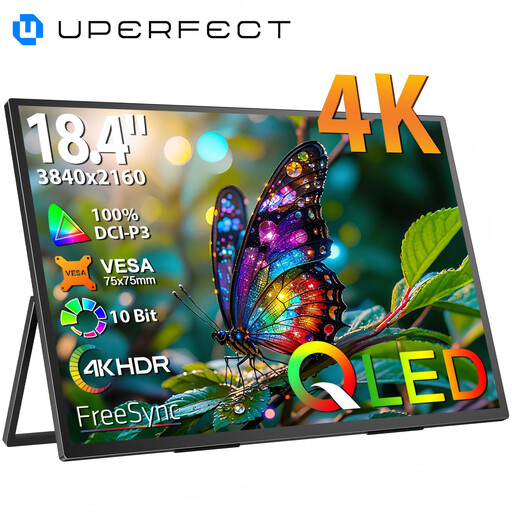
Why This Fits Their Persona: For those who need maximum screen real estate and the highest image quality for photo editing, video production, or working with large spreadsheets. This is a portable workstation, not just a small secondary screen.
This screen relies on concrete, high-end specifications (4K resolution, QLED panel) instead of vague promises. The metal chassis and integrated stand provide the necessary sturdiness for its large size.
Massive 18.4-inch screen surface. Pin-sharp 4K UHD resolution (3840x2160) and a QLED panel for excellent color reproduction. VESA mounting capability for added flexibility.
We have compiled a complete, up-to-date list of products that meet these selection criteria and comply with current regulations.
That depends on your laptop. If you have a modern laptop with a full-function USB-C port that delivers enough power (usually indicated by a lightning bolt or 'DP' symbol), then a single cable for video and power is sufficient. For older laptops, or when using HDMI, you will often need a separate power source. This can be from a wall outlet or a powerful power bank, such as a 140W Power Bank with 20,000mAh, which is a great solution for on-the-go use.
In most cases, yes, as long as you have the right ports. Check if your laptop has a USB-C port with DisplayPort Alternate Mode or an HDMI port. For devices with only older ports (like USB-A or VGA), you may need a separate adapter, which is not always included. Read the monitor's product description carefully to see which cables are included.
The refresh rate, expressed in Hertz (Hz), indicates how many times the image is updated per second. For standard office work, browsing, and watching movies, 60Hz is sufficient and provides a smooth picture. For competitive gamers, 144Hz offers a noticeable advantage: movements are much smoother and sharper, which can help you react faster in fast-paced games. If you don't game, the extra investment in a 144Hz screen is not necessary.
