First, check that your laptop and monitor can work together to provide a picture and enough power, and that the screen will fit on the reading room table. A 14-inch screen takes up less space than a 15.6-inch model; Lenovo lists the ThinkVision M14t Gen 2 as having a 14-inch diagonal, while MSI gives the PRO MP165 E6 as 15.6 inches. HDMI can provide an alternative video connection, but it does not power the monitor by itself. Also ask the archive you’re visiting about its rules on using an additional screen.
Who is a portable monitor suitable for?
Researchers who often change rooms
If you regularly pack up your workspace, key things to consider include a manageable weight, a suitable stand and a connection that works with your laptop. Lenovo, MSI and Philips publish model specifications that let you compare these features.
Readers of scans and lengthy documents
If you view scans alongside notes or read long pages, consider the screen size, resolution and aspect ratio. Arboportaal also highlights factors such as reflections, contrast and ambient light when it comes to screen legibility.
Users with an unfamiliar laptop connection
If you’re not sure whether your laptop’s USB-C port supports video, check the connection requirements for both the laptop and the monitor. Philips specifies DisplayPort Alt Mode as a requirement for USB-C video on the 16B1P3302D/00.
What should you consider when choosing one?
If you’re doing archive research and regularly changing workspaces, four questions can help narrow down your options: how often you move, how you read documents, which connections will work, and how much space and power you have available.
| What to consider |
What should you check? |
Who is this important for? |
| Moving and setting up |
Compare the stated weight of the exact model and check its dimensions, stand and any protective case. |
If I often change rooms, I want to set up my screen quickly without carrying unnecessary weight. Consumers who prioritise ease of moving it account for around 31% of consumers with this buying need. |
| Keeping documents readable |
Check the screen diagonal, resolution, aspect ratio, anti-glare finish and how easily the screen can be positioned. |
When I want to view scans and notes side by side, the available reading space matters more than extra features. Consumers who prioritise readability account for around 25% of consumers with this buying need. |
| Connecting video and power |
Check whether the laptop supports the monitor’s video connection method, and what cables and power supply are required. |
If I switch between laptops, I want to know in advance whether the video connection will work and how the monitor gets its power. This is the main priority for consumers who value compatibility, accounting for around 25% of consumers with this buying need. |
| Workspace and power supply |
Measure the available table space and ask what equipment and power sources are permitted at the location you’re visiting. |
At a shared archive table, I want to leave enough room for documents and notes, with a usable power source nearby. Consumers who prioritise setup and power account for around 19% of consumers with this buying need. |
Common buying mistakes
-
Assuming USB-C always provides both video and power
A compatible plug alone doesn’t confirm that your laptop outputs video over USB-C or supplies enough power to the monitor. Philips requires USB-C with DisplayPort Alt Mode for USB-C video on the 16B1P3302D/00; MSI lists separate connection and power information for the PRO MP165 E6.
Check the laptop port, monitor connection, power requirements and cables together for the exact model.
Depending on the combination, you may need a different cable or a separate power source.
-
Judging carrying weight from an isolated specification
ASUS Netherlands lists the ZenScreen MB16AHV as weighing 0.9 kg net. A weight is only useful for comparison if it’s clear whether accessories and the case are included.
Use the specification for the exact model, and factor in the screen, case and cables separately when estimating what you’ll be carrying.
-
Assuming every reading room allows the same setup
Information about house rules and power sockets at the National Archives applies to that institution. It doesn’t mean you can use an extra monitor in another local archive.
Ask the reading room you’re visiting in advance about its rules on a second screen, available table space and power.
-
Confusing the manufacturer’s warranty with your legal guarantee
ACM ConsuWijzer explains that your legal guarantee exists alongside a manufacturer’s or seller’s warranty. If a product doesn’t provide what you could reasonably expect, the seller is responsible.
Check what any additional cover includes, and keep your proof of purchase in case you need to contact the seller.
Extra cover may be unnecessary if it doesn’t provide relevant additional protection.
Brands to consider
Lenovo
The ThinkVision M14t Gen 2 is a compact 14-inch option for anyone who often packs up and reads documents.
- Lenovo lists this model as having a resolution of 2240 × 1400 pixels, a 16:10 aspect ratio, a weight of 700 g, two USB-C ports and touch functionality.
- Touch functionality is only useful if your device and working methods support it; the 14-inch screen has less physical screen space than a larger model.
MSI
The PRO MP165 E6 combines a 15.6-inch screen with USB-C and HDMI.
- MSI lists Full HD resolution, an anti-glare panel, two USB-C ports, HDMI and a weight of 0.78 kg.
- The stated 15 W Power Delivery doesn’t guarantee that every laptop can be charged using it; check how your devices are powered.
ASUS
The ZenScreen MB16AHV is a 15.6-inch model with USB-C and mini-HDMI.
- ASUS lists this model as having Full HD resolution, an anti-glare IPS panel and a typical brightness of 250 cd/m².
- ASUS gives a net weight of 0.9 kg; remember to factor in anything else you’ll be carrying in your bag.
Philips
The Business Monitor 16B1P3302D/00 is a 15.6-inch Full HD model with two USB-C ports and an adjustable stand.
- Philips describes a stand that tilts from 0 to 90 degrees and USB power.
- According to Philips, the connected device must support DisplayPort Alt Mode for USB-C video; separate requirements apply to power.
HP
The E14 G4 is a compact 14-inch model worth considering if an anti-glare screen with a stated brightness matters to you.
- HP lists this model as having Full HD resolution, an anti-glare screen and a brightness of 400 nits.
- The stated brightness isn’t an independent measurement of how readable the screen will be in your workspace.
Portable monitors at Joybuy
This Joybuy selection includes portable second screens for use with laptops, from compact 14-inch models to larger screens. Check the requirements for video connections and power for each model to make sure they’re suitable for your laptop.
 No image available
Blackview DCM6 PRO, portable 14-inch monitor
A compact screen option if you want to take a 14-inch second screen with you to study.
The product information lists Full HD resolution of 1920 × 1080 pixels, USB-C, HDMI and a built-in speaker. The title says the monitor is designed for 13–17.3-inch laptops; check your laptop’s connection and power requirements.
View at Joybuy
 No image available
TECLAST V16H, portable 16-inch monitor
The 16-inch model offers more physical screen space than the 14-inch models in this selection.
The title lists FHD, a 16:10 aspect ratio, two USB-C ports, Mini HDMI and a built-in stand. The product description mentions an IPS panel and 144 Hz; check which video port and power supply work with your laptop.
View at Joybuy
 No image available
PM14R, portable 14-inch monitor
A 14-inch option for anyone who wants to view documents on a compact second screen.
The title lists 1920 × 1200 pixels, a 16:10 aspect ratio, an IPS panel, Type-C and Mini-HDMI. The product description mentions a protective case; check that the video connection is compatible with your laptop.
View at Joybuy
 No image available
Blackview SCM5, portable 14-inch monitor
A compact 14-inch option for changing workspaces; the product information lists a built-in adjustable stand.
The title lists FHD and an IPS panel. The product description mentions a thickness of 18.2 mm and a 1.5 W speaker; check the connections on the exact model before ordering.
View at Joybuy
 No image available
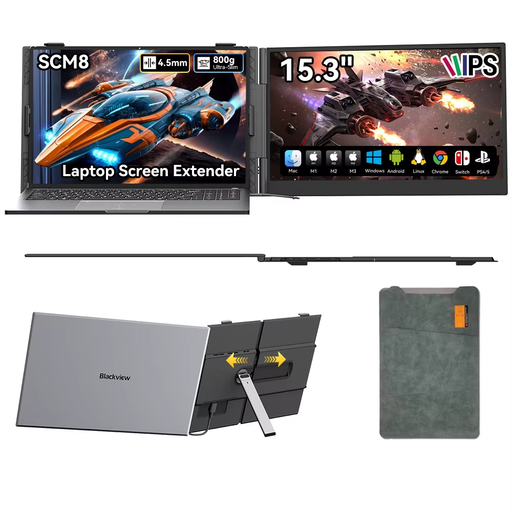
Blackview SCM8, portable 15.3-inch monitor
A larger screen may suit you if you want more physical screen space in changing workspaces.
The product description mentions USB-C for video and power, an adjustable stand and a protective case. Check that USB-C video works with your laptop and how the monitor will be powered in your setup.
View at Joybuy
Frequently asked questions
Will a portable monitor work with any USB-C port on my laptop?
No, not automatically. Philips requires USB-C with DisplayPort Alt Mode for USB-C video on the 16B1P3302D/00; power supply and charging have their own requirements too. Check the specifications for your laptop and the exact monitor model.
How can you set up a temporary archive workspace for reading over a longer period?
Position the screen so that light sources and reflections don’t make the text harder to read, and set the text to a comfortable size. Arboportaal describes how factors including reflections, contrast and ambient light can affect screen work; legal workplace requirements apply in an employment context and don’t automatically apply to every hobby researcher.
Can you use your own second monitor in a local archive reading room?
That depends on the rules of the reading room you’re visiting. Ask the institution in advance about permission, table space and power. The National Archives’ information about laptops and power sockets applies to that institution and doesn’t determine the rules at other archives.
What are your rights if a monitor bought online turns out to be faulty or unsuitable?
If a product doesn’t provide what you could reasonably expect, the seller is responsible under the legal guarantee; ACM ConsuWijzer explains that this exists alongside a manufacturer’s or seller’s warranty. For a consumer purchase made online, you’ll generally have a 14-day cooling-off period after delivery, subject to applicable exceptions. The cooling-off period for an unsuitable purchase is separate from your rights if a product is faulty.


