
Spreadsheet checker on the go
You want to compare bills and transaction entries side by side in a temporary workspace. Screen space, aspect ratio and readable text matter most to you.


Start with the screen size and aspect ratio that suit viewing bills and source documents side by side. Then check that your laptop can output video through the connection you plan to use and provide enough power. A larger screen can give you more physical workspace, while a more compact model may be easier to carry; neither feature alone proves that the screen will work with your laptop. Treat the models mentioned as technical examples, and check that the applicable CE marking and EU declaration of conformity apply to the exact version.
You want to compare bills and transaction entries side by side in a temporary workspace. Screen space, aspect ratio and readable text matter most to you.
You want to connect a second screen, but aren’t sure whether your USB-C port supports video or how much power is needed.
You often carry the screen with you, so you’re particularly mindful of its size, weight, stand and power options.
First, check what video output and power your laptop can provide. Then choose a screen size and aspect ratio to suit your workspace and bag.
| What to consider | What should you check? | Who is this most important for? |
|---|---|---|
| Overview and readability | Compare screen size, aspect ratio, resolution and text scaling. | I want to read entries and source documents at the same time, so I look at usable screen space and text scaling. Around 36% of consumers prioritise an overview and readability. |
| Connecting to your laptop | Check whether the specific laptop port supports video and which cable or adapter you need. | When I connect my laptop, I want to know whether that particular port outputs video and whether the screen gets enough power. Around 29% of consumers prioritise connection compatibility. |
| Portability and power | Check the weight of the exact version, the stand and the power requirements. | I take the screen to different workspaces, so I need to consider its weight and power supply. Around 21% of consumers prioritise portability and power. |
| Visibility in changing light | Compare the stated brightness and screen finish with the places where you usually work. | In a bright place, I want to be able to read text without assuming that a brightness figure guarantees outdoor performance. Ambient light is the main concern for around 14% of consumers. |
USB-C describes the connection, but doesn’t prove that the laptop port supports video. The Philips monitor mentioned requires DisplayPort Alt Mode for video over USB-C.
Check the video capabilities of the exact laptop port you want to use and compare them with the screen’s requirements.
A paid extended warranty can be an additional expense; assess it separately from your statutory rights.
The ZenScreen MB16AHV is a 15.6-inch example for anyone looking for USB-C and mini-HDMI on one portable screen.
The ThinkVision M14t Gen 2 is a 14-inch example for anyone looking for a 16:10 aspect ratio and high resolution in a more compact size.
The Business Monitor 16B1P3302D/00 is a 15.6-inch example for a temporary workspace with USB-C.
The E14 G4 is a 14-inch example for anyone who takes stated brightness and an anti-glare screen into account.
These product picks are portable monitors for use as a second screen when checking accounts on the go. Before buying, check whether the specific laptop port supports video, what power is needed, and whether the applicable CE marking and EU declaration of conformity apply to the exact version.
 No image available
The 16-inch size may suit you if you want to view bills on a larger second screen.
The product name lists FHD, 16:10, 144 Hz, two USB-C ports, mini-HDMI and a built-in stand.
Check that your laptop outputs video through the port you plan to use and find out how much power your setup needs.
 No image available
The stated 16:10 aspect ratio may be useful if you want to view transaction entries vertically.
The product name lists 2.5K, 144 Hz, two USB-C ports and mini-HDMI.
Check readability at your preferred text scaling and whether your laptop port supports video.
 No image available
A 16-inch screen may suit you if you want more physical screen space for checking accounts.
The product name lists a 16:10 screen and a pull-out, rotating magnetic stand.
Check which cables and power supply will work with your laptop and chosen monitor setup.
 No image available
The larger stated screen size may suit you if you want to view bills on a spacious screen; remember to factor in carrying it, too.
The product name lists 23.8 inches and 100 Hz.
One stated drawback is its weight of 1.91 kg without the stand. Also check which connections will work with your laptop.
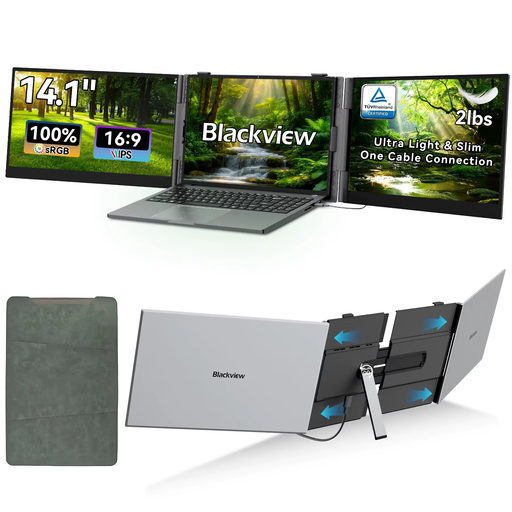 No image available
The 14-inch size may suit you if you want to take a smaller screen to a temporary workspace.
The product name lists Full HD, 1920 × 1080 pixels, IPS, 60 Hz and a 16:9 aspect ratio.
Check your laptop’s connection and video capabilities before assuming it will be compatible.
No. The laptop port you use must support video, and the monitor must be compatible with that video signal path. Also check that the setup gets enough power; a USB-C connection alone doesn’t guarantee this.
Check that the exact version includes a stand and that it fits on the available table. Philips states that the 16B1P3302D/00 has a stand that tilts from 0° to 90°; this doesn’t automatically apply to other monitors.
No. According to the Dutch government, there is no fixed statutory warranty period in the Netherlands; what matters is what you can reasonably expect from the product. If a product is faulty, contact the seller, not just the manufacturer.
The relevant European product rules apply to electrical and electronic equipment. Dutch government guidance sets out the requirements for CE marking and an EU declaration of conformity. CE is not an independent quality mark; check the applicable information for the exact model version.
According to the Dutch government, online purchases often come with a 14-day cooling-off period; the relevant terms and exceptions matter. This is separate from your rights if a product is faulty, so check the sales and returns information and contact the seller if there’s a problem.