
Researcher using a tablet and laptop
You switch between devices when reviewing survey results and mainly want to know whether one keyboard will work with both.


Start by checking whether the keyboard is compatible with the device you use to review the results. For quick checks, a compact Bluetooth model is a good fit. If you often enter figures, a number pad may be useful, while a built-in pointer can help when desk space is limited. Also consider the power supply: replaceable batteries need changing, while a rechargeable battery needs to be charged in advance.
You switch between devices when reviewing survey results and mainly want to know whether one keyboard will work with both.
You regularly enter totals or percentages and are weighing up a number pad against the space it takes up in your bag and on your desk.
You review tables in a small workspace and want to choose between an ultra-slim keyboard and navigating without a separate mouse.
First check the connection to your device and the power supply. Then consider how much space you have and how often you enter figures.
| What to consider | What should you check? | Who should pay particular attention? |
|---|---|---|
| Connection and compatibility | Check your device’s operating system, Bluetooth support and any USB connection. | If you review survey results on both a tablet and a laptop, you’ll want to know whether the same keyboard works with both. Around 33% of consumers put device compatibility first. |
| Power supply | Check whether the model uses replaceable batteries or a rechargeable battery, and what you need to do before setting off. | If you’re working without a power socket, you’ll want to know whether to charge the keyboard in advance or bring batteries. For around 27% of consumers, the power supply is their main buying concern. |
| Space in your bag and navigation | Compare the dimensions with your bag and workspace. Decide whether you’ll use a mouse, touchscreen or built-in pointer. | In a small workspace, you’ll want to navigate tables without an extra mouse and take your keyboard with you easily. Around 20% of consumers prioritise portability and navigation. |
| Entering figures | Consider how often you enter figures and check the layout and overall dimensions of the version you’re looking at. | If you often copy across totals or percentages, you’ll want to know whether a number pad is worth the extra space. Around 20% of consumers give entering figures top priority. |
If you copy across lots of survey figures, you may miss having separate number keys. A version with a number pad takes up more space.
Check the layout of the exact version and compare its dimensions with your bag and workspace.
Lenovo’s specifications list Windows and Android for the ThinkPad TrackPoint Keyboard II. Apple lists specific iPad models for the Magic Keyboard Folio.
Before buying, check your exact device model and operating system. If you’re buying a keyboard case, make sure it fits your device.
Lenovo says the maximum battery life of the ThinkPad TrackPoint Keyboard II can vary depending on usage. The Rapoo E9390M uses replaceable AAA batteries.
Before setting off, check the charge or bring suitable replacement batteries. Don’t rely on the maximum battery life alone when planning ahead.
Logitech offers a range of portable keyboard designs, from compact models to versions with backlighting.
The Rapoo E9390M is a keyboard with a number pad and a choice of Bluetooth or a USB receiver.
The ThinkPad TrackPoint Keyboard II combines a compact layout with a built-in pointer.
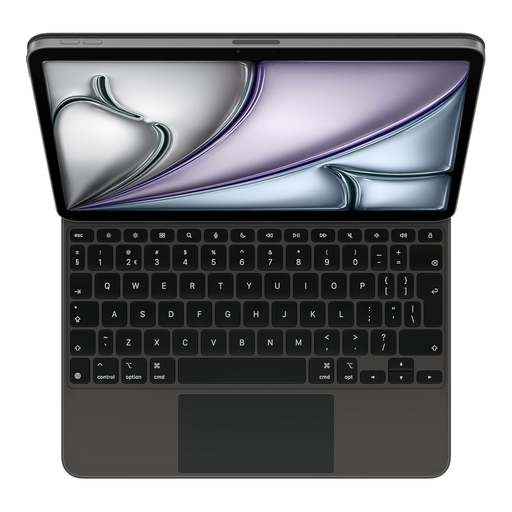
The Magic Keyboard Folio is a keyboard case with a trackpad for specific iPad models.
This selection includes keyboards for reviewing results on the go, from foldable compact models to a full-size layout and a keyboard case designed for a specific iPad model.
 No image available
A good fit if you want to type on a phone or tablet while out and about and are looking for a foldable keyboard.
The product description mentions a magnetic stand, a rechargeable battery, Type-C charging and connections to up to three devices. The product name specifies an aluminium casing.
 No image available
A good fit if you’re looking for a compact layout and can keep an eye on the battery charge during a work session away from a power socket.
The product name mentions Bluetooth, an 8000 mAh battery and a US QWERTY layout. The product description mentions arrow keys and a function row.
 No image available
A good fit if you review survey results on an iPad Air 11-inch (M3) and want to navigate without a separate mouse.
The product description mentions an integrated trackpad, 14 function keys, a protective case and an adjustable viewing angle. The iPad can be charged via USB-C; this keyboard case is designed for a specific model.
 No image available
A good fit if you have limited space in your bag and want to navigate a compatible device without a separate mouse.
The product description mentions Bluetooth, an integrated touchpad and support for iOS, Android and Windows. According to the description, it measures 152 × 97 × 12 mm when folded.
 No image available
A good fit if you regularly enter totals or percentages and have space for a full-size keyboard layout.
The product description mentions Bluetooth, a USB receiver and a rechargeable battery. It has three Bluetooth channels and a USB receiver. The stated length is 440 mm. Check that the US QWERTY layout suits your preferences.
Yes. The Bluetooth connection between a keyboard and a supported device works locally. Separately check whether the app and survey results are available offline on your device; this isn’t covered by the keyboard specifications.
Pair it with your device in advance and test the layout. For a rechargeable model, check the charge; for a model with replaceable batteries, decide whether to bring spares. Rapoo specifies two AAA batteries for the E9390M, while Lenovo describes the ThinkPad TrackPoint Keyboard II as having a built-in rechargeable battery.
For a consumer purchase in the Netherlands, the product must be fit for purpose, and you can contact the retailer if it’s faulty. According to the Government of the Netherlands, there is no fixed statutory guarantee period; what you can reasonably expect from a product depends, among other things, on the product and the information provided.
The Government of the Netherlands lists shops and supermarkets that sell batteries as drop-off points for used household batteries. For private customers, the take-back scheme applies when you buy a new, similar electrical appliance: the shop will then take your old appliance free of charge under the conditions described, including for online purchases.