
People checking numerical results
You work with lots of numerical responses while on the go and want to decide whether a separate numeric keypad is worth the extra space at your location. ProtoArc lists a numeric keypad for the XK01.


When checking survey results on the go, your choice mainly depends on how many figures you need to enter, how much space you have and whether you always use the same device. Choose a foldable keyboard with a numeric keypad for lots of number entry, a compact standalone Bluetooth model for quick edits and switching between devices, or a cover made for one specific tablet. Check the keyboard layout, connection and power supply; being portable alone doesn’t mean a keyboard can withstand rain or dust.
You work with lots of numerical responses while on the go and want to decide whether a separate numeric keypad is worth the extra space at your location. ProtoArc lists a numeric keypad for the XK01.
You check results on a tablet, phone or laptop, and so you’re looking for a suitable connection and keyboard layout. Logitech says that Keys-To-Go 2 Universal and Pebble Keys 2 K380s let you switch between up to three devices.
You work on one tablet and are weighing up a keyboard cover made for your model against a standalone keyboard that you can store separately. Samsung lists the Galaxy Tab S10+, S9+ and S9 FE+ as compatible models for the EF-DX820UBEGWW.
Choose this if: you often enter figures while checking results and have a stable surface to work on. ProtoArc lists a separate numeric keypad for the XK01.
Bear in mind: the numeric section takes up extra space when unfolded.
Choose this if: you make quick edits or switch between devices. Logitech says that you can switch between up to three devices with the models mentioned.
Bear in mind: a standalone keyboard won’t hold your tablet upright; according to Logitech, the Keys-To-Go 2 Universal cover protects the keys in transit.
Choose this if: you always use the same compatible tablet and want the keyboard attached to it. Samsung specifies that the EF-DX820UBEGWW is for the Galaxy Tab S10+, S9+ and S9 FE+.
Bear in mind: the fit is model-specific, so check the full tablet and cover codes.
| What to consider | What should you check? | Who should consider this? |
|---|---|---|
| Compatibility and connection | Check the exact device model, supported connection and keyboard layout of the version you’re considering. | If I check results on different devices, I want to know whether the keyboard works with each one. Around 36% of consumers prioritise compatibility above all else. |
| Number entry | Check whether the exact version has a numeric keypad and whether the physical key labels match your preferred layout. | When I check lots of numerical responses, I want to enter figures quickly. Around 29% of consumers put number entry first. |
| Pack size and set-up | Compare the folded and unfolded dimensions, and think about where you’ll place the screen and keyboard. | If I travel between locations and make quick edits, both the pack size and the available workspace need to be right. Around 21% of consumers give this combination top priority. |
| Power on the go | Check how the exact version is powered and, for a rechargeable model, which charging port it has. | If I don’t want a flat battery to catch me out while I’m working, I want to know in advance how it’s powered and plan when to charge it. Around 14% of consumers put power first. |
According to the manufacturer, the ProtoArc XK01 has a numeric keypad, while the XK01 TP has an integrated trackpad and a different keyboard layout.
Choose based on your main task: entering figures or navigating results with a pointer. Check the full model name.
Samsung specifies that the EF-DX820UBEGWW is for the Galaxy Tab S10+, S9+ and S9 FE+; this compatibility doesn’t automatically extend to other Galaxy Tab models.
Before buying, compare the full cover code with your tablet’s model code.
A compact or foldable design alone doesn’t mean a keyboard is protected against water or dust.
Plan to work in a dry spot. If water or dust protection is essential for your work, check the documentation for the exact version.
Compact standalone keyboards for people who work with multiple devices. Logitech lists a protective cover for Keys-To-Go 2 Universal and Easy-Switch for three devices on Pebble Keys 2 K380s.
The foldable XK01 range includes different input options: according to the manufacturer, the XK01 has a numeric keypad and the XK01 TP has an integrated trackpad.
Samsung specifies the Book Cover Keyboard Slim version EF-DX820UBEGWW for the Galaxy Tab S10+, S9+ and S9 FE+.
Targus describes the foldable AKF003NO as a Bluetooth keyboard with a split layout for multiple devices.
This selection includes standalone and foldable keyboards, as well as keyboard models made for specific iPads, for typing while checking results on the go.
 Image unavailable
A suitable choice if you want to type on one of the specified 11-inch iPad Pro models with an M5 or M4 chip; check that your exact tablet model matches.
The product name describes it as a wireless keyboard.
 Image unavailable
A standalone, foldable option for typing on your phone or tablet while you’re out and about.
The product name lists a rechargeable design, magnetic stand, aluminium casing and quiet keys.
 Image unavailable
A model-specific choice if you want to type on the specified iPad Pro 13-inch (M4); check the exact tablet code before buying.
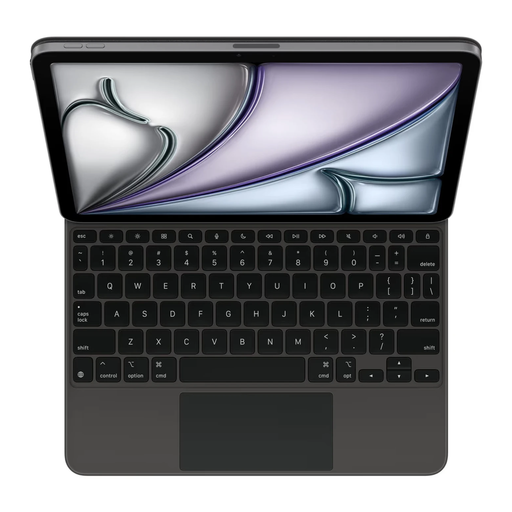 Image unavailable
Designed for typing with the specified iPad Air 11-inch (M3); check that this tablet model is compatible with your device.
The product name lists a US keyboard layout.
 Image unavailable
A compact option if you want to combine typing and pointer control on a phone, tablet or computer.
The product name lists an integrated touchpad, foldable design and Bluetooth.
No. Samsung lists a POGO connection and compatibility with the Galaxy Tab S10+, S9+ and S9 FE+ for the EF-DX820UBEGWW. Check the full model code of both your tablet and the cover.
Before you set off, test on your own device that pairing, number entry and the keys you need work in your survey app. If your keyboard can switch between devices, also check which device is active; Logitech lists this switching feature for the standalone models mentioned.
No, this requirement doesn’t automatically apply to every keyboard. According to the European Commission, EU common charger rules have applied to devices in the relevant categories since 28 December 2024. The European Commission and EUR-Lex explain that the rules cover, among other things, radio equipment with a rechargeable battery that can be charged via a cable. Check the specifications of the exact version.
When you buy remotely from a business, you’re entitled to a 14-day cooling-off period in many cases, although there are exceptions. The Dutch government also states that you’re entitled to a product that works properly and can contact the seller if there’s a problem; there’s no fixed statutory guarantee period for all products.
The European Radio Equipment Directive sets requirements for radio equipment, including safety and electromagnetic compatibility. The European Commission explains that the manufacturer is responsible for meeting the relevant conformity requirements and applying the CE mark. A Bluetooth label alone doesn’t prove that a specific version meets all applicable rules.