What should you look for when choosing?
Compact standalone Bluetooth keyboard
Choose this if: you use more than one device or want to position the keyboard separately from your screen.
Bear in mind: it’s an extra item in your bag, and you’ll need a separate, stable place for your screen.
Foldable Bluetooth keyboard
Choose this if: saving space in your bag is your main concern and you use your screen separately.
Bear in mind: some foldable models have smaller keys; also check whether any touchpad features depend on your device.
Keyboard case made for a specific tablet
Choose this if: you own a compatible tablet model and want to carry your screen and keyboard together.
Bear in mind: a case won’t automatically fit another tablet; check how the combination sits on a table, too.
The percentages below show which purchasing concern may matter most to consumers in this café scenario. The Consumentenbond highlights key size and layout as things to consider when choosing a tablet keyboard.
| What to consider |
What should you check? |
Who is it most important for? |
| Portability and space |
Compare the dimensions in use and when packed away. Check that there’s also room on the table for your textbook and a securely positioned screen. |
If I’m carrying my textbook, screen and keyboard together, I want to know how much space the keyboard will take up in my bag and on the table. Around 36% of consumers in this café scenario put portability first. |
| Typing comfort for longer texts |
Look at the size, position and layout of the keys, as well as key travel and resistance. If possible, try the model you’re considering. |
When writing a long summary, I want a layout and key feel that let me keep typing comfortably. Typing comfort is the main purchasing concern for around 29% of consumers. |
| Compatibility with your device |
Note the exact model of your device and check the supported devices, connection, keyboard layout and any touchpad features. |
If I want to use a keyboard with my existing tablet, phone or laptop, I check in advance that its features work with my device. Around 21% of consumers put compatibility first. |
| Typing noise in a shared space |
If possible, listen to the model you’re considering and weigh the noise against the typing feel you’re looking for. |
When I’m sitting at a café table, I want to be mindful of the noise from my keys. Typing noise is the main purchasing concern for around 14% of consumers; a manufacturer’s claim is not a comparative sound test. |
Joybuy products
These Joybuy products include foldable Bluetooth keyboards and keyboard cases for specific iPad models.
 No image available
NAXSIR foldable Bluetooth keyboard with magnetic stand, grey
A foldable model to take with you when you want a standalone keyboard.
The product name mentions Bluetooth, a rechargeable design, a magnetic stand and an aluminium casing.
View at Joybuy
 No image available
Apple Magic Keyboard for iPad Pro 13-inch (M4)
A keyboard case for anyone using an iPad Pro 13-inch (M4) as a screen and wanting to carry the keyboard and tablet together.
Check that your iPad is exactly the model listed.
View at Joybuy
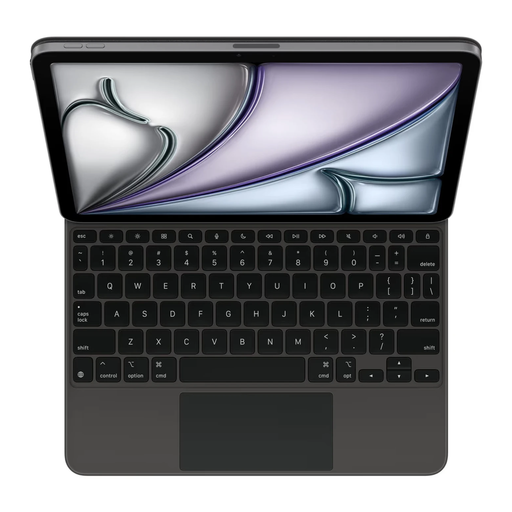 No image available
Apple Magic Keyboard for iPad Air 11-inch (M3), black, US layout
A keyboard case for anyone using an iPad Air 11-inch (M3) and wanting to carry the tablet and keyboard together.
The product name specifies a black version with a US layout. Check that your iPad is the model listed.
View at Joybuy
 No image available
Voxis B033 foldable Bluetooth keyboard with touchpad
A foldable keyboard to take with you when switching between a tablet, phone or computer.
The product name mentions Bluetooth and a touchpad; check that the model and its features are right for your device.
View at Joybuy
 No image available
Voxis HL-BOX1 foldable keyboard with touchpad
A foldable model to take with you if you use a mobile device as well as your textbook.
The product name mentions a Bluetooth keyboard with a touchpad. Check that its features work with your device.
View at Joybuy
Frequently asked questions
Do I need to know my device model before choosing a keyboard case?
Yes. Compare the exact tablet model with the compatibility list for the specific case. The Galaxy Tab models Samsung lists for the EF-DX720UBEGWW are not interchangeable with the iPad models Apple lists for each keyboard version.
How do I connect a standalone Bluetooth keyboard to my device?
Put the keyboard into pairing mode, then select it in your device’s Bluetooth settings. Follow the instructions for the model you’ve chosen. The iClever IC-BK08 manual also says that the keyboard may go into sleep mode after a period of inactivity, which can cause a delay when waking it.
What should I check about maintenance and power?
Before buying, check whether the model you’ve chosen is rechargeable or uses replaceable batteries, and what’s included. Trust lists a rechargeable battery for the Lyra Compact 24707; this doesn’t tell you how other models are powered.
What are my rights if I buy a keyboard online and it turns out to be unsuitable?
For online purchases, you generally have a 14-day cooling-off period, although there are exceptions. The Dutch Government also states that you’re entitled to a product that works properly, and that the seller is your point of contact for a solution if something is faulty. In the Netherlands, there is no fixed general statutory warranty period.
Does an electronic keyboard sold in the Netherlands need CE marking?
Electrical and electronic equipment sold in the Netherlands is subject to applicable European product requirements. The Rijksinspectie Digitale Infrastructuur states that this equipment must carry the correct CE marking, and that European requirements apply to radio equipment. Check the specific model; a brand name or product description alone doesn’t prove that it complies.


