
Student using a phone and tablet
Wants to add to their notes on several devices while out and about, without carrying a different keyboard for each one. Logitech says the Keys-To-Go 2 can pair with up to three devices.


If you switch between a phone and tablet, a separate Bluetooth keyboard is an obvious choice. Choose a foldable model if you want more room to type when you’re out and about. A keyboard case is best suited to a tablet it’s specifically compatible with. Before you buy, check the keyboard layout, the space you have to work in and whether you’ll need a separate stand.
Wants to add to their notes on several devices while out and about, without carrying a different keyboard for each one. Logitech says the Keys-To-Go 2 can pair with up to three devices.
Turns observations into longer pieces of writing and weighs up typing space against the room available in their bag. The Consumers’ Association distinguishes between separate keyboards and tablet cases with a built-in keyboard.
Uses the same tablet model each time and wants a keyboard that stays connected to it. Samsung lists specific Galaxy Tab models as compatible with the EF-DX720UBEGWW.
Best for: switching between a phone and tablet; Logitech says the Keys-To-Go 2 supports several operating systems and can pair with up to three devices.
Bear in mind: the key cover isn’t a stand for your screen; check the keyboard layout on offer.
Best for: anyone who wants to carry a keyboard and unfold it to take longer notes; ProtoArc specifies 105 keys and a number pad for the XK01.
Bear in mind: even when folded away, the keyboard needs space to work on once unfolded. Check the version too: the XK01 model discussed has a DE/QWERTZ layout.
Best for: anyone who always uses the same compatible Galaxy Tab; Samsung lists a POGO connector and specific tablet models for the EF-DX720UBEGWW.
Bear in mind: this case isn’t designed as a universal keyboard for any phone or tablet.
| What to consider | What to look for | Who should pay particular attention? |
|---|---|---|
| Compatibility and layout | Check the operating system, the exact device model and whether the physical layout is QWERTY or QWERTZ. | If I work across different devices, I want to be sure the keyboard will pair with them and that the layout feels familiar. Around 25% of consumers check this first. |
| Portability and setup | Compare the dimensions when folded and unfolded, and think about where you’ll use the keyboard. | If my bag is short on space, I also want to know whether the keyboard will fit on the table when unfolded. Around 25% of consumers put portability first. |
| Typing space | Check the number and positioning of the keys; a compact design doesn’t automatically offer the same room to work as a larger layout. | For longer assignments, I want a layout that’s comfortable to use for extended periods, not just a keyboard that’s easy to carry. Around 20% of consumers give typing space top priority. |
| Power | Check how to charge the keyboard and the conditions under which the stated battery life applies. | If I want to keep typing during a field trip, I’ll check how it charges and how battery life differs with and without the backlight. Around 15% of consumers put power first. |
| Screen setup | Find out whether you already have a suitable stand or case, and whether it fits your tablet. | I want to position my screen somewhere practical without unexpectedly needing another accessory. Around 15% of consumers give screen setup and the accessories required top priority. |
The ProtoArc XK01 version discussed has a DE/QWERTZ layout. So the model name alone doesn’t tell you which physical layout you’ll receive.
Check the keyboard layout of the specific version before you order.
A different layout may mean getting used to a new arrangement of keys or looking for another version.
For the iClever BK05, the manufacturer gives different battery life figures with and without the backlight: 5 hours with the backlight on, compared with up to 300 hours with it off.
Only compare battery life figures under the same conditions, including the backlight setting.
If you want to use the backlight, remember to charge the keyboard before you leave.
Samsung lists a POGO connector and specific Galaxy Tab models for the EF-DX720UBEGWW. That doesn’t automatically make the case suitable for every Samsung tablet.
Compare your tablet’s full model number with Samsung’s compatibility information.
The Keys-To-Go 2 is a separate keyboard option for anyone looking for a slim model to use with different devices.
The XK01 is a foldable option for anyone who wants more typing space when the keyboard is unfolded.
The BK05 is a foldable keyboard with a backlight for use in low-light conditions.
The Book Cover Keyboard Slim EF-DX720UBEGWW is designed for owners of a specific Galaxy Tab model.
This selection includes foldable Bluetooth keyboards, a keyboard for specific Surface Pro models and a compact wired keyboard for use with a computer.
 No image available
A foldable option for taking notes on a phone or tablet; the description mentions a detachable magnetic stand.
According to the product description, it pairs with up to three devices and supports iOS, Android, Windows and HarmonyOS. Charges via USB-C.
 No image available
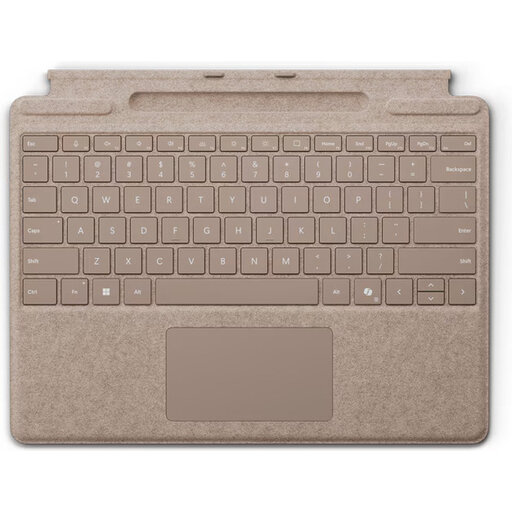
A keyboard case for anyone who takes notes on a compatible Surface Pro model.
The product description lists Surface Pro 8, 9, 10 and 11 as compatible models, as well as a touchpad, backlit keys and a storage compartment for the Surface Slim Pen. The keyboard attaches magnetically to the tablet.
 No image available
A foldable model for anyone who wants to type and use a touchpad while out and about.
The product description lists 63 keys, a touchpad and support for iOS, Android and Windows. When folded, it measures 152 × 97 × 12 mm and weighs 0,3 kg.
 No image available
A foldable option for anyone who wants to navigate with a touchpad as well as type.
The product specifications list 64 keys and Bluetooth support for iOS, Android and Windows. Dimensions: 157,5 × 98 × 15,8 mm when folded and 315 × 98 × 8,2 mm when unfolded.
 No image available
A compact option for anyone who types on a computer while out and about and can use a wired connection.
The product description lists a 60% layout, optical switches, lighting and a detachable USB-C cable. This model uses a wired USB connection and is described as being designed to connect to a computer.
Yes, if the keyboard supports the operating systems on both devices. Logitech says the universal Keys-To-Go 2 supports several systems and can pair with up to three devices; also check the physical keyboard layout of the version on offer.
Pair it in advance with the device you’ll be writing on and check that it fits on the surface available when unfolded. Charge a rechargeable model beforehand; for the iClever BK05, the manufacturer gives different battery life figures with and without the backlight.
In the Netherlands, a product must be of satisfactory quality, and if there’s a fault, the seller is the point of contact for a solution. There’s no fixed statutory guarantee period for every product. For online purchases from a business, you’ll often also have 14 days to change your mind, subject to statutory exceptions.
The European Commission describes the Radio Equipment Directive as the framework for placing radio equipment on the market. According to Your Europe, CE marking is only compulsory for products covered by harmonised EU rules that require it. Check the relevant product information for the specific item.