
Teacher taking a tablet on a trip
Writes lesson plans between activities and wants a keyboard that works with their tablet and is easy to take along.


A separate Bluetooth keyboard is a good choice if you want to type on several devices. A foldable model could suit you if saving space in your bag is the priority, while a keyboard case is designed for a specific tablet model. Logitech, Trust and iClever describe these features for their respective models. Before buying, check device compatibility, keyboard layout and power requirements. If you’ll be writing for longer periods, your working setup matters too, as Arboportaal explains for screen-based work.
Writes lesson plans between activities and wants a keyboard that works with their tablet and is easy to take along.
Also types longer documents away from school and needs to weigh up size, keys and working posture.
For example, uses a tablet for notes and a laptop for the final lesson plan. Quick switching and system compatibility are key.
Suitable if: you often carry a separate keyboard in your bag and write short texts in different places. Logitech says the Keys-To-Go 2 comes with a cover and supports multiple devices.
Bear in mind: the cover protects the keys but doesn’t prop up your tablet. Also check whether you’re looking at the universal or iPad version.
Suitable if: you work at a table and want to switch between, for example, a tablet and a laptop. Logitech says the Pebble Keys 2 K380s can switch between up to three devices; Trust lists Bluetooth and a USB receiver for the Lyra.
Bear in mind: the keyboard stays in one piece in your bag. You’ll need a suitable port for the Lyra’s USB receiver.
Suitable if: your main priority is saving space in your bag. iClever lists separate dimensions for the BK05 when open and folded.
Bear in mind: the stated battery life of the BK05 differs depending on whether the backlight is on. Also consider whether the key layout suits you for longer texts.
Suitable if: you always use the same tablet and want an attached typing setup rather than two separate items.
Bear in mind: check the exact tablet model and whether the keyboard is included. The Consumentenbond notes that this isn’t always the case with tablets.
| What to consider | What should you check? | Who is this most relevant to? |
|---|---|---|
| Storage and portability | Compare the dimensions when open and folded, how well it’s protected in your bag, and how much space the keyboard takes up when in use. | If you’re going on a trip with little room in your bag, you’ll want a keyboard that’s easy to carry without being awkward to use. Around 33% of consumers put storage space first. |
| Typing longer texts | Look at the layout and frequently used keys. Try the typing feel if possible, and consider screen height and posture too. | If you write longer lesson plans, you’ll want to weigh up the keys and working setup against a compact size. Around 25% of consumers prioritise writing longer texts. |
| Connections and switching between devices | Check your devices and operating systems, the connection method and the keyboard layout of the version on offer. | If you switch between writing on a tablet and a laptop, you’ll want a keyboard that works with both. Around 25% of consumers give switching between devices top priority. |
| Power when you’re out and about | Check the power source, any cables or batteries needed, and the conditions that apply to the stated battery life. | If you can’t always recharge while you’re out, you’ll want to know in advance how the keyboard is powered. Around 17% of consumers say power is their main concern. |
A keyboard isn’t always included as standard with a tablet. This could mean your chosen typing setup isn’t what you expected.
Check what’s included and the exact tablet model before you order.
Logitech offers the Keys-To-Go 2 as both a universal version and an iPad version. Choosing the right version can determine whether it works with your device.
Check the full model name, supported systems and keyboard layout.
iClever gives different battery life figures for the BK05 with and without the backlight. The stated figures don’t apply equally to both settings.
Compare battery life for the setting you’ll actually use when typing.
The Keys-To-Go 2 and Pebble Keys 2 K380s are different options for typing on the go: one comes with a cover, while the other is a compact, one-piece keyboard.
The Trust Lyra is a compact option if you want to connect via Bluetooth or use a USB receiver.
The BK05 is a foldable option if the space it takes up in your bag is an important consideration.
This selection includes foldable keyboards, keyboards for specific tablets and compact keyboards for use on the go. Check that each model is compatible with your device.
 No image available
An option if you’re looking for a foldable keyboard for typing on a phone or tablet.
The product name lists Bluetooth, a rechargeable battery, a magnetic stand and an aluminium casing.
 No image available
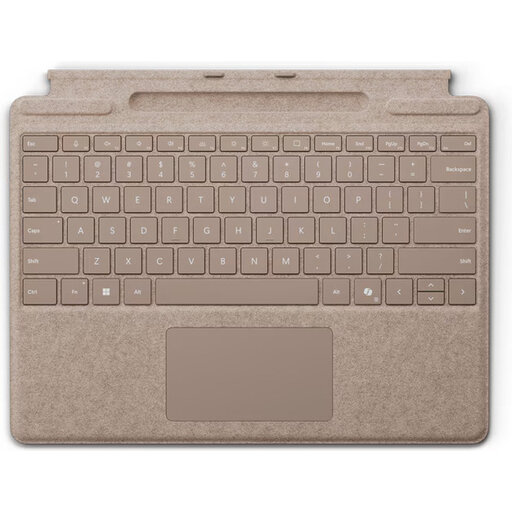
An option to consider if you use a compatible Surface Pro and want a keyboard with a touchpad.
Compatibility is listed for Surface Pro 8, 9, 10 and 11. The description also mentions magnetic attachment, a full row of function keys and a storage slot for the Surface Slim Pen.
 No image available
A keyboard case to consider if you use a compatible iPad Pro to write lesson plans on the go.
Compatibility is listed for the 11- and 13-inch iPad Pro models from 2024. The description mentions a trackpad, adjustable viewing angles and a USB-C pass-through charging port.
 No image available
A compact set to consider if you want to switch between devices and need a mouse too.
The description lists Bluetooth or USB receiver connectivity, support for up to three devices and a rechargeable battery. The keyboard layout is QWERTY US.
 No image available
An option if you want to write lesson plans on a compatible Mac using a separate wireless keyboard.
The description lists Bluetooth, a rechargeable battery and automatic connection to a Mac. The stated system requirement is macOS 11.4 or later with Apple silicon.
Not without checking the version. Compare your tablet’s operating system and connection method with the specifications of the exact keyboard. If you’re buying a keyboard case, it also needs to fit your tablet model.
Position the screen so it’s easy to read, change your posture and take breaks. Arboportaal advises limiting the use of a tablet, smartphone or laptop without accessories as much as possible. A separate keyboard doesn’t automatically make a temporary workspace suitable for extended screen-based work.
Check the charge level and take the cable or suitable spare batteries for your model. If your keyboard has a backlight, don’t assume it will last as long as the stated battery life for typing with the backlight off.
Yes. There is a requirement for employees who do screen-based work for more than 2 hours a day. Arboportaal states that the screen and keyboard must not be attached to one another in this situation. This is not a general product specification or a requirement for every buyer.
That depends on your school’s policies and security arrangements. The Autoriteit Persoonsgegevens explains schools’ responsibility to process pupil data carefully and securely, but doesn’t give a general yes or no on using a personal device.