
Quiet note-taker
You edit text close to other people and want to keep typing noise down without overlooking the space between the keys.


For taking interview notes in a shared workspace, a compact keyboard with demonstrably quiet typing is a sensible choice when colleagues are sitting nearby. RTINGS describes the Logitech Pebble Keys 2 K380s as very quiet to type on, but also notes that the key spacing can feel cramped. For longer editing sessions, consider the typing feel and space between the keys, and check that the layout and connection suit your work device before buying.
You edit text close to other people and want to keep typing noise down without overlooking the space between the keys.
You move between desks or locations and want a compact keyboard that’s easy to carry in your bag.
You switch between devices, such as a laptop and a tablet, while editing, and want to know in advance which connections and layouts will work for you.
Start with your main requirement: quiet typing, easy portability, switching between devices or comfortable use during long editing sessions. A compact size alone doesn’t tell you whether the keys will feel comfortable.
| What to consider | What to look for | Who should pay particular attention? |
|---|---|---|
| Typing noise | Look for a review of the exact model and consider the key spacing and shape too. | If colleagues work nearby, I want to keep noise down without choosing a layout that feels too cramped; around 33% of consumers prioritise quiet typing. |
| Portability and desk space | Compare the dimensions, any protection for carrying it and the layout of the version you’re considering. | If I regularly move between workspaces, I want a keyboard that’s easy to carry and doesn’t take up much room; around 27% of consumers prioritise portability and available space. |
| Connecting devices | Check that your devices support Bluetooth or the USB receiver you intend to use, and that the layout suits your operating system. | If I use more than one device for my notes, I want to be able to switch between them using a connection that’s permitted in my workplace; around 20% of consumers prioritise connectivity and switching between devices. |
| Long typing sessions | Consider the key spacing and the position of the navigation keys. Also check whether your workspace has room for a separate keyboard. | When transcribing long interviews, I want a layout that stays comfortable and suits my workspace; around 20% of consumers prioritise comfort during extended typing. |
RTINGS describes the Logitech Pebble Keys 2 K380s as portable and very quiet to type on, but also warns that its relatively close key spacing may not feel comfortable for everyone.
For long editing sessions, consider the key spacing and layout as well as the size of the keyboard itself.
RTINGS says the Pebble Keys 2 K380s works with a Logi Bolt receiver, but that one isn’t included. Trust, by contrast, lists a USB receiver for the Lyra.
Check which connection methods your work device supports and what’s included with the exact version.
As well as the KW 7100 MINI BT, CHERRY offers a separate Mac version. The model name alone doesn’t tell you which keyboard layout you’ll receive.
Before buying, check the version, key markings and layout for your operating system.
The Pebble Keys 2 K380s and MX Keys Mini are compact models with different features to consider.
The Lyra Compact is designed for those who want to use Bluetooth alongside a USB receiver.
The KW 7100 MINI BT is a compact Bluetooth model for those who want to connect without a USB receiver.
The B1 Pro is a compact option for those looking for multiple connection types.
These models are designed for compact setups and carrying between different workspaces. Above all, check that the keyboard layout and connections suit your devices and working environment.
 No image available
The compact layout may suit you if you want to save desk space.
Layout: 75%, 82 keys; US-QWERTY. Listed connections are Bluetooth, 2.4 GHz and USB-C.
 No image available
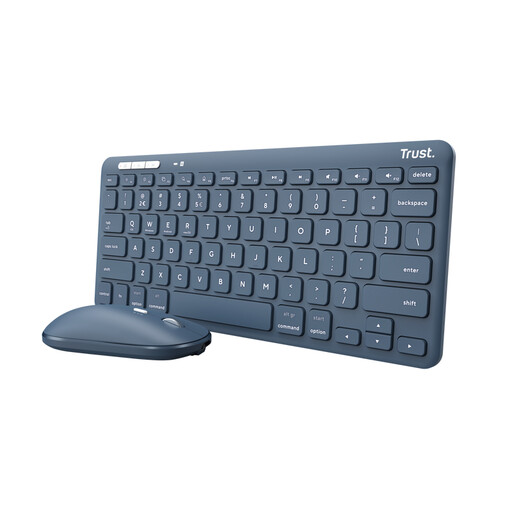
This set may suit you if you want to carry a keyboard and mouse together.
The product name lists RF wireless and Bluetooth. This version has a US-QWERTY layout and includes a mouse.
 No image available
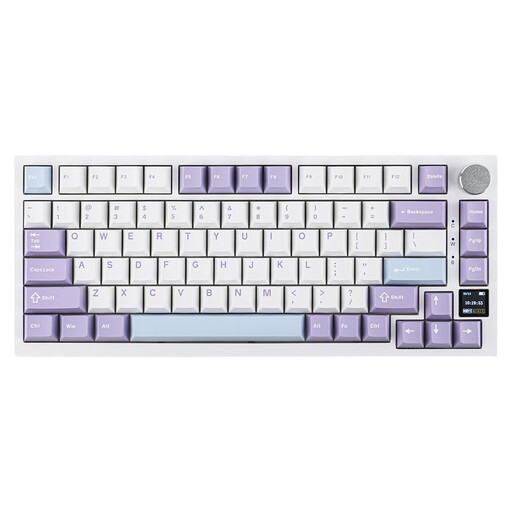
The compact layout is an option if you want to save desk space and need several connection options.
US-QWERTY; wired, Bluetooth and 2.4 GHz. The product name lists an TFT screen and hot-swappable keys.
 No image available
This compact version may suit you if you’re looking for a 75% layout and several connection options.
US-QWERTY; wired, Bluetooth and 2.4 GHz. The product name lists PBT keys and hot-swappable keys.
 No image available
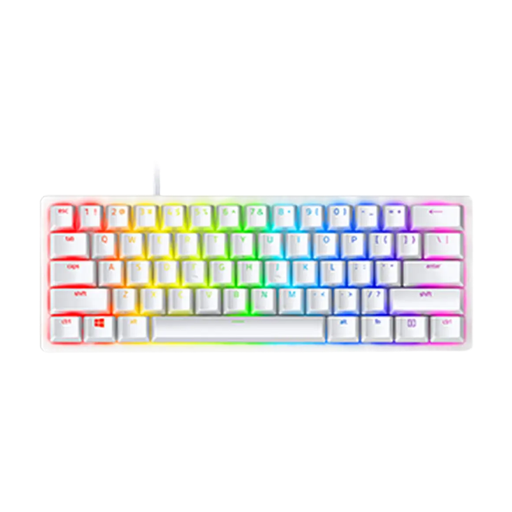
This compact version may suit you if desk space is limited.
The product name lists linear optical switches and a US layout. It requires a USB port connection.
Choose a connection that your work device supports and that’s permitted in your workplace. Trust lists a USB receiver and two Bluetooth connections for the Lyra; Logitech says the Pebble Keys 2 K380s can switch between three paired devices. Check the manual and the layout of the exact version.
For employees who work at a screen for more than two hours a day, Arboportaal says that the screen and keyboard must not be attached to each other. If you use a laptop, you must be able to use a separate screen or keyboard. This is a conditional workplace requirement, not a general recommendation for a particular portable model.
Before buying, check that the key markings and layout suit your operating system and typing style. Pay attention to the exact version too: for example, CHERRY offers a separate Mac version alongside the KW 7100 MINI BT.
The Dutch Authority for Digital Infrastructure says that devices must meet the applicable European requirements and that products sold in Europe must carry a CE marking. This doesn’t establish whether a specific item or version meets those requirements; check the marking and product information for the model you’re considering.
If you buy as a consumer in the Netherlands, you’re entitled to a product that is fit for purpose, and the seller is your point of contact for an appropriate solution. According to the Dutch Government, there’s no fixed statutory guarantee period; what you can expect depends, among other things, on the product and the circumstances. Normal wear and tear or damage caused by you isn’t automatically covered by free repairs.