
Considerate typists
You type near other people and want to keep keyboard noise to a minimum. RTINGS.com rated the typing noise of the Pebble Keys 2 K380s as very quiet; this rating does not automatically apply to other keyboards.


If you make flashcards in a shared workspace, a compact, non-folding keyboard is a sensible choice if you often edit text and have enough room on your desk and in your bag. If saving space matters more, consider an ultra-thin or folding model. In every case, check the keyboard layout, connection options and compatibility with your device.
You type near other people and want to keep keyboard noise to a minimum. RTINGS.com rated the typing noise of the Pebble Keys 2 K380s as very quiet; this rating does not automatically apply to other keyboards.
You regularly add to your flashcards and want a comfortable keyboard layout. In RTINGS.com's comparison, the Pebble Keys 2 K380s had a less cramped layout than the Keys-To-Go 2.
You create flashcards on, for example, a tablet and laptop, and take your keyboard with you. If so, consider the connection options, how easy it is to switch between devices and how much space the keyboard takes up when packed away.
Best for: anyone who regularly adds to and edits flashcards, and has room for a separate keyboard.
Trade-off: it takes up more space in your bag than the smaller model in RTINGS.com's comparison.
Best for: anyone who mainly travels with a tablet or phone and wants to protect the keys while on the move.
Trade-off: RTINGS.com describes the Keys-To-Go 2 as smaller, but with a more cramped layout than the Pebble Keys 2 K380s. Check whether you're looking at the universal or Apple version.
Best for: anyone who prioritises a compact packed size and can check the layout when the keyboard is unfolded.
Trade-off: you'll still need desk space while using it. According to the iClever IC-BK08 manual, the touchpad is not supported on iPhone.
Best for: anyone who switches between devices or wants the option of using a receiver or cable as well as Bluetooth.
Trade-off: check that the connection is compatible and see what's included with the version you choose. According to CHERRY, the KW 9200 MINI does not have a number pad.
When creating and editing flashcards, it helps to start by identifying what matters most to you: keeping typing noise to a minimum, having a comfortable layout, connecting to your own device or choosing a compact design.
| What to consider | What to look for when buying | Who is it most important to? |
|---|---|---|
| Keyboard noise | Look for a rating of the exact model; a manufacturer's description is not a comparative noise test. | If I'm making flashcards near other people, I want to avoid my typing dominating the room. Around 36% of consumers make keyboard noise their top priority. |
| Editing text | Check the key spacing and the position of the keys you use most often; also consider the layout when the keyboard is set up for use. | If I'm adding and editing a lot of text, I want a comfortable layout for typing. Around 29% of consumers prioritise typing and editing. |
| Device connection | Check compatibility with your device, the available connections and whether you can switch between devices. | If I'm using my own tablet, phone or computer, the keyboard needs to connect to it. Around 21% of consumers make compatibility their top priority. |
| Storage and portability | Compare the dimensions when the keyboard is in use with those when it's packed away; also check how the keys are protected. | If I take my keyboard with me often, I want it to fit in my bag without compromising on the layout when in use. Around 14% of consumers choose based on packed size. |
Logitech describes the Pebble Keys 2 K380s as quiet, while RTINGS.com's independent rating applies specifically to that model. The description does not rank its noise against other keyboards.
Assess the exact model and don't treat a manufacturer's description as a comparative test.
The iClever IC-BK08 has different dimensions when in use than when packed away, and still needs to fit on a desk while you type.
Compare its folded and unfolded dimensions, and check that the layout works for you when in use.
The Trust Lyra version reviewed is a keyboard and mouse set. A similar product name doesn't mean the bundle contents are the same.
Before buying, check the exact version, keyboard layout and what's included in the box.
A mouse included in the bundle is an extra item to carry if you don't use it.
ACM ConsuWijzer distinguishes between a commercial warranty and your statutory rights with the seller. What you can reasonably expect from a product is relevant to your statutory rights.
Keep your proof of purchase and contact the seller if there's a fault to discuss your options.
The Pebble Keys 2 K380s is a compact Bluetooth option; the Keys-To-Go 2 is a separate, thinner model with a cover. The Apple version of the Keys-To-Go 2 should be assessed separately.
The KW 9200 MINI is designed for anyone looking for a compact keyboard with a choice of connection options.
The Lyra range includes a compact wireless keyboard and mouse set; check whether you're looking at a set or a keyboard without a mouse.
The IC-BK08 is a folding Bluetooth keyboard with a touchpad, designed for anyone who prioritises a compact packed size.
These product choices are for anyone looking for a keyboard for an iPad, Mac or Surface Pro, as well as a folding Bluetooth option for a phone or tablet. Check that the version you choose is compatible with your device.
 No image available
A wireless option for use with the specified 11-inch iPad Pro models with M5 or M4 chips.
Check that your iPad Pro version matches the compatibility information.
 No image available
A folding option for anyone looking for a Bluetooth keyboard for a phone or tablet.
The product name specifies a rechargeable model, a magnetic stand and an aluminium casing. Check the connection and compatibility with your device.
 No image available
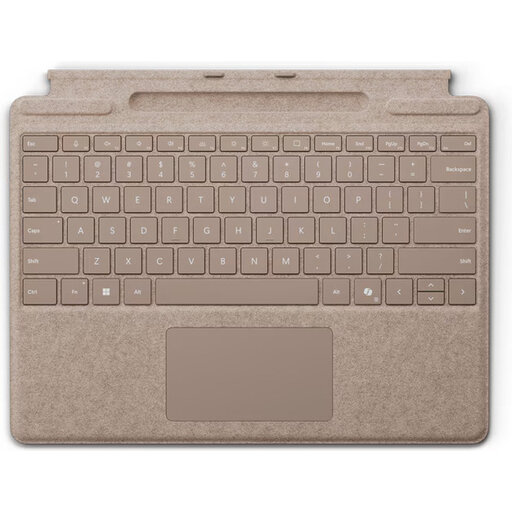
For anyone making flashcards on a compatible Surface Pro and looking for a keyboard designed for it.
The product name specifies a QWERTY layout. This is not a general-purpose Bluetooth keyboard; check that it's suitable for your Surface Pro version.
 No image available
A model for anyone editing flashcards on a compatible iPad Pro 13-inch (M4).
This version is specifically for this iPad Pro model; don't assume it's compatible with other devices.
 No image available
A compact, wireless option for anyone making flashcards on a compatible Mac model with Apple silicon.
The product information specifies a rechargeable battery. Also check the stated requirement for macOS 11.4 or later.
Bluetooth is a practical choice if your tablet supports it and you don't want to use a separate receiver. Only choose a receiver if your device has a suitable connection; according to CHERRY, the KW 9200 MINI also offers Bluetooth and cable connections.
Follow the pairing instructions for the exact version and check which device the connection is active on. The iClever IC-BK08 manual explains Bluetooth pairing; how the touchpad works depends on the device.
A rechargeable model uses a battery that you can recharge, but that alone doesn't tell you how long it will last. CHERRY specifies a rechargeable lithium battery and a detachable USB-A to USB-C cable for the KW 9200 MINI; RTINGS.com specifies two AAA batteries for the Pebble Keys 2 K380s.
According to ACM ConsuWijzer, if a product is faulty, you're entitled to a solution from the seller; the statutory warranty does not have a fixed duration of two years. For a standard online product purchase, you generally have up to 14 days from delivery to change your mind, subject to statutory exceptions.
The information cited from Arboportaal concerns employees and employers, and does not automatically apply to every student making a purchase. For employees who work at a screen for more than two hours a day, Arboportaal outlines requirements relating to the use of a separate screen or keyboard.