
Writers of longer field notes
You write up detailed notes at a hotel desk after a field visit and want a keyboard layout and feel that suit your work.


First, choose a keyboard that works with your phone, tablet or laptop and has a physical layout that suits your notes. For longer writing sessions, a comfortable typing area matters more than the smallest folded size. If luggage space is at a premium, a folding model could be a good fit, although smaller keys or a crease may be a compromise. Also check the power source, whether it comes with a stand or touchpad, and the exact version.
You write up detailed notes at a hotel desk after a field visit and want a keyboard layout and feel that suit your work.
You write shorter notes on a phone or tablet and want a keyboard that packs away compactly.
You might work on a phone, tablet and laptop at different times, and want to know in advance how the keyboard connects to them.
Start with the keyboard layout and how it connects to your writing device. Then compare how much space it takes up in your bag and how it’s powered.
| What to consider | What to look for | Who should prioritise it |
|---|---|---|
| Typing comfort and layout | Check the physical QWERTY layout, punctuation keys and key spacing. If possible, try typing a piece of your own notes. | If you write up longer notes at a hotel desk after a field visit, you’ll want a layout that works well for your writing. Around 33% of consumers put typing comfort for longer notes top of their list. |
| Device connectivity | Check that it supports your operating system, and look at the touchpad features separately from Bluetooth pairing. | If you switch between a phone, tablet or laptop, you’ll want to know whether both the keyboard and the controls you need work with your device. Around 27% of consumers put device connectivity first. |
| Packed size and setup | Compare its dimensions when open and packed away, its weight, and whether a stand or case is included with that version. | If you have limited luggage space, you’ll want a keyboard that’s easy to take with you without making your workspace awkward. Around 27% of consumers put packed size top of their list. |
| Power | Check whether that version is rechargeable or uses batteries, and what’s included. | If you have several writing sessions in a row, you’ll want to know in advance how to power the keyboard. Around 13% of consumers put power top of their list. |
A small packed size doesn’t tell you what the keys are like when the keyboard is unfolded. ProtoArc itself describes the XK04’s smaller layout as a compromise for short tasks.
Also compare its size when open and the keys you use most often for field notes.
The iClever IC-BK08 manual describes differences between operating systems and states that the touchpad isn’t supported on iPhone.
Check touchpad support separately from the Bluetooth connection to your device.
The model name alone won’t tell you where the punctuation marks are on the physical keys.
Check photos and specifications for the exact version, and compare them with your device’s keyboard settings.
The Keys-To-Go 2 is a slim model with a built-in cover; the Pebble Keys 2 K380s is a compact, non-folding alternative.
The XK04 is a two-fold Bluetooth model for anyone who values a small packed size.
The IC-BK08 combines a folding design with an integrated touchpad.
The KW 9200 MINI is compact and non-folding, with several connection options.
This selection includes portable keyboards for writing on the go, including folding models and keyboards designed for specific tablets. Check each model’s compatibility, physical layout and included accessories to make sure it suits the way you write.
 No image available
Could suit you if you’re looking for a folding keyboard for mobile use; check that the layout and connection work with your device.
Rechargeable, with a magnetic stand and aluminium casing; grey version.
 No image available
Consider this model if you write on the iPad Pro version listed; check that it’s compatible with your tablet before choosing.
Version for iPad Pro 13-inch (M4).
 No image available
Could suit you if you’re looking for a folding keyboard with a touchpad; check that the keyboard and touchpad features work with your device.
Tri-fold Bluetooth keyboard with touchpad.
 No image available
Could suit you if you’re looking for a folding keyboard case with a touchpad; check compatibility with your phone or tablet.
Folding keyboard case with touchpad.
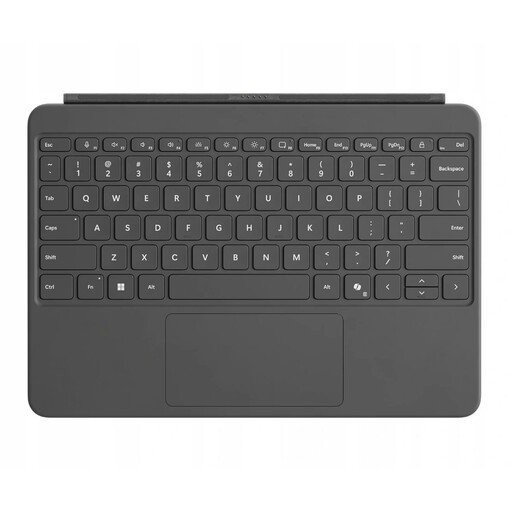 No image available
Could suit you if you’re looking for a keyboard for a Surface Pro; the stated compatibility doesn’t automatically extend to other devices.
QWERTY version for Surface Pro, 12-inch, Platinum.
Choose a folding model when saving bag space is a priority. For longer notes, also consider its size when open, the layout and how the keys feel to type on. The Consumers’ Association (Consumentenbond) assesses tablet keyboards on factors including key placement, layout, key feel and resistance.
Turn on Bluetooth on your writing device and select ‘Keys-To-Go 2’, as described in the Logitech manual. If prompted, enter the pairing code shown using the keyboard, then test your notes app and preferred layout. The manual describes a separate layout switch for Android.
Check the power source for the exact version before you set off. The Logitech manual says the Keys-To-Go 2 uses two CR2032 cells; the iClever IC-BK08 manual says it charges via USB-C and that a charging adapter isn’t included.
For many distance purchases from a business, you have a 14-day cooling-off period, according to the Dutch government. Purchases from private individuals, for example, aren’t covered by this scheme. If a product is faulty, contact the seller. The Dutch government states that there is no fixed statutory warranty period in the Netherlands.
Yes. Applicable European requirements apply to radio equipment. The Dutch Authority for Digital Infrastructure (Rijksinspectie Digitale Infrastructuur) states that the manufacturer affixes the CE marking when all requirements are met; a mention in an advert alone doesn’t confirm that the specific item being offered complies.