
Quiet note-taker
You write up observations alongside other people and want keys that the product specifications describe as quiet. Compare the layout and key feel before relying on a claim that a keyboard is silent.


For field notes in a shared workspace, a compact keyboard with a suitable layout is a sensible place to start. Choose Bluetooth if you want to switch between compatible devices, a USB receiver if you have the right port, or a wired model for a permanent workstation. Claims that a keyboard is quiet are not comparative sound measurements, so check the noise level and typing comfort in your own surroundings too.
You write up observations alongside other people and want keys that the product specifications describe as quiet. Compare the layout and key feel before relying on a claim that a keyboard is silent.
You regularly take your keyboard with you and may switch between a laptop and tablet. Size, weight and device compatibility will all affect your choice. Logitech lists the Pebble Keys 2 K380s as measuring 279,5 × 124,2 × 16,4 mm and weighing 415 g with batteries.
You work through longer note-taking sessions and are mainly looking for a suitable layout and a workspace where you can type comfortably. A larger keyboard may suit the keys you use better, but it takes up more space.
Start with the connection supported by your laptop or tablet. Then weigh up the size and layout against the type of work you do and the space available on your desk.
| What to consider | What should you check? | Who should pay particular attention? |
|---|---|---|
| Typing noise | Compare the key feel and assess the sound in your workspace; a manufacturer's claim is not a comparative sound measurement. | If I type alongside colleagues, I want to be as unobtrusive as possible, but a claim that a keyboard is quiet doesn't tell me how much noise I'll hear in my workspace. Around 33% of consumers put minimising disruptive typing noise at the top of their list when buying. |
| Portability | Check the dimensions and weight of the exact version, and whether its layout includes the keys you use. | When I move between workspaces, my keyboard and bag need to work well together, even if that means having fewer keys or a smaller surface. Around 25% of consumers prioritise being able to pack up and set up easily. |
| Taking lengthy notes | Check the physical layout and the keys you need; make sure you have enough space to work comfortably. | For longer transcription sessions, I want a layout suited to the way I enter text and a place where I can rest my forearms comfortably. Around 25% of consumers say comfortable typing during longer note-taking sessions is their main concern when buying. |
| Connection and power | Check for Bluetooth support or the USB port required, and whether the model uses batteries or is rechargeable. | If I switch between devices, I want to know in advance which connection and power options are available at my workstation. Around 17% of consumers prioritise a reliable connection and suitable power source. |
Logitech and Trust describe certain keys as quiet, but their product information does not provide comparable sound measurements for these models. So the claim doesn't tell you which keyboard will sound quieter in your workspace.
Use the claim as one factor in your choice, and also assess the key feel and sound where you work.
Bluetooth, a USB receiver and different power options require different connections or steps. A receiver needs a compatible USB port.
Before choosing, check the connection, power requirements and device compatibility of the exact model.
A compact layout saves space, but may omit keys you need when writing up notes. A larger keyboard, on the other hand, takes up more room.
Check which keys you need and leave yourself enough space to type comfortably when setting up your workspace.
The Pebble Keys 2 K380s is a compact Bluetooth model; the MX Keys Mini is a compact backlit version.
The Nado II is a compact, rechargeable Bluetooth keyboard for multiple devices and shared workspaces.
According to Rapoo, the E9310M offers Bluetooth and a 2,4 GHz USB receiver.
This Joybuy selection includes compact and larger keyboards, with wireless and wired connections. For a wireless model, check whether the version on offer meets the applicable requirements and carries a CE mark; the Dutch Authority for Digital Infrastructure sets out these requirements for radio equipment.
 No image available
The 75% layout may suit you if you're looking for a smaller keyboard for a changing workspace.
US QWERTY layout; wired, Bluetooth or 2,4 GHz. Check the layout and the applicable compliance requirements and CE mark for the wireless version on offer.
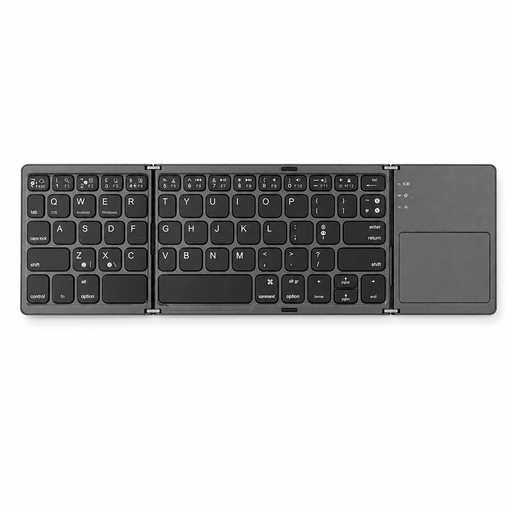 No image available
The foldable design may suit you if you want to take a keyboard between workspaces.
Bluetooth and touchpad; the product name states that it works with tablets, smartphones and computers. Check the applicable compliance requirements and CE mark for the wireless version on offer.
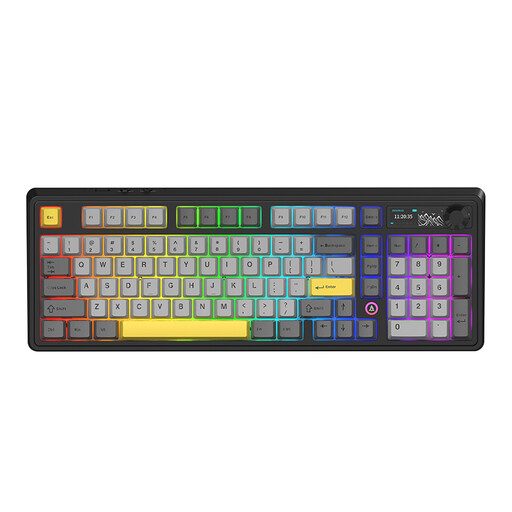 No image available
The 98% layout may suit you if you want a more spacious layout and have more room on your desk.
Mechanical keyboard with wired, Bluetooth and 2,4 GHz connections. Check the applicable compliance requirements and CE mark for the wireless version on offer.
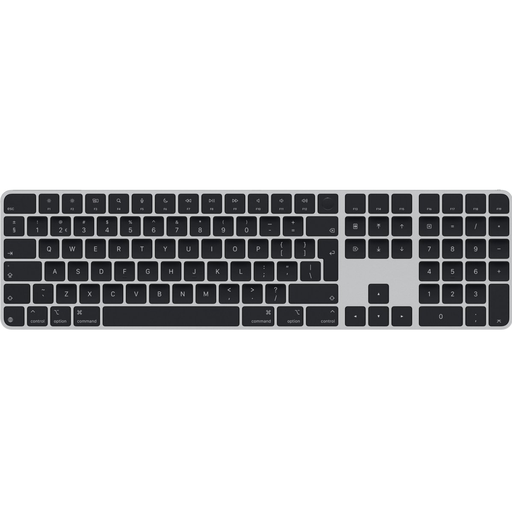 No image available
The Dutch QWERTY layout may suit you if you type text with Dutch punctuation.
USB and Bluetooth; the larger design with a numeric keypad is less compact to carry around. Check the applicable compliance requirements and CE mark for the wireless version on offer.
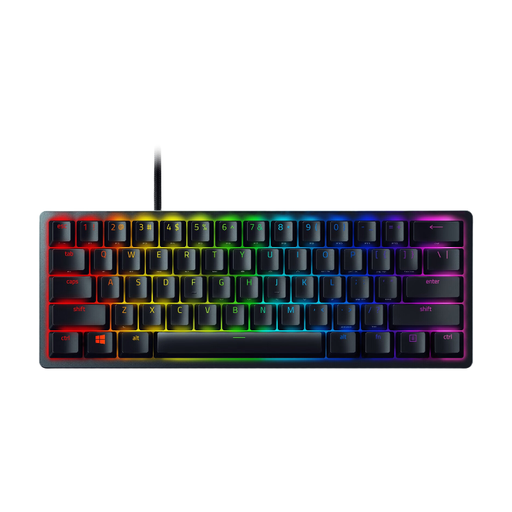 No image available
The wired connection may suit a permanent workstation where you don't need a wireless connection.
USB-C cable; the cable limits how freely you can move the keyboard. The product information lists a US International layout.
Check the physical layout of the exact version and the input language set on your device. This is especially important if you often use punctuation and symbols when writing up notes.
Position the screen and keyboard so you can type comfortably, with your shoulders relaxed and your forearms horizontal. In the Netherlands, specific regulations apply to employees who spend more than 2 hours a day working with display screen equipment. Arboportaal explains that when using a laptop, the screen and keyboard must not be attached to one another.
Check that your device supports the Bluetooth connection you've chosen or has a suitable port for the USB receiver, then check the power supply and pairing. Rapoo provides separate connection instructions for Bluetooth and the USB receiver for the E9310M.
For a standard online consumer purchase, you generally have up to 14 days after delivery to change your mind, subject to legal exceptions; ACM ConsuWijzer explains this cooling-off period. A product must also meet what you could reasonably expect from it. If a fault is covered by the legal guarantee, the retailer is your point of contact.
Radio equipment must meet the applicable European requirements and carry a CE mark, according to the Dutch Authority for Digital Infrastructure. Check separately whether this applies to the specific version on offer and whether it complies.