
Story writer at a table
Writes or rewrites longer passages during a break, and pays attention to the key layout, key feel and the space available for both the keyboard and screen.


First, choose a keyboard that works with the device your story is on, with a layout that suits the way you write and edit. A flat model takes up its full length in your bag, while Logitech says its built-in cover protects the keys. A foldable model needs space to be opened out where you’re writing. These design differences aren’t an independent measure of typing comfort.
Writes or rewrites longer passages during a break, and pays attention to the key layout, key feel and the space available for both the keyboard and screen.
Brings a phone or tablet and wants a keyboard that can be packed away compactly or has keys protected while on the move.
Switches between a phone, tablet and laptop, for example, and checks in advance which connections and operating systems the model supports.
Best for: writing longer passages at a table, if you’d rather avoid a fold in the middle.
Bear in mind: the keyboard takes up its full length in your bag.
Best for: carrying keys loose in a bag alongside a tablet or phone; Logitech says the Keys-To-Go 2 has a built-in key cover.
Bear in mind: check separately how you’ll prop up the screen while writing.
Best for: when bag space is limited but you have somewhere to lay the keyboard out fully.
Bear in mind: compare its size when open and the position of the hinges with your writing space.
Best for: anyone specifically looking for a split key layout, such as the Targus AKF003US.
Bear in mind: a split layout takes some getting used to and won’t feel intuitive to every writer.
| Concern | What to check before buying | Who is this more important to? |
|---|---|---|
| Writing and editing | Compare the physical key layout and, if possible, try the feel of the exact model. | If I write longer passages and often use punctuation or editing keys, I want to know whether the layout suits the way I work. Around 28% of consumers prioritise comfortable writing and editing. |
| Storage and portability | For a foldable model, compare its size both open and folded; for a flat model, allow for its full length. | When my bag has limited space, I want to pack the keyboard away easily without ending up with an awkward setup where I’m writing. Around 22% of consumers prioritise compact or protected storage. |
| Connection to your device | Check compatibility with Bluetooth and your operating system, and whether you need a USB receiver for the connection you want. | If I update my story on different devices, I want to know whether the model I choose can connect to each one. Around 22% of consumers say connection to their writing device matters most. |
| Key layout for Dutch text | Check the physical model and set the input language correctly on your device. | When I use lots of quotation marks and other punctuation, I don’t want to keep searching for the right key. Around 17% of consumers particularly value a familiar layout. |
| Power | Check whether the model is rechargeable or uses batteries, and take the right cable if needed. | If I don’t have access to a power socket during a day out, I want to know in advance how to power the keyboard. Around 11% of consumers prioritise power. |
A foldable keyboard takes up less space when folded, but you’ll need room to open it out beside your screen when you get there.
Compare both dimensions with your bag and the space where you expect to write.
A different physical layout or input language can mean that punctuation isn’t where you expect it to be.
Check the exact model and try typing a few punctuation marks on your own device before you leave.
A manufacturer’s battery-life claim may refer to standby time, for example, and doesn’t automatically tell you how long you can type during your day out.
Check exactly what usage time is stated and make sure you know how the keyboard is powered before you leave.
A similar product name alone doesn’t prove that the keyboard on offer is the same model or variant.
Before buying, check the product identity, model and availability of the specific item on offer.
The Pebble Keys 2 K380s is a flat, compact model; the Keys-To-Go 2 is designed for mobile use and, according to Logitech, has a built-in key cover.
According to Trust, the Lyra Compact Wireless Keyboard US combines a compact size with Bluetooth and a USB receiver.
The XK01 is a tri-fold keyboard with a number pad.
The AKF003US is a foldable model with a split key layout.
This selection includes keyboards for specific iPad and Surface models, plus a foldable Bluetooth model for a phone or tablet. Check that each product is compatible with your device; not every model is a standalone universal keyboard.
 No image available
The product title describes a wireless keyboard for the iPad Pro models listed.
Compatibility according to the title: 11-inch iPad Pro with an M4 or M5 chip.
 No image available
The product title describes a foldable keyboard for a phone or tablet, designed for anyone who wants a compact option for storage.
The title mentions Bluetooth, a rechargeable design, a magnetic stand and an aluminium body.
 No image available
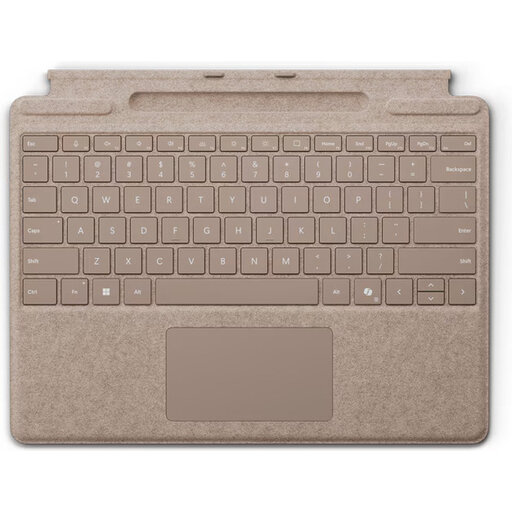
This keyboard is designed for use with Surface Pro models; choose it only if your device is within the stated compatibility range.
The product description lists a QWERTY layout, magnetic attachment, a thickness of 4,89 mm and a weight of 281 g.
 No image available
This model is designed for use with the iPad Pro listed; check it’s compatible with your tablet before ordering.
The product description lists a Dutch QWERTY layout, a trackpad and a cover that protects the front and back of the iPad.
 No image available
The product title lists this model for iPad Air 11-inch M3; check that it’s compatible with your tablet.
The title mentions a Dutch layout and the colour white.
Check in advance that your device supports the connection used by the exact model, and pair the keyboard beforehand. Try typing a few punctuation marks on your own device, too. Trust says the Lyra supports both Bluetooth and a USB receiver; the right connection depends on your device.
Check the power and connection requirements for your model, and consider whether you’ll need a flat surface or a stand for your screen. ProtoArc says the XK01 charges via USB-C; this doesn’t tell you what connection other models use.
Check both the physical model and the input language on your device. Before you leave, try typing the punctuation marks you often use in your story, so you know where to find them.
Wireless equipment placed on the market in the Netherlands must meet the applicable European requirements. The Dutch Authority for Digital Infrastructure states that devices which meet the requirements carry CE marking. Check the specific product, as a brand name or product description doesn’t prove that it has the marking.
For a standard online consumer purchase, you’re generally entitled to a statutory 14-day cooling-off period after delivery, subject to legal exceptions. Your statutory rights if a product doesn’t meet your reasonable expectations under normal use are separate from any manufacturer’s warranty. ACM ConsuWijzer explains that the seller must provide an appropriate solution.