What should you look for?
Start by checking the connection and power supply for the device you’ll be writing on. Then choose a keyboard with a layout and working size that suit the amount of text you plan to write.
Compact keyboard with replaceable batteries
A good fit if: you don’t expect to have access to a charging source while you’re out and can bring the right type of spare battery. Logitech lists two replaceable AAA batteries for the Pebble Keys 2 K380s, along with switching between three devices.
Bear in mind: how much space the keyboard takes up in your bag, and whether the round keys and layout feel comfortable for longer stretches of writing.
Extra-slim keyboard with cover
A good fit if: a flat keyboard with protection for the keys is important to you. Logitech lists an integrated cover and two replaceable CR2032 batteries for the Keys-To-Go 2.
Bear in mind: the cover isn’t a screen stand. RTINGS described the keys on this specific model as closely spaced, which can make typing feel cramped.
Compact rechargeable keyboard
A good fit if: you can charge it before setting off. Trust lists up to three months of use per charge for the Nado II; this doesn’t guarantee uninterrupted typing. CHERRY also lists receiver and cable connections for the KW 9200 MINI.
Bear in mind: you’ll still need a charging source if the battery isn’t sufficiently charged. If you’re using a receiver or cable, check that your device has the right port.
Foldable keyboard with touchpad
A good fit if: saving space in your bag is a priority. iClever describes the IC-BK08 as a tri-fold Bluetooth keyboard with a touchpad.
Bear in mind: it still needs table space when unfolded. iClever manuals list different charging ports for different IC-BK08 versions, so check the connection on the exact variant.
| Concern |
What should you check? |
Who is this important for? |
| Power without a mains socket |
Check the battery type or charging port, and make sure the keyboard is sufficiently charged before you set off. |
If you’re planning a long writing session somewhere without a mains socket, you’ll want to know whether you can bring spare batteries or need to charge it beforehand. Around 29% of consumers prioritise power. |
| Typing for long periods |
Look at the physical key layout and spacing; if possible, try typing a longer paragraph. |
If you write a lot and make revisions, you’ll want a layout that lets you work accurately. Around 29% of consumers give comfortable typing top priority. |
| Connection to your device |
Check the operating system and Bluetooth; if you’re using a cable or receiver, also check which ports are available. |
If you write on a particular tablet or laptop, or switch between devices, you’ll want to make sure the connection and layout are suitable. Around 24% of consumers prioritise compatibility. |
| Packed size and working size |
Compare the size of the keyboard in your bag with its size in use, and check whether your screen can stand up on its own. |
If you have limited space in your bag, a foldable or flat model may be appealing; it still needs to fit your workspace comfortably. Around 18% of consumers give packed size top priority. |
Portable keyboards at Joybuy
This Joybuy selection includes portable keyboards for writing on the go: foldable Bluetooth models, a keyboard for compatible iPads and a full-size wireless model.
 Image unavailable
NAXSIR foldable Bluetooth keyboard with magnetic stand, aluminium body, grey
A good choice if you’re looking for a foldable keyboard that can connect to up to three Bluetooth devices.
Rechargeable; the description mentions scissor-switch keys and a detachable magnetic stand. Charge the battery before you set off if you won’t have access to a charging source while you’re out.
Joybuy
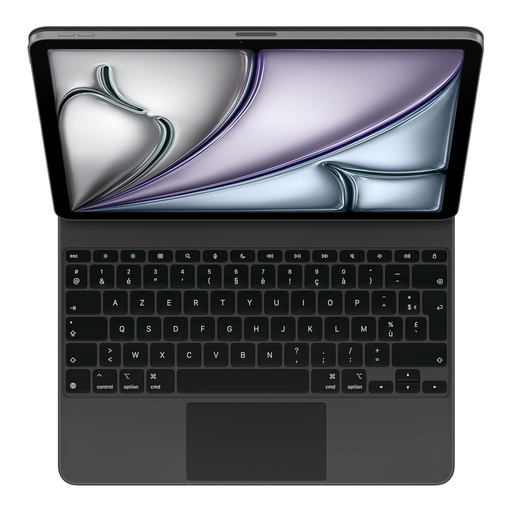 Image unavailable
Apple Magic Keyboard for iPad Air 13-inch (M3), French layout, black
A good choice if you use a compatible iPad and don’t want a keyboard that needs charging separately.
The Smart Connector handles power and data. This version has a French AZERTY layout and, according to the product information, is compatible with iPad Air 13-inch (M3) and iPad Pro 12.9-inch (3rd generation or later).
Joybuy
 Image unavailable
Voxis B033 foldable Bluetooth keyboard with touchpad
A good choice if you’re looking for a foldable keyboard with a touchpad for different types of devices.
The description lists 63 keys, a 140 mAh battery capacity and support for iOS, Android and Windows. A charging cable is included; charge the keyboard before you set off if you don’t expect to have access to a charging source.
Joybuy
 Image unavailable
Voxis HL-BOX1 foldable leather-cover keyboard with touchpad
A good choice if you’re looking for a foldable Bluetooth keyboard with a touchpad to take with you.
The description lists 64 keys, a 180 mAh battery capacity and support for iOS, Android and Windows. The stated folded dimensions are 157,5 × 98 × 15,8 mm. Charge the battery before you set off if you won’t have access to a charging source.
Joybuy
 Image unavailable
Apple Magic Keyboard Universal, USB + Bluetooth, Dutch QWERTY layout, black
A good choice if you want more room for the keys while you write and the full-size design fits in your bag and workspace.
Rechargeable, with Bluetooth, a numeric keypad and document navigation keys. The Dutch QWERTY layout is specified; the keyboard weighs 369 g and is approximately 41,87 cm long. Charge it before you set off if you won’t have access to a charging source while you’re out.
Joybuy
Frequently asked questions
Can I use any Bluetooth keyboard with my tablet and laptop?
No. Check that both devices support Bluetooth and the operating system of the version you’ve chosen. Also check the physical key layout; if the keyboard uses a receiver or cable, you’ll need a suitable port too.
What should I check before setting off without access to a mains socket?
Pair the keyboard with your writing device in advance and test the punctuation keys and shortcuts. Then check the charge on both devices, or bring the right type of battery if the keyboard takes replaceable batteries. Logitech describes the Keys-To-Go 2 as using two CR2032 batteries and connecting via Bluetooth.
Is a foldable keyboard also smaller while you’re writing?
No. Folding it makes it more compact to pack, but you’ll need space for the unfolded keyboard when using it. Compare its dimensions with the space where you plan to write.
Do Dutch workplace rules apply if I’m an employee and spend a long time writing my proposal?
For employees who work with display screen equipment for more than two hours a day, Arboportaal lists regulations stating that the screen and keyboard must not be attached to each other. Whether this rule applies to your working situation depends on the circumstances; it isn’t a product specification that applies to all buyers.
Where can I dispose of used keyboard batteries?
Take used batteries to a collection point, such as a shop or supermarket that sells batteries. The Dutch government states that used batteries must not be put in the bin.


