If you often write longer pieces at a table, start by considering the keyboard layout and key feel. For quick stops and limited bag space, weight and packed size matter more. If you switch between a laptop and tablet, check the connection and compatibility. A keyboard case with a stand and trackpad is mainly suited to one compatible iPad.
Who is this for?
Writers working on longer chapters
If you write longer passages between appointments, you can weigh up the keys, layout and typing position first, then decide how portable your keyboard needs to be. Logitech, Trust and ProtoArc offer a range of keyboard layouts and designs.
Writers with a full bag
A slim or foldable keyboard can be handy to take with you for short stops. Also think about where your screen will sit: a standalone keyboard doesn’t double as a tablet stand.
Writers using multiple devices
If you switch between, for example, a laptop and tablet, check the connection, shortcut keys and compatibility with each device. A keyboard that switches between devices should also have the layout you need.
What should you consider when choosing?
Start with how you write: long sessions call for careful consideration of the keys and layout, while for short bursts of work, packed size may matter more. Then check that the keyboard suits your screen setup and devices.
| What to consider |
What should you check? |
Who should pay extra attention? |
| Long typing sessions |
Compare the keyboard layout, key shape and function keys. If possible, try the keys for yourself to see whether they feel right for longer writing sessions. |
If I’m writing longer chapters, I want the keys and layout to feel comfortable, even if that means the keyboard takes up more table space. Around 36% of consumers say long typing sessions are their top priority. |
| Packed size |
Compare the weight, folded dimensions and key protection. Also consider how much table space you have available. |
When I have little room in my bag between customer visits, portability matters more to me than a spacious working setup. Around 29% of consumers prioritise a compact packed size. |
| Switching between devices |
Check which devices each version supports, how it connects and whether you need a USB receiver. |
If I switch between, for example, a laptop and tablet while writing, I want to know whether both devices can connect and how to switch between them. Around 21% of consumers prioritise switching between devices. |
| iPad setup |
Check the exact iPad model and compatibility, then decide whether you need a separate stand or an integrated setup. |
If I mainly write on one iPad, an integrated stand and trackpad may be more practical than a keyboard for multiple devices. Around 14% of consumers make an iPad setup their top priority. |
Common purchasing mistakes
-
Assuming all foldable models are the same
ProtoArc lists the XK01 with a 105-key layout and number pad, and the XK01 TP with an 88-key layout and trackpad. Your model choice therefore determines which features and keys you get.
Compare the full model name and layout of the version on offer; don’t choose based on the foldable design alone.
-
Buying a standalone keyboard without planning your screen setup
A standalone keyboard won’t hold a tablet upright by itself. According to Apple, a model-specific iPad case can provide an integrated setup, but it only fits the iPad models listed.
Decide in advance whether you’ll be writing on a laptop, on a tablet with an existing stand, or with a compatible keyboard case.
A separate stand may be needed for a standalone tablet.
-
Assuming ‘wireless’ or ‘QWERTY’ tells you everything
A keyboard may connect via Bluetooth, a USB receiver or both. The Trust Lyra listing on Joybuy specifies QWERTY US, so check the exact layout and connection of the version you choose.
Before buying, check the country-specific layout, connection and compatibility with the devices you write on.
Brands to compare
Logitech
The options covered range from a slim standalone keyboard to a compact model for multiple devices.
- Logitech lists a built-in cover and a weight of 222 g for the Keys-To-Go 2 keyboard alone. For the Pebble Keys 2 K380s, Logitech says you can switch between three devices.
- The standalone keyboards are not tablet stands. Check the version and layout; the compact keys may feel different from what you’d prefer for long typing sessions.
Trust
Lyra is a compact option for multiple devices; Keyra is a separate, larger model with an ergonomic layout for a permanent workstation.
- Trust describes Lyra as having scissor keys and adjustable feet.
- Keyra’s ergonomic design is a product description, not proof that every user will experience fewer aches and pains. Also consider whether its larger design suits your travel routine.
ProtoArc
The XK01 and XK01 TP are different versions of a foldable keyboard.
- The manufacturer lists the XK01 with 105 keys and a number pad, and the XK01 TP with 88 keys and a trackpad.
- Don’t confuse the layouts and features. Check the full model name and the keyboard version on offer.
Apple
Magic Keyboard cases are designed for specific compatible iPad models.
- Apple lists an integrated trackpad for the relevant versions.
- The case is model-specific, so it isn’t designed to work as one keyboard for a range of different devices.
Joybuy products
This selection includes keyboard cases for specific iPad models, as well as standalone compact or foldable keyboards for writing between appointments.
 No image available
Apple Magic Keyboard for iPad Pro 13-inch (M4)
Ideal if you mainly write on a compatible iPad Pro 13-inch (M4) and want an integrated setup for use at a table.
This version is designed for the iPad Pro 13-inch (M4); check that it matches your model.
View at Joybuy
 No image available
Trust Lyra wireless keyboard and mouse set, QWERTY US
Ideal if you want to use a compact keyboard at a table and switch between devices.
The specified layout is QWERTY US; check that it suits your writing and device settings.
View at Joybuy
 No image available
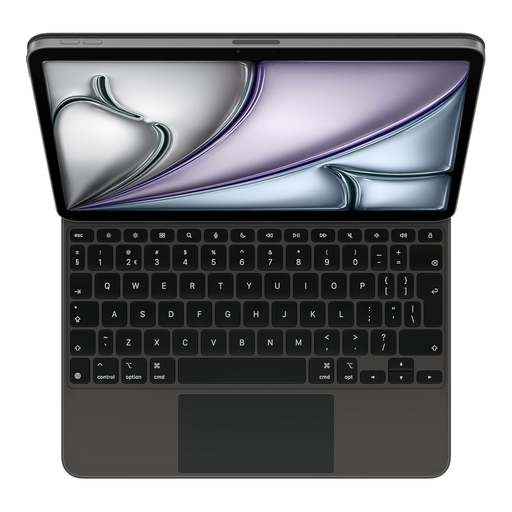
Apple Magic Keyboard for iPad Air 11-inch (M3), Dutch layout
Ideal if you mainly work on a compatible iPad Air 11-inch (M3) and want a keyboard case.
Check your exact iPad model and compatibility before choosing this version.
View at Joybuy
 No image available
Voxis B033 foldable Bluetooth keyboard with touchpad
Ideal if you’re looking for a foldable keyboard with a touchpad to use with a tablet, smartphone or computer.
Check that the compact key layout suits the way you write.
View at Joybuy
 No image available
Voxis HL-BOX1 foldable keyboard with touchpad
Ideal if you’re looking for a foldable keyboard with a touchpad to take with you between appointments.
Check that the compact key layout and Bluetooth connection suit your devices and writing needs.
View at Joybuy
Frequently asked questions
How do I switch between a tablet and laptop while writing?
Pair both devices by following the instructions for the version you’ve chosen, then check the keyboard layout in your device settings. Logitech lists Easy-Switch for three devices on the Pebble Keys 2 K380s; Trust says the Lyra has three device buttons.
What should I look for in a foldable ProtoArc keyboard?
Check the full model name and layout: the manufacturer lists the XK01 with 105 keys and a number pad, and the XK01 TP with 88 keys and a trackpad. These versions therefore have different layouts and features.
What power supply should I take with me for a keyboard on the go?
Check the power requirements of the exact version before you set off. Logitech specifies two replaceable CR2032 batteries for the Keys-To-Go 2; Trust describes the Lyra as having a rechargeable battery. Only take a compatible spare battery or charging cable.
Do I need to register a Bluetooth keyboard or apply for a licence in the Netherlands?
According to the Netherlands Authority for Digital Infrastructure, Bluetooth can use radio frequencies without a licence, and there is no notification or registration requirement. This does not, in itself, say anything about whether an individual device is compliant.
How can I work with customer data when I’m out and about?
A keyboard won’t protect customer data by itself. The Dutch Data Protection Authority recommends, among other things, using a secure environment and protecting sensitive documents when working with customer or client data. Also follow the rules that apply to your work and the data you handle.


