
Teachers with a small train bag
If you want to type up lesson plans without using much extra bag space, compare slim standalone keyboards with a protective cover. Logitech lists a cover for the Keys-To-Go 2.


If you work across several devices, a compact standalone keyboard is a practical option. If you only use a compatible iPad and also want a case and trackpad, compare keyboard cases made for your exact model. Before buying, check device compatibility and keyboard layout, and weigh the space it saves against typing comfort, power requirements and noise for fellow passengers.
If you want to type up lesson plans without using much extra bag space, compare slim standalone keyboards with a protective cover. Logitech lists a cover for the Keys-To-Go 2.
If you want to disturb fellow passengers as little as possible, remember that manufacturers’ claims about quiet keys are not the same as a sound measurement. NS asks passengers in quiet carriages not to talk or make phone calls.
If you want to switch between devices, check which connections and keyboard layouts work with each one. Logitech, Trust and HP describe models that connect to multiple devices.
First decide whether you need a standalone keyboard for several devices or a case made for one iPad model. Then check the keyboard layout, connection and power requirements.
| What to consider | What to look for | Who this matters to |
|---|---|---|
| Bag space and workspace | Compare dimensions, weight and key protection, and consider how much room you need for the screen. | If I want to work in a small seat and avoid filling my bag unnecessarily, I prioritise saving space. Around 33% of consumers give this need top priority. |
| Quiet typing | Check the type of keys, and don’t treat a claim such as ‘quiet’ as a comparable sound measurement. | In a shared carriage, I want to keep keystrokes as quiet as possible without assuming a keyboard is inaudible. Around 27% of consumers prioritise quiet typing. |
| Device connection | Check Bluetooth support, whether the USB connection is suitable, how many devices can be paired and which keyboard layout is available. | If I switch between my tablet and laptop to work on lesson plans, I want to know whether the same keyboard works with both. Around 20% of consumers give switching between devices top priority. |
| Typing comfort and power | Check the keyboard layout and key size, screen position, and whether the model is rechargeable or uses batteries. | For longer texts, I want a familiar typing feel and a practical setup; it’s also important to vary your activities when working at a screen. Around 20% of consumers prioritise typing comfort. |
A keyboard case is only designed for the models on its compatibility list. Keyboard layouts can also vary between versions in the same product range.
Before choosing, check your exact device model, the full keyboard model and its layout.
A manufacturer’s description such as ‘quiet’ doesn’t prove that keystrokes are inaudible. NS asks passengers in quiet carriages not to talk or make phone calls, but this says nothing about sound measurements for keyboards.
If possible, try the keys and be considerate of fellow passengers. Don’t infer a noise level from a product claim.
According to HP, the HP 350 we looked at uses two AAA batteries; Trust lists a rechargeable battery for the Lyra. These options call for different preparations when travelling.
Choose a power option that suits your travel routine, and check the charge or batteries before you set off.
The Dutch Government states that the Netherlands has no fixed statutory warranty period and that the seller remains responsible for ensuring the product is fit for purpose. An extended warranty is therefore not automatically necessary.
Read the terms and exclusions of any additional warranty alongside your existing rights.
The product ranges we looked at include a slim standalone keyboard with a cover and a model that can switch between devices.
The Lyra Compact we looked at offers both Bluetooth and a USB receiver.
The 350 Compact Multi-Device we looked at is designed for switching between devices and uses replaceable batteries.
The Magic Keyboard case we looked at is an option for certain compatible 13-inch iPad Air models, not every tablet.
Joybuy keyboards for working on the move, including standalone wireless models and a keyboard case for a specific iPad model.
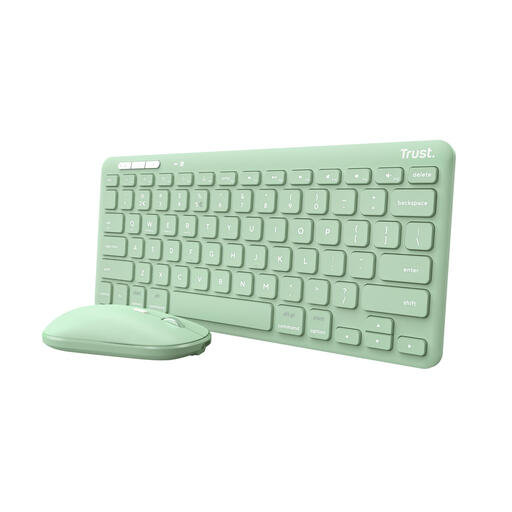 No image available
A standalone wireless set worth comparing if you want to switch between devices while working at a small workspace on the go.
The product information lists a scissor-switch mechanism, Bluetooth and a USB receiver. Check that the US English layout suits you and that your device has a suitable USB port.
 No image available
The 75% layout makes this worth comparing if you’re looking for a standalone keyboard with a more compact layout.
The product name lists Bluetooth, 2.4G and a wired connection. Check that the US QWERTY layout and connection options work with your devices.
 No image available
A keyboard case worth comparing if you use the iPad Air version listed and want to carry your keyboard and tablet as one unit.
The product information lists a trackpad and adjustable viewing angles. This case is designed for the iPad Air version listed and isn’t a universal keyboard.
 No image available
A foldable model worth comparing if saving space is important and you want a touchpad on your keyboard.
The product information lists 63 keys and a folded size of 152 × 97 × 12 mm. Check that the stated support for iOS, Android and Windows suits the device you’re taking with you.
 No image available
This model could be a good fit if switching between devices matters more to you than a compact layout; its full-size design takes up more room in a small seat.
The product information lists two Bluetooth connections, a 2.4 GHz dongle and USB-C charging.
First, check that your laptop supports Bluetooth and that Bluetooth is switched on. Put the keyboard into pairing mode as described in its manual, then add it through Windows Bluetooth settings. The steps on the keyboard vary by model.
The NS guidance we consulted says that you must not talk or make phone calls in a quiet carriage, and doesn’t mention a separate ban on typing. However, be considerate of fellow passengers and any audible keystrokes; a manufacturer’s claim such as ‘quiet’ doesn’t prove that a keyboard is inaudible.
Arboportaal advises alternating screen work with other activities, looking away regularly and taking microbreaks. A standalone keyboard only helps you arrange your workspace if there’s enough room for both the screen and keyboard.
When you buy online from a professional seller, you generally have a 14-day right to cancel from the date of delivery; check for exceptions and any return costs disclosed in advance. You’re also entitled to a product that is fit for purpose. The Dutch Government states that the Netherlands has no fixed statutory warranty period; if a product is faulty, the seller must offer a solution.
If your lesson plans contain pupils’ personal data, the school’s privacy rules apply. The Dutch Data Protection Authority says schools must be able to demonstrate that they have safeguards in place. Follow your school’s policy and make sure others can’t read information on your screen; using a keyboard doesn’t automatically make the data processing secure.