What should you look for when choosing one?
Start with your workspace and the device you’ll be writing on. Then compare the physical layout, noise level and power supply of the model you’re considering.
| What to consider |
What should you check? |
Who is this important for? |
| Typing comfort for long texts |
Compare the key size and punctuation key positions. Also check whether you can comfortably fit your keyboard and screen side by side. |
When I’m writing longer pieces, I want a layout and workspace set-up that suit the way I type. Around 28% of consumers put typing comfort first. |
| Pack size and work surface |
Check the dimensions both folded and ready to use, and make sure the keyboard fits on your work surface. |
If my bag or the train table offers little space, I weigh up a smaller pack size against the shape of the typing surface. Around 22% of consumers focus mainly on pack size and workspace. |
| Typing noise |
Where possible, try the keys in a quiet environment. Logitech describes the Pebble Keys 2 K380s as quiet, but that is not an independent noise measurement. NS requires the quiet zone to be genuinely quiet. |
When I’m working in a quiet zone, I want to type without disturbing others. Around 22% of consumers put quiet operation first. |
| Layout and device connection |
Check the physical layout, supported operating systems and whether your device has Bluetooth or a suitable USB connection. |
If punctuation keys or pairing could interrupt my writing, I check the exact model and test the connection beforehand. Around 17% of consumers prioritise layout and pairing. |
| Power supply |
Check whether the model is rechargeable or uses batteries, and what power supply you’ll need while travelling. |
If I don’t want to run out of power while travelling, I choose based on whether I prefer recharging or replaceable batteries. Around 11% of consumers put the power supply first. |
Joybuy products for travelling
This selection includes compact and foldable keyboards, an iPad-specific option and a full-size model. In particular, compare the space available, device compatibility and the physical layout of each version.
 No image available
Trust Lyra RF wireless and Bluetooth keyboard and mouse set, US English QWERTY, blue
This set is designed for anyone who wants to switch between multiple devices while travelling; the product description says it can connect to up to three devices.
The description lists a rechargeable keyboard with scissor-switch keys and a USB receiver. Check that the US English layout suits you; the keyboard has no separate numeric keypad.
View at Joybuy
 No image available
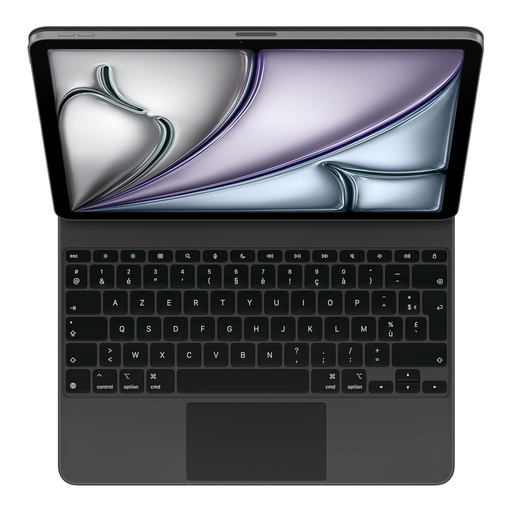
Apple Magic Keyboard for iPad Air 13-inch (M3), French, black
This option is designed for writing on a compatible iPad Air. Check your exact iPad size and model before ordering.
The product information lists an integrated trackpad, 14 function keys, USB-C pass-through charging and a protective cover. It mentions both the iPad Air 13-inch (M3) and 11-inch (M3), so make sure the size matches your iPad. The layout is French.
View at Joybuy
 No image available
Voxis B033 foldable Bluetooth keyboard with touchpad
A foldable model with a touchpad could suit you if you want to save space in your bag and have navigation controls built into the keyboard.
The product information lists a 63-key layout, Bluetooth, support for iOS, Android and Windows, and folded dimensions of 152 × 97 × 12 mm. Check the layout and compatibility with your device.
View at Joybuy
 No image available
Voxis HL-BOX1 foldable Bluetooth keyboard with touchpad and case
This foldable option is designed for mobile use. Compare its folded size with the space you have in your bag.
The product information lists Bluetooth, a 64-key layout and a touchpad. The stated dimensions are 157,5 × 98 × 15,8 mm when folded and 315 × 98 × 8,2 mm when unfolded. Check that the layout and work surface suit your needs.
View at Joybuy
 No image available
Trust Ody II full-size wireless keyboard, US QWERTY
This model may suit you if you want a full-size keyboard with a numeric keypad; bear in mind how much space it will take up on a train table.
The product information lists a width of 422 mm, membrane keys and a USB receiver; Bluetooth isn’t mentioned for this model. The title describes the keys as quiet, but that is not an independent noise measurement.
View at Joybuy
Frequently asked questions
How can I check whether a keyboard works with my writing device?
Compare the supported operating systems and connection type for the exact version with your phone, tablet or laptop. Pair the keyboard before you travel, and test punctuation keys and shortcuts in the software you use for writing.
Can I use a keyboard in the quiet zone?
NS also identifies the quiet zone as a place to work, but requires it to be genuinely quiet. NS doesn’t specifically ban keyboards; take care not to disturb others while typing, and move elsewhere if necessary.
How can I keep a foldable or rechargeable keyboard ready to use?
Test a foldable keyboard fully open on a flat surface, pair it before setting off and follow the instructions for charging the exact version. iClever describes the BK08 as foldable; Trust says the Lyra is rechargeable.
What if I’m not happy with the layout after buying online, or the keyboard breaks too soon?
For online consumer purchases, ACM ConsuWijzer says you generally have 14 days from delivery to change your mind; terms and exceptions may apply. This is separate from your statutory rights if a product is faulty: if something breaks sooner than you could reasonably expect under normal use, the retailer is responsible for providing an appropriate solution.
Do workplace rules about separate keyboards also apply to students?
The workplace guidance described by Arboportaal is aimed at employees. According to that guidance, if you work at a screen for more than two hours a day, the screen and keyboard must not be attached to each other. This is not a general legal purchasing requirement for every student. However, it can still help to review your workspace and posture during longer sessions.


