
Traveller with limited workspace
You want to type notes and quickly pack your keyboard away when changing trains. A compact or foldable model could be a good choice, as long as its smaller keys suit how long you type for.


First, choose a keyboard to suit the device you use for planning. A separate keyboard can work with several devices, while a compatible keyboard case also positions your tablet screen. A foldable model takes up little space, but its smaller keys may be a compromise if you type for long periods. Also check the layout, connection and power supply of the exact model.
You want to type notes and quickly pack your keyboard away when changing trains. A compact or foldable model could be a good choice, as long as its smaller keys suit how long you type for.
You might use your phone for messages and a tablet or laptop for tasks and quotes. Check which devices are supported and how to switch between connections.
You want to type and navigate documents with a trackpad. With a keyboard case, compatibility with your exact tablet model determines whether it’s a suitable option.
Choose this option: if you switch between your phone, tablet and laptop while planning.
Keep in mind: you’ll need to position the screen yourself. Also check Bluetooth support and the keyboard layout.
Choose this option: if saving space in your bag matters more than having a full-size keyboard.
Keep in mind: the manufacturer of the iClever IC-BK08 says its keys are smaller than standard keys.
Choose this option: if you have a compatible tablet and want to combine typing with a screen stand and trackpad.
Keep in mind: the case only fits the tablet models and generations listed.
| What to consider | What should you check? | Who should consider this? |
|---|---|---|
| Packed size and workspace | Compare the keyboard’s size when folded and when in use. Check whether you’ll need to position your screen separately, too. Logitech lists a protective key cover for the Keys-To-Go 2, while iClever describes the IC-BK08 as foldable. | If you want to pack up quickly when changing trains without using an extra seat for your luggage, packed size is a key consideration. Around 33% of consumers give it the highest priority. |
| Device compatibility | Note your device’s full model name, operating system, connection type and preferred layout. Apple and Samsung list specific tablet models for their keyboard cases. | If you edit plans on a device you already own, you’ll want to know that the keyboard and device will work together. Around 27% of consumers put compatibility first. |
| Comfortable, quiet typing | Check the key size and layout, especially if you’ll be entering longer notes or budgets. Logitech and Trust describe certain keyboards as quiet, but there are no comparable sound measurements to rank the models against each other. | If you want to type longer passages on the train without making unnecessary noise, key feel and your surroundings are worth considering. Around 27% of consumers put typing first. |
| Trackpad and screen support | Check whether the keyboard has a trackpad and whether its stand suits your tablet and the space available. Apple and Samsung cases are designed for specific models. | For consumers who want to use a trackpad to work with plans or spreadsheets on a tablet, with the screen positioned for them, this combination can be decisive. Around 13% give it the highest priority. |
A case is often designed for specific tablet models and generations. A similar screen size doesn’t prove that the attachment and connection will fit.
Before buying, compare your tablet’s full model name with the compatibility list for that exact case.
If a case doesn’t fit your tablet, you won’t be able to use it as the intended keyboard setup.
A separate keyboard won’t provide a screen stand by itself. A compatible keyboard case can position the screen and provide a trackpad, but it will only work with certain tablets.
Before you buy, think about where you’ll put your phone or tablet while typing, and whether you need a trackpad.
With a separate keyboard, you may need to buy a suitable stand to position the screen while you type.
The power supply varies by model. The Logitech Keys-To-Go 2 manual describes two replaceable CR2032 coin-cell batteries, while Trust describes the Lyra as rechargeable.
Check the power supply for the exact model. For a longer journey, bring the right spare batteries or a way to recharge it.
Depending on the model, you may need to bring spare coin-cell batteries or a charging cable.
Logitech offers separate keyboards for a range of devices, including the Keys-To-Go 2 Universal and Pebble Keys 2 K380s.
According to Trust, the Lyra Compact can connect to multiple devices via Bluetooth and a USB receiver.
The IC-BK08 is a foldable keyboard option for anyone who also wants a touchpad.
The Magic Keyboard for iPad is designed for specific tablets and includes a trackpad and screen support.
Samsung offers a Book Cover Keyboard designed for selected Galaxy Tab tablets.
This Joybuy selection includes a separate wireless keyboard, foldable keyboards with a touchpad and keyboard cases designed for specific models. For a case, check compatibility with your exact tablet; for any keyboard, check the layout. Equipment newly placed on the Dutch market must meet the applicable European product requirements and bear the required CE marking, as explained by the Dutch Authority for Digital Infrastructure.
 No image available
A compact keyboard layout may be handy for taking notes on the go. Check that the US layout suits the way you type.
75% layout, QWERTY US and Tri-Mode connection: wired, Bluetooth or 2.4 GHz. The product name lists Reaper Switch and side-engraved keycaps.
 No image available
This case is designed for typing and navigating on a compatible iPad Pro. Check that it fits your tablet model before buying.
The product description lists a Dutch QWERTY layout, trackpad, adjustable viewing angles and USB-C pass-through charging. The stated compatibility includes 2024 iPad Pro 11- and 13-inch models.
 No image available
A foldable model with a touchpad could suit you if you want to combine typing and cursor control in a compact package.
The product description lists 63 keys and a folded size of 152 × 97 × 12 mm. Bluetooth and an included charging cable are also mentioned.
 No image available
This foldable Bluetooth keyboard with a touchpad lets you combine typing and navigation. Check that it connects to your device.
The product description lists 64 keys and a folded size of 157.5 × 98 × 15.8 mm. A charging cable is also mentioned.
 No image available
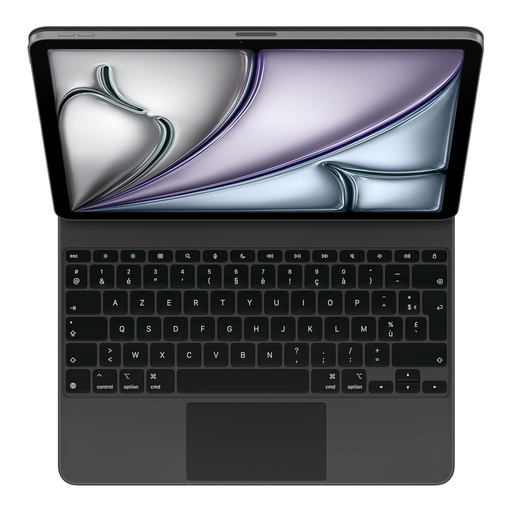
This case combines typing, trackpad control and screen positioning for the specified iPad Air model.
The product description lists a French AZERTY layout, trackpad and adjustable viewing angles. Check both the layout and compatibility with your tablet.
Yes. Check the full model name and generation. Apple and Samsung list compatibility by tablet series; the same screen size alone doesn’t prove that a case will fit.
Check the layout of the exact model, not just the product family. For example, one of the Joybuy products in this selection has a French AZERTY layout, while another version is labelled QWERTY US.
No. NS says free Wi-Fi is available on almost all Intercity trains, but not every train. If you need access to documents during your journey, save them locally beforehand.
Equipment newly placed on the Dutch market must meet the applicable European product requirements. The Dutch Authority for Digital Infrastructure says the equipment must bear a CE marking. Check the item you receive and ask the seller for clarification if the marking is missing. A CE logo is not an independent safety test.
NS describes the quiet zone as a place to work in silence. Be considerate of other passengers and avoid making disruptive noise; don’t take up an extra seat with your luggage either.