What should you look for?
When preparing lessons on the train, your choice mainly depends on the workspace available, how comfortably and quietly you can type, and how the keyboard connects to your device. Also check how it’s powered.
| What to consider |
What to look for |
Who is this most important for? |
| Portability and workspace |
Check the dimensions when the keyboard is in use and how you’ll position your screen. Also check whether the keys are protected in your bag. |
If I’m often packing and unpacking my keyboard and working at a small table, I want it to be easy to carry and practical to use with my screen. Around 29% of consumers say portability and workspace are their top buying concern. |
| Quiet, comfortable typing |
Pay attention to key spacing, layout and typing feel. Try the keyboard yourself if possible; a manufacturer’s description isn’t a sound measurement. |
If I’m writing longer lesson notes alongside other passengers, I want keys that feel comfortable to use and cause as little disturbance as possible. Around 29% of consumers give quiet, comfortable typing top priority. |
| Compatibility and switching between devices |
Check the supported operating system, Bluetooth and keyboard layout. A suitable port is needed for a USB receiver. |
If I switch between, for example, a tablet and a laptop, I want to be sure I can type on both without any hassle. Around 21% of consumers say device compatibility and switching are their main buying concern. |
| Power and being ready to go |
Check whether the keyboard is rechargeable or uses replaceable batteries, and check the battery level before you set off. |
If I want to keep working on the go, I don’t want to run out of power halfway through. Around 21% of consumers prioritise power and being ready to go. |
Keyboards at Joybuy
This selection ranges from compact and foldable models to keyboards with a dedicated tablet attachment or a full-size layout. Check whether each model’s shape, layout and connection suit your workspace on the train.
 No image available
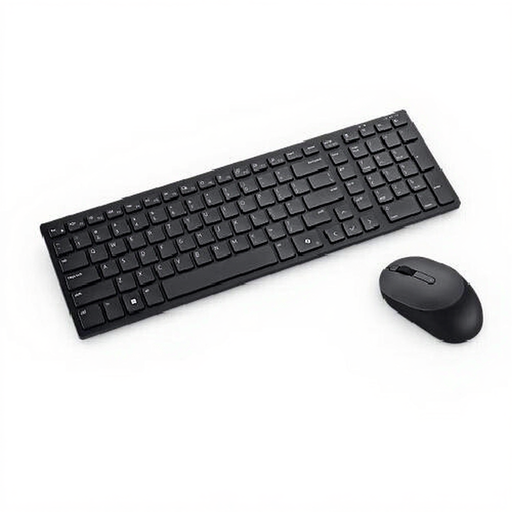
DELL Pro Compact Silent Keyboard and Mouse KM555, Belgian AZERTY
A compact option if you want to use Bluetooth or an RF receiver and are looking for a Belgian AZERTY keyboard.
The product description lists Bluetooth 5.1, RF and battery power. It describes the plunger keys as quieter; this isn’t a sound measurement.
View at Joybuy
 No image available
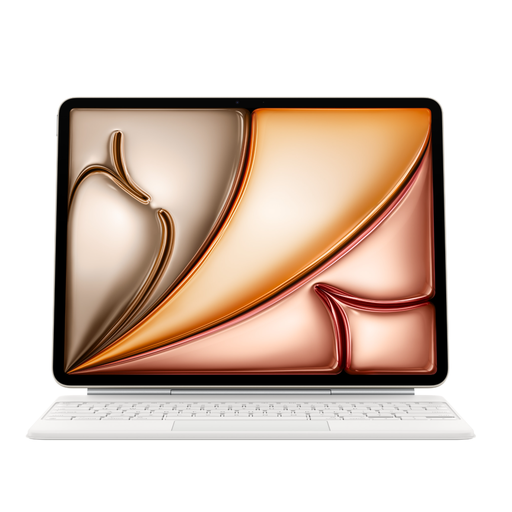
Apple Magic Keyboard for iPad Air 13-inch (M3), US English, White
This keyboard case is designed for the iPad Air 13-inch (M3), not as a universal keyboard for other devices.
The description lists a trackpad, 1 mm key travel, 14 function keys and a USB-C pass-through port. According to the product description, the case protects the front and back during transport.
View at Joybuy
 No image available
Voxis B033 foldable Bluetooth keyboard with touchpad, QWERTY
A foldable model to take with you if you’re short on bag space and want to type on a mobile device.
The product description lists 63 keys, a touchpad and a 140 mAh rechargeable battery. The stated folded dimensions are 152 × 97 × 12 mm and the weight is 0,3 kg. Supported systems listed include iOS, Android and Windows.
View at Joybuy
 No image available
HP 725 Multi-Device Rechargeable Wireless Keyboard
This model may suit you if you want to switch between several devices, but its full-size design makes it less compact for a small workspace on the train.
The product description lists two Bluetooth connections, a 2,4 GHz receiver and USB-C charging. The stated width is 420,5 mm and the keyboard form factor is full-size (100%).
View at Joybuy
 No image available
Trust Vaiya wireless keyboard, full-size, US-QWERTY
A full-size option if you want to switch between devices, but less suitable if you have limited space at your seat on the train.
The product description lists three Bluetooth channels, a USB receiver and a rechargeable battery. The keys are described as quiet, low-profile scissor keys; this isn’t a sound measurement. The stated dimensions are 440 × 130 × 25 mm and the weight is 550 g.
View at Joybuy
Frequently asked questions
Can I work on my lesson in a quiet zone?
Yes. NS says working is one possible use of the quiet zone, as long as the area stays quiet. Decide for yourself whether your typing noise will disturb others; a product label such as ‘quiet’ doesn’t measure the noise it makes on the train.
How can I avoid connection problems before setting off?
Check that your device is supported by the exact keyboard version, and test the connection, characters and shortcuts you need beforehand. If you use a USB receiver, also check that your device has a suitable port.
Do I need power on the train to use a rechargeable keyboard?
Not if the keyboard is sufficiently charged before you set off. Trust describes the Lyra as rechargeable, while Rapoo lists two AAA batteries for the E9310M. Check the battery level, and don’t assume every seat has a power socket.
What if a keyboard I bought online isn’t compatible with my device?
According to the Dutch government, many distance purchases come with a 14-day cooling-off period. You’re also entitled to a product that meets legal requirements; the Netherlands doesn’t have one fixed statutory warranty period for all products. Check the terms that apply to your specific purchase with the seller.
Can I edit visible pupil data on the train?
The Dutch Data Protection Authority says schools must protect pupils’ personal data carefully and be able to demonstrate that they have appropriate technical and organisational measures in place. This information doesn’t give general permission or impose a specific ban on editing data on the train. Follow your school’s security arrangements when handling pupil data, and make sure unauthorised people can’t see it.


