What should you look for?
Start with what matters most to you: portability, quiet typing, switching between devices, layout or power. Keyboard features vary by model, and a compact design alone says nothing about how comfortable it’ll be for long writing sessions.
Slim keyboard with protective cover
A good fit if: you often carry your keyboard loose in your bag and type on a supported mobile device. Logitech describes the Keys-To-Go 2 as having a built-in cover.
Bear in mind: check whether you’re choosing the universal or Apple version, and whether the layout suits you. The product description doesn’t prove that the keys will feel comfortable when typing long pieces of text.
Compact keyboard for quiet typing and switching
A good fit if: you work in a shared carriage or switch between devices. Logitech describes the Pebble Keys 2 K380s as having quiet keys and Easy-Switch for three devices.
Bear in mind: compact, round keys are a matter of personal preference. Check the physical layout and, if possible, try typing a longer piece of text.
Compact keyboard with Bluetooth and a receiver
A good fit if: you’d like to have the option of using a USB receiver as well as Bluetooth. Trust lists both connection types and a rechargeable battery for the Lyra.
Bear in mind: the Lyra version we looked at has a US layout. Check that it suits the punctuation you type most often.
Compact keyboard for switching between devices
A good fit if: switching between paired devices is important to you. Samsung specifies Bluetooth and switching between up to three devices for the Smart Keyboard Trio 500.
Bear in mind: Samsung lists two AAA batteries and a weight of 412,3 g for the black version we looked at. Check the layout and the shortcut keys you need too.
Keyboard with Bluetooth, receiver and cable
A good fit if: you’d also like the option of a wired connection. Keychron lists Bluetooth, 2,4 GHz and wired use for the B1 Pro.
Bear in mind: Keychron lists dimensions of 296 × 130 mm and a weight of 425 g. This doesn’t confirm which version is sold in the Netherlands or what local purchase terms apply.
| What to consider |
What should you check? |
Who should pay particular attention? |
| Portability and work surface |
Compare the dimensions, any protection for the keys and the space you’ll need while typing. NS rules don’t allow hand luggage to take up a seat that another passenger could use. |
If you type up lots of field notes, you’ll want a keyboard that fits in your bag and is still practical on the available work surface. Around 27% of consumers prioritise portability and workspace above all else. |
| Key noise |
Look at the stated key mechanism and judge the sound while typing normally; a product description isn’t a sound test. |
If you’re working alongside other passengers, you won’t want your typing to make unnecessary noise. Around 20% of consumers prioritise quiet typing. |
| Connection and switching |
Check that your operating system is supported, along with Bluetooth, the number of paired devices and whether any receiver will work with your device. |
If you read source notes on your phone and continue writing on a tablet, you’ll want to switch easily between the two. Around 20% of consumers make connection and device switching their top priority. |
| Keyboard layout and feel |
Check the layout of the exact version and look at the position of punctuation marks, key size, placement and feel. |
When writing long pieces in Dutch, you’ll want to type your usual letters and punctuation quickly. Around 20% of consumers prioritise the physical layout and key feel. |
| Power |
Check whether the keyboard uses a rechargeable battery or replaceable batteries, and what you’ll need to bring with you. |
If you type while travelling, you’ll want a power option that fits your travel routine. Around 13% of consumers put power that doesn’t require charging during the journey first. |
Joybuy products for typing on the go
This selection of Joybuy products ranges from folding and compact keyboards to models with a wired connection or a larger layout. Check the specific listing for the layout and connection, and whether the applicable CE marking is visible. The Dutch Authority for Digital Infrastructure says products placed on the European market must carry CE marking.
 No image available
Voxis B033 foldable Bluetooth keyboard with touchpad
An option if you’re looking for a foldable keyboard for typing on a phone, tablet or computer. Check that the layout suits the text you’ll be entering.
Tri-fold design and Bluetooth. Folded dimensions: 152 × 97 × 12 mm; 63 keys. The description lists support for iOS, Android and Windows.
View at Joybuy
 No image available
AJAZZ AK820 MAX, German QWERTZ layout
An option if you want several connection types, but the German QWERTZ layout may not be the best fit for typing in Dutch.
75% layout; Bluetooth, 2,4 GHz and wired use. Check the physical layout of the exact version before ordering.
View at Joybuy
 No image available
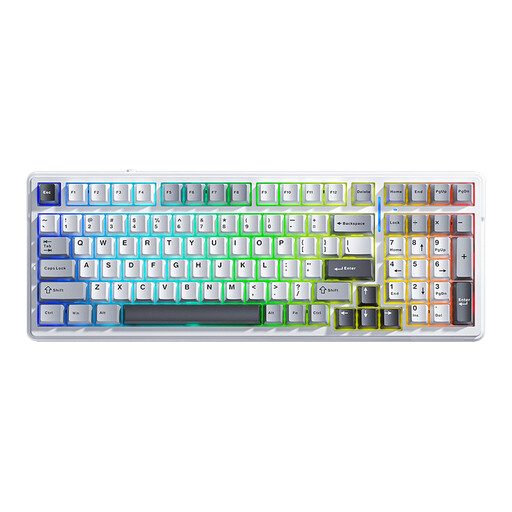
AULA F99 mechanical keyboard, US layout
An option if you want to choose between wireless and wired connections. Bear in mind that the US layout may differ from the Dutch keyboard layout you’re used to.
99 keys; Bluetooth, 2,4 GHz and wired use. The product name specifies a US layout.
View at Joybuy
 No image available
MageGee TS91 60%, wired, US layout
An option if you want a compact layout and a wired connection. Bear in mind that you’ll have a cable to manage while travelling, and check the US layout.
61 keys; USB cable connection. Dimensions: 29,2 × 10,1 × 3,8 cm; weight: 400 g. The description lists Windows and Mac.
View at Joybuy
 No image available
HP 725 rechargeable wireless keyboard for multiple devices
An option if you want to switch between several devices. Its full-size layout takes up more space than a compact one on a limited train work surface.
Full-size layout (100%); two Bluetooth connections and one 2,4GHz receiver. Rechargeable via USB-C; the description says you can charge it while using it and includes a switching key.
View at Joybuy
Frequently asked questions
Can my keyboard or bag take up an extra seat?
No, not if another passenger could use that seat. Under NS’s house rules, hand luggage must not take up a seat; this is a rule set by the train operator.
How do I pair a keyboard if I switch between a phone and tablet?
First check that the exact version supports both devices. Samsung describes pairing the Trio 500 via Bluetooth using a code shown on screen; Logitech lists buttons for switching between three devices with the Pebble Keys 2 K380s.
Can I assume I’ll have Wi-Fi while travelling?
No, not on every train. NS says free Wi-Fi is available on almost all Intercity trains, and you can identify a Wi-Fi-enabled train by its logo. Also check separately whether your note-taking app works offline.
What cooling-off period and guarantee apply to an online purchase in the Netherlands?
According to ACM ConsuWijzer, online product purchases generally come with a statutory cooling-off period of up to 14 days after delivery. You’re also entitled to a product that lasts for as long as you can reasonably expect under normal use; this isn’t automatically a fixed two-year period.
What should I look for on product labels and when disposing of flat batteries?
The Dutch Authority for Digital Infrastructure says equipment placed on the European market must carry CE marking; check the specific listing for the mark. According to the Dutch government, loose flat batteries must not go in general waste: take them to an appropriate collection point.


