
Editor with limited luggage space
You want to edit copy during a train journey, but your keyboard needs to be easy to carry and fit into the workspace you have available.


Start by choosing a keyboard that suits your device and the space you have to type in. A separate Bluetooth keyboard works with different devices, a foldable model takes up little room in your bag, and a compatible keyboard case combines keys with a screen stand and cursor controls. Then check the exact compatibility and key layout. A case won’t fit every tablet, and smaller keys on an extra-compact keyboard may be less comfortable for lengthy edits.
You want to edit copy during a train journey, but your keyboard needs to be easy to carry and fit into the workspace you have available.
You edit the same newsletter on different devices, such as a phone, tablet or laptop, and want to know in advance whether pairing and switching between them will work.
You want to edit longer passages and need not only a keyboard but also a stable screen position and, possibly, cursor controls.
A good fit if: you switch between a phone, tablet and laptop, or want to use a separate keyboard.
The trade-off: you’ll need to position the screen separately and check the compatibility and key layout of the model you choose.
A good fit if: a compact folded size and, possibly, a built-in touchpad are important to you.
The trade-off: iClever says the IC-BK08 has smaller keys, so consider whether its layout will feel comfortable for longer editing sessions.
A good fit if: you have a compatible tablet model and want to combine a keyboard, screen stand and cursor controls.
The trade-off: the case is designed for specific devices, and the stand takes up space when opened.
| Consideration | What to look for | Who it’s for |
|---|---|---|
| Portability and workspace | Compare the folded size with the keyboard’s size when ready to use, and think about where you’ll position the screen. | If I have limited space in my bag and workspace, I want to know how much room the keyboard takes up when in use. Around 25% of consumers prioritise portability and space. |
| Compatibility and key layout | Check the device model, operating system, keyboard version and language layout. | When I work across different devices, I want to be sure that pairing and typing work with my layout. Around 25% of consumers prioritise compatibility. |
| Editing longer passages | Compare the key layout and consider whether you need cursor controls; also check how the screen is held in place. | For longer editing sessions, I want to type comfortably and move the cursor easily. Around 20% of consumers prioritise comfortable editing over long periods. |
| Quiet typing | Consider how noisy your typing is and the area of the train you’re travelling in; a brand’s claim isn’t the same as a sound-level measurement. | If I’m working among other passengers, I want to avoid making distracting noise. Around 20% of consumers prioritise quiet typing. |
| Power | Check whether the model uses batteries or needs charging, and bring the right accessories if necessary. | Before setting off, I want to know how to avoid my keyboard running out of power on the way. Around 10% of consumers prioritise power. |
Apple and Microsoft specify compatibility by device model or model range. The Dutch-language Apple Magic Keyboard Folio also has specific software requirements.
Before buying, check your tablet’s full model name, the compatibility information for the exact case and any software requirements.
iClever says the foldable IC-BK08 has smaller keys. A compact folded size alone doesn’t tell you how the keys will feel for the way you type.
Compare the layout when unfolded with the keyboard you normally use and, if possible, try editing longer passages.
According to the Rijksoverheid, the Netherlands has no fixed statutory warranty period. The retailer is your point of contact if a product doesn’t have the features you’re entitled to expect.
Check what extra cover any manufacturer’s warranty provides, and contact the retailer if there’s a fault.
Offers both separate keyboards with a protective cover and a compact model for switching between devices.
The IC-BK08 is a foldable option with a built-in touchpad.
The Magic Keyboard Folio combines a detachable keyboard, stand and trackpad for specific iPad models.
Surface Pro keyboards and Type Covers are designed for specific Surface devices and model ranges.
These products include foldable Bluetooth keyboards and keyboard cases for specific tablets. For a case, always check that the device version listed matches your tablet.
 No image available
A foldable option if you want to save space in your bag and need cursor controls via a built-in touchpad.
The product description lists 63 keys and folded dimensions of 152 × 97 × 12 mm. The stated weight is 0,3 kg.
The description mentions Bluetooth support for iOS, Android and Windows. Check that it’s compatible with your device and preferred key layout.
 No image available
A foldable version with a touchpad for anyone looking for a compact keyboard with cursor controls.
The product description lists 64 keys and folded dimensions of 157,5 × 98 × 15,8 mm.
The description mentions Bluetooth and support for iOS, Android and Windows. Check the connectivity and layout of the version you choose.
 No image available
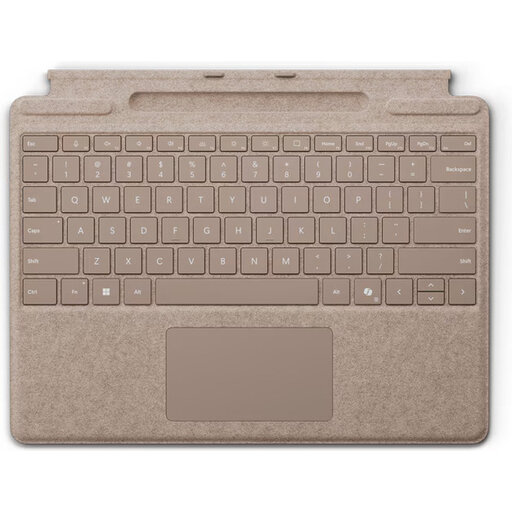
A device-specific option if you have a compatible Surface Pro and want a keyboard and cursor controls in one setup.
The product description lists mechanical keys, backlighting, a glass touchpad and a weight of 281 g.
The stated compatibility includes Surface Pro (11th generation), Surface Pro 10, 9 and 8. The description also mentions magnetic attachment; check that your model is included in the compatible range.
 No image available
A tablet-specific option if you want a keyboard and cursor controls in one setup.
The product description lists a Dutch QWERTY layout, trackpad and 14 function keys.
The stated compatibility is for 2024 iPad Pro 11-inch and 13-inch models. Check that your exact iPad model is compatible.
 No image available
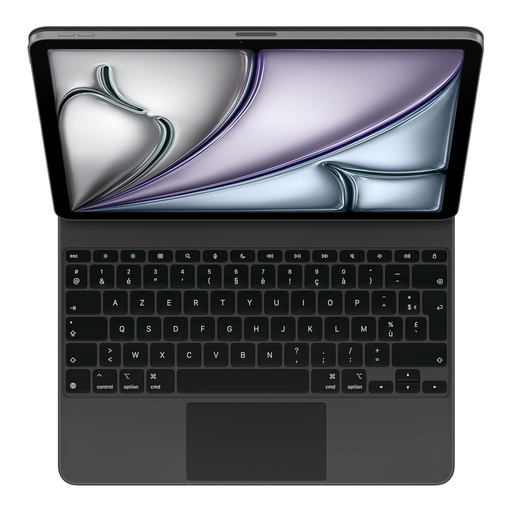
A device-specific keyboard case for anyone who wants to combine a keyboard and cursor controls with a compatible iPad.
The product description lists a built-in trackpad, scissor mechanism and USB-C port for pass-through charging.
The stated compatibility includes iPad Air 13-inch (M3) and certain iPad Pro models. Check that your exact device is among the models listed.
First, find your exact tablet model and compare it with the compatibility information for the specific case. For the Dutch-language Magic Keyboard Folio reviewed, Apple lists iPad (A16) and iPad (10th generation), and requires iPadOS 18.3 or later. Microsoft also lists keyboard compatibility by Surface model range.
Pair a separate Bluetooth keyboard with your device in advance and check the key layout in your text app. Logitech Support says the Keys-To-Go 2 uses two replaceable CR2032 batteries and a T5 screwdriver to access the battery compartment. For other models, follow their own charging or battery instructions.
Not on every train: NS says free Wi-Fi is available on almost all Intercity trains, which are marked with a Wi-Fi logo. If it’s important to sync your work during the journey, make sure you can access your text offline too.
NS describes the quiet zone as a place to work, among other things, without disruptive noise. So be mindful of how much noise your keyboard makes; this description doesn’t mean that typing is generally prohibited.
According to the Rijksoverheid, there’s no fixed statutory warranty period in the Netherlands; the retailer is your point of contact if a product doesn’t meet expectations. ACM ConsuWijzer says that for a standard online purchase, you’ll often have a statutory cooling-off period of up to 14 days after delivery, although exceptions apply. Check which terms apply to your purchase.