First, choose a keyboard that works with your laptop or tablet and has a layout that feels comfortable for taking notes. A compact Bluetooth model can save space and switch between devices; a USB receiver needs a compatible port, while a keyboard case only fits specific tablets. Logitech describes some models as quiet, but this is not a comparative noise ranking based on measurements.
Who are these keyboards for?
People who type in quiet study spaces
If you take notes alongside other people, you’ll want to consider how the keys feel and avoid a keyboard that sounds disruptive. Logitech describes certain models as quiet, but this is not a measured comparison between models.
People who often move between study spaces
If you take your keyboard with you and have limited desk space, consider its size and whether it has any protection for when you’re on the move. Logitech lists an integrated key cover for the Keys-To-Go 2.
People who switch between a laptop and tablet
If you take notes on more than one device, check how the keyboard connects, how to switch between devices and whether it’s compatible with your specific device and operating system. Logitech and Trust describe models that can connect to multiple devices.
What should you look for when buying?
Compact Bluetooth keyboard
Best for: a small shared desk or switching between multiple devices.
Keep in mind: a compact layout may feel different from what you’re used to, so check the layout and device compatibility.
Bluetooth with USB receiver
Best for: using Bluetooth with one device and a receiver with a computer.
Keep in mind: the receiver needs a compatible port and is an extra item to carry.
Wired keyboard
Best for: people who prefer using a cable and have enough desk space.
Keep in mind: a cable limits where you can position it; the Trust Primo is a full-size model.
Keyboard case for a tablet
Best for: people who want to combine a keyboard and tablet stand for a specific compatible iPad model.
Keep in mind: check your exact tablet model; a keyboard case is not the same as a standalone keyboard.
When studying in a shared space, the feel of the keys, portability and connection to your devices all play a part in choosing the right keyboard.
| What to consider |
What to look for when buying |
Who should pay particular attention? |
| Typing noise |
Consider how the keys feel and the layout; don’t treat ‘quiet’ as a noise measurement unless it’s based on a like-for-like test. |
If I’m typing alongside others, I want to disturb them as little as possible. Around 29% of consumers put typing noise first. |
| Portability and desk space |
Compare the size and check whether any key protection suits the way you’ll use the keyboard. |
If you often move between study spaces, you’ll want a keyboard you can take with you that still leaves room for notes. Around 29% of consumers prioritise portability above all else. |
| Connection and switching between devices |
Check Bluetooth support, any USB ports you may need and compatibility with the exact model. |
If I’m taking notes on multiple devices, I want to know how to switch between them. Around 24% of consumers give switching between devices top priority. |
| Layout and typing feel |
Check the layout of the specific model and make sure it has the keys you use most often. |
For longer notes, I want a layout I can type on comfortably. Around 18% of consumers prioritise layout and typing feel above all else. |
Common mistakes
-
Assuming ‘quiet’ means it’s proven to be quieter than other keyboards
Manufacturers describe individual keyboards as quiet, but that doesn’t show which model is quieter than another.
Compare how the keys feel and the layout for your needs, and check the applicable returns policy before ordering. Don’t assume a guaranteed noise level.
-
Confusing an iPad keyboard case with a standalone keyboard
A case is designed for compatible iPad models. The standalone Apple Magic Keyboard (USB-C) has its own system requirements.
Check the full product name and compatibility with your exact iPad model before buying.
-
Looking only for ‘wireless’
A model with a USB receiver needs a compatible port; Bluetooth and a receiver are different connection options.
Check in advance which connection you want to use and which ports your device has.
Brands to consider
Logitech
The product lines mentioned include compact keyboards for use on the move, switching between devices and backlit typing.
- Logitech says the Pebble Keys 2 K380s and Keys-To-Go 2 can switch between up to three paired devices.
- The description of the K380s as ‘quiet’ and the noise reduction claim for the MX Keys Mini come from the manufacturer; they are not comparative noise measurements.
- Check the keyboard layout and compatibility with your devices for the model you choose.
Trust
The models mentioned range from a compact keyboard with wireless connection options to a full-size wired model.
- According to Trust, the Lyra has two Bluetooth connections and a USB receiver.
- Check the layout of the Lyra model you choose and whether your device has a compatible port for the receiver.
- The Trust Primo is a full-size wired keyboard, so bear the cable and desk space in mind.
Apple
Apple offers both a standalone Magic Keyboard (USB-C) and separate keyboard cases for compatible iPads.
- The standalone Magic Keyboard (USB-C), Dutch version, is a Bluetooth keyboard.
- Apple lists minimum system versions for the standalone model. A Magic Keyboard case for iPad is a different product with its own model compatibility.
Joybuy products
This selection includes keyboards for studying on the move, including tablet-focused models and compact options with multiple connection choices.
 No image available
VoxorAI / Apple Magic Keyboard for iPad, white
An option if you want to take notes on an iPad; check that this version fits your exact iPad model before buying.
The product title specifies a white version.
View at Joybuy
 No image available
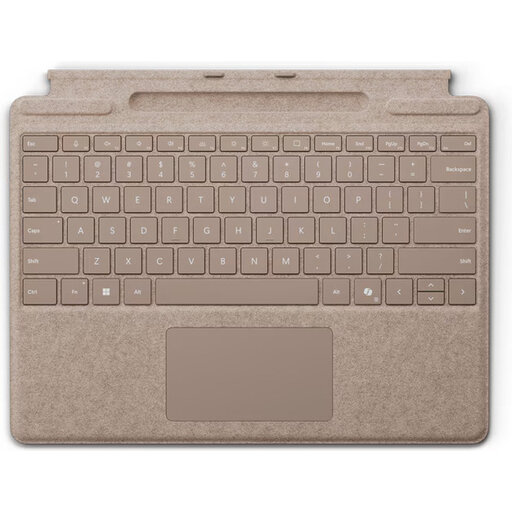
Microsoft Surface Pro Keyboard QWERTY, Dune
For taking notes on a Surface Pro; check that this version is compatible with your specific model.
The product title specifies a QWERTY layout and the colour Dune.
View at Joybuy
 No image available
Apple Magic Keyboard for iPad Pro 13-Inch (M4)
For taking notes on an iPad Pro 13-inch (M4); the product title specifies this particular version.
View at Joybuy
 No image available
AJAZZ AK820 MAX 75% Wireless Mechanical Keyboard, US Layout QWERTY
A compact version if you want to save desk space; check that the layout suits the way you type.
The product title specifies wired, Bluetooth and 2.4G connections, a 75% layout and US Layout QWERTY.
View at Joybuy
 No image available
Trust Lyra keyboard with mouse, QWERTY US English, blue
For wireless typing at a shared desk; check that the US English layout suits your needs.
The product title specifies RF wireless and Bluetooth, QWERTY US English and an included mouse.
View at Joybuy
Frequently asked questions
Will a keyboard case fit every iPad?
No. Check that the case fits your exact iPad model. Apple distinguishes between a Magic Keyboard case for iPad and the standalone Magic Keyboard (USB-C).
Does ‘quiet’ mean a keyboard is quieter than other models?
No. A manufacturer’s description such as ‘quiet’ is not a measured comparison of noise between models. Logitech uses this kind of description for individual models, so consider how the keys feel and the layout for your own needs.
How do I clean an Apple keyboard?
Apple recommends using a soft, lint-free cloth and advises against spraying cleaning products directly onto the product. For keyboards from other brands, follow the manufacturer’s care instructions.
What can I do if I’m unhappy with a keyboard bought online or it breaks soon after purchase?
For eligible online purchases, you generally have a 14-day cooling-off period, with some exceptions. If a product doesn’t meet what you could reasonably expect from normal use, contact the seller. The Dutch government website explains the cooling-off period; ACM ConsuWijzer provides information about your statutory guarantee.
How do I choose between Bluetooth and a USB receiver?
Choose based on the connections your devices support, and check that there’s a suitable USB port for the receiver. Trust says the Lyra has two Bluetooth connections and a USB receiver; it’s also worth checking the ports and keyboard layout of the version you choose.


