Choose a slim keyboard with a protective cover if you mainly make short notes and pack it away often. A foldable model with a touchpad is a better fit if you also want to navigate without a separate mouse. For longer typing sessions, the keyboard layout and available typing space matter more. Always check the layout and device compatibility: a keyboard case made for one tablet range is not a universal alternative.
Who is a portable keyboard suitable for?
Note-taker making short stops
If you often carry a keyboard and want to type quickly during a short stop, look for a protective cover or folding design, as well as a quick set-up. Logitech describes the Keys-To-Go 2 as having a protective cover, while ProtoArc describes the XK01 TP as foldable.
Student writing longer notes
If you type longer passages during a break, compare the keyboard layout and size with the space in your bag. ProtoArc lists a 105-key layout with a number pad for the XK01; Logitech gives the Pebble Keys 2 K380s weight as 415 g including batteries.
Note-taker using multiple devices
If you take notes on, for example, a phone and a tablet, check how you switch between devices. Logitech says the Keys-To-Go 2 and Pebble Keys 2 K380s can connect to up to three devices; Trust lists this feature for the Nado II too. A touchpad can be useful if you want to navigate without a separate mouse, while a Surface Pro keyboard is made for a specific model range.
What should you look for when choosing?
Slim keyboard with protective cover
Best for: short typing sessions and frequent trips in your bag.
Bear in mind: Logitech does not list backlighting for the Keys-To-Go 2; you will need a separate stand for your phone or tablet.
Foldable keyboard with touchpad
Best for: limited storage space and navigating without a separate mouse.
Bear in mind: check the keyboard layout and how touchpad gestures work with your own device.
Compact, non-folding keyboard
Best for: switching between devices when you do not need to pack your keyboard away as small as possible.
Bear in mind: Logitech gives the Pebble Keys 2 K380s weight as 415 g including batteries; weight alone does not tell you how comfortable it is to type on.
Keyboard for a specific Surface Pro
Best for: taking notes on a compatible Surface Pro and looking for a keyboard designed to work with it.
Bear in mind: this is not a universal keyboard for phones and tablets; check the exact Surface generation.
| What to consider |
What should you check? |
Who should prioritise this? |
| Quick to carry and pack away |
Compare the packed size, weight, key protection and the stand you will need. |
If you have little time to unpack your things between visits, you will want to be able to carry and set them up quickly during a short stop. Around 40% of consumers prioritise quick packing and storage. |
| Room for longer notes |
Check the physical keyboard layout and key size, and whether you need a number pad; try it out for typing comfort if you can. |
If you write longer notes during a break, the space available for typing matters more than the smallest packed size. Around 30% of consumers prioritise longer typing sessions and keyboard layout. |
| Switching between devices |
Check Bluetooth and OS requirements, and how to switch between paired devices. |
If you take notes on more than one of your own devices, you will want to switch between them without pairing again each time. Around 20% of consumers prioritise using multiple devices. |
| Navigation and connection |
Decide whether you need cursor control and, for a keyboard case, check the exact device generation. |
If you want to navigate without a separate mouse or attach a keyboard to your tablet, check the required feature or connection in advance. Around 10% of consumers prioritise built-in navigation or a suitable tablet connection. |
Common buying mistakes
-
Choosing a keyboard case based only on ‘Surface Pro’
Microsoft offers keyboards for different Surface Pro models. The product family name alone does not confirm that a keyboard will fit your device.
Check your tablet’s full model name and generation, then compare them with the keyboard’s compatibility information.
A keyboard that does not fit may need to be exchanged or replaced.
-
Assuming compact or foldable means comfortable to type on
The models discussed differ in their design and number of keys. Those specifications do not automatically tell you how comfortable the layout will be for writing longer notes.
Look at the layout when unfolded and, if possible, try the key spacing before choosing a smaller design.
-
Expecting a touchpad to work the same way on every device
ProtoArc describes touchpad gestures for the XK01 TP, but how they work also depends on your device and the system it uses.
Check whether your phone or tablet supports them if navigating without a mouse is essential.
Brands worth comparing
Logitech
The Keys-To-Go 2 is a slim, standalone keyboard with a protective cover; the Pebble Keys 2 K380s is a compact, non-folding alternative for using with multiple devices.
- Logitech lists a protective cover and connection to up to three devices for the Keys-To-Go 2.
- Logitech does not list backlighting for the Keys-To-Go 2. The weight of 415 g including batteries applies to the Pebble Keys 2 K380s and is specific to that model.
ProtoArc
The XK01 range includes foldable keyboards; the XK01 TP is worth considering if you also want a touchpad.
- ProtoArc lists a touchpad, 88 keys and three Bluetooth channels for the XK01 TP. For the standard XK01, the manufacturer lists 105 keys and a number pad.
- These are different models. Check the layout of the version on offer; the listed features do not tell you how comfortable it is to type on.
Trust
The Nado II is a compact Bluetooth keyboard for switching between devices.
- Trust lists connections to up to three devices and low-profile scissor keys.
- The description of the keyboard as quiet is a claim made by Trust, not an independent sound measurement. Check the layout of the version on offer.
Microsoft
Surface Pro keyboards are worth considering if you already use a compatible Surface model.
- Microsoft says the Surface Pro 12-inch Keyboard is compatible with Surface Pro 12-inch models.
- The connection is model-specific, so this is not a universal travel keyboard. Check compatibility with your Surface Pro.
Portable keyboards at Joybuy
These products are suitable for taking notes on the go, including foldable keyboards and keyboard cases for specific iPad Air models. Before buying, check that the layout and connection are compatible with your device.
 No image available
NAXSIR foldable wireless Bluetooth keyboard with magnetic stand, grey
The foldable design and magnetic stand make this a good option for taking notes on your phone or tablet while you are out and about.
Rechargeable; according to the product description, you can switch between up to three Bluetooth devices. The description lists support for iOS, Android, Windows and HarmonyOS.
View at Joybuy
 No image available
Voxis B033 foldable Bluetooth keyboard with touchpad
The foldable design and built-in touchpad are useful if you want to carry your keyboard compactly and navigate without a separate mouse.
The product description lists a 63-key layout and a folded size of 152 × 97 × 12 mm. Check that this compact layout suits the way you type.
View at Joybuy
 No image available
Voxis HL-BOX1 foldable keyboard with touchpad
The folding design and touchpad are handy for taking notes on the go and controlling the cursor without a separate mouse.
The product description lists 64 keys and a folded size of 157,5 × 98 × 15,8 mm. Check that the compact layout suits your typing sessions.
View at Joybuy
 No image available
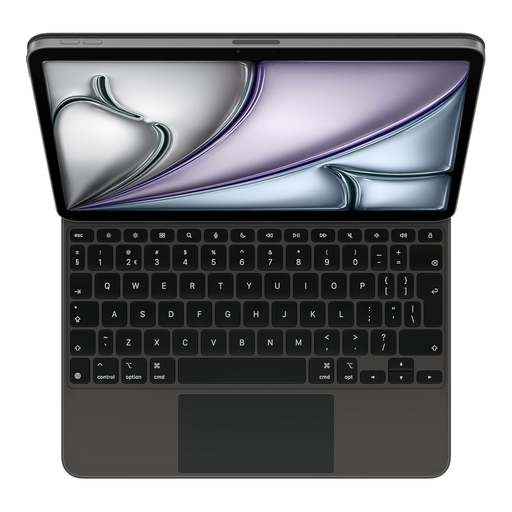
Apple Magic Keyboard for iPad Air 11-inch (M3), Dutch layout, black
This keyboard case is designed for taking notes on the iPad Air version listed, rather than as a standalone universal keyboard.
The product name lists a Dutch keyboard layout and compatibility with iPad Air 11-inch (M3). The product description mentions a trackpad and adjustable viewing angle.
View at Joybuy
 No image available
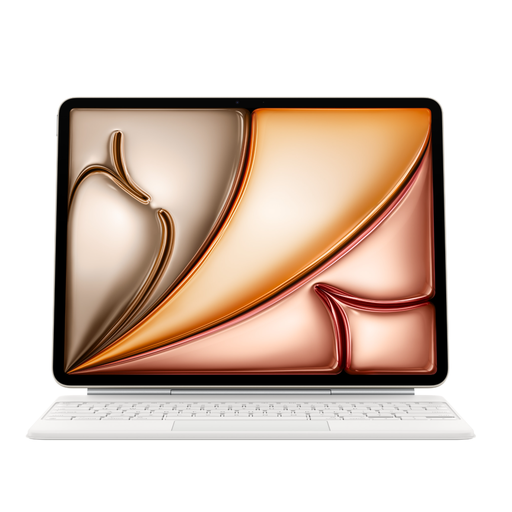
Apple Magic Keyboard for iPad Air 13-inch (M3), US English layout, white
This keyboard case is designed for the iPad Air version listed; choose it only if the model connection and keyboard layout are right for you.
The product name lists a US English layout and compatibility with iPad Air 13-inch (M3). The product description mentions a trackpad and adjustable hinge.
View at Joybuy
Frequently asked questions
Will a Bluetooth keyboard automatically work with any phone or tablet?
No. Check the Bluetooth and OS requirements for the exact version. For the Keys-To-Go 2 Universal, Logitech lists minimum versions for Windows, iPadOS, iOS, macOS and Android, among other systems; the Apple version is described as compatible with different devices.
How can you set up a keyboard quickly between visits?
Pair the keyboard with your device in advance and check the desired keyboard layout in your device settings. A standalone keyboard also needs a stable place for your phone or tablet; a Surface Pro keyboard must have the right connection for your model range.
Which batteries do the Logitech models use?
Logitech specifies two CR2032 coin-cell batteries for the Keys-To-Go 2 and two AAA batteries for the Pebble Keys 2 K380s. Check the details for the exact version if the battery type is important to your choice.
What rules apply to a wireless keyboard sold in the Netherlands?
Radio equipment placed on the EU market is covered by the Radio Equipment Directive, which sets requirements for areas including safety, electromagnetic compatibility and spectrum use. According to the European Commission, CE marking is required only when applicable EU rules stipulate it; the mark alone does not prove that an individual product has been independently tested.
Will a different keyboard keep client data in your notes safe?
No. Choosing a keyboard does not replace the security of your device and note-taking environment. If an organisation processes personal data, the Dutch Data Protection Authority says it must determine appropriate security measures based on the risks and prevent unauthorised access.


