
Working in a quiet reading room
If you edit slides alongside other people, you’ll want to assess how much noise the keys make. Logitech and Trust describe certain models as quiet, but that description is not based on a comparative noise test.


Start with the device you use to edit your slides: check the connection, operating system and keyboard layout before deciding on a size. A separate compact keyboard is handy if you switch between devices, a foldable model takes up little space, and a keyboard cover combines a keyboard and tablet. None of these features alone proves that the keys will be quiet enough for your library.
If you edit slides alongside other people, you’ll want to assess how much noise the keys make. Logitech and Trust describe certain models as quiet, but that description is not based on a comparative noise test.
If you switch between devices such as a tablet and laptop while preparing your slides, check the connection, keyboard shortcuts and layout on each device.
If you’re carrying a tablet, you can choose between a slim standalone keyboard, a foldable model or a cover that fits only specific tablet models.
Choose this if: you edit slides on different devices and can carry a separate keyboard.
Keep in mind: check the keyboard layout and connection of the version on sale; a manufacturer’s claim that it is quiet is not a comparative measurement.
Choose this if: you carry a separate keyboard and want to cover the keys in your bag. Logitech says the Keys-To-Go 2 has a built-in cover and can connect to up to three devices.
Keep in mind: you’ll also need a suitable viewing angle or stand for your tablet.
Choose this if: a compact folded size matters more to you than full-size keys.
Keep in mind: iClever says the IC-BK08 has smaller keys; also check that the touchpad works with your device.
Choose this if: you have a specifically supported tablet and want to carry the keyboard and viewing stand together.
Keep in mind: these covers aren’t universal; check your full tablet model and any system requirements.
| Consideration | What to check before buying | Who should prioritise this? |
|---|---|---|
| Typing noise | If possible, compare how the keys sound for yourself and bear in mind the rules of the library space. | If I’m editing slides alongside other people, I want to know how much noise my typing makes; around 31% of consumers say typing noise is their main concern. |
| Connection and compatibility | Check the full device model, operating system and whether the version uses Bluetooth or a USB receiver. | I want to connect the keyboard to the device I’m working on; around 25% of consumers put device compatibility first. |
| Size for carrying | For foldable models, compare their size both folded and unfolded. For a cover, check that it fits your tablet. | If I’m taking my keyboard to the library, the space it takes up in my bag matters; around 25% of consumers prioritise a compact size when packed. |
| Typing comfort and layout | Check the physical keyboard layout and try typing for longer periods. Find out whether the touchpad works with your device. | When editing titles and text boxes, I want a familiar layout and controls; around 19% of consumers prioritise typing comfort and layout. |
Logitech and Trust describe the models reviewed as quiet, but these descriptions aren’t based on a comparable noise test.
If possible, try typing for yourself and bear in mind the rules of the particular library space.
Samsung and Apple list specific compatible tablet models; a similar screen size doesn’t confirm that a cover will fit.
Before buying, check the full tablet model name, the version and any system requirements.
According to Trust, the Trust Ody II uses a USB receiver, while the Lyra offers a different connection option.
Check the connection for the exact version and make sure your tablet or laptop supports it.
The iClever manuals reviewed list different charging connectors for different IC-BK08 versions.
Check the version and its corresponding manual rather than relying on the model range alone.
Standalone keyboards reviewed for switching between devices or travelling light.
The Lyra and Ody II offer different connection options and aren’t interchangeable models.
The IC-BK08 is a foldable Bluetooth option with a touchpad.
The Book Cover Keyboard version EF-DX725UBEGWW is designed for specific Galaxy Tab models.
The Magic Keyboard cover reviewed is an option for a specifically supported iPad.
This selection from Joybuy includes tablet-specific keyboard covers and foldable keyboards for mobile use. For each cover, check the full tablet model; for each keyboard, check the layout and connection.
 Image unavailable
A tablet-specific cover for editing slides on a compatible iPad Pro.
Check the full iPad model before you order.
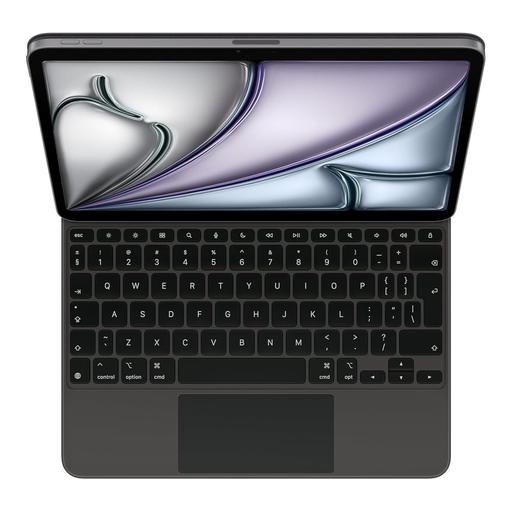 Image unavailable
A cover for editing slides on a compatible iPad Air 13-inch (M3).
Version: US English. Check that it matches your full tablet model.
 Image unavailable
A tablet-specific cover for editing slides on a compatible iPad Air 11-inch (M3).
Version: Dutch layout. Check the full tablet model.
 Image unavailable
A foldable option for taking a keyboard with a touchpad along for mobile work.
Before buying, check that the keyboard layout and connection suit your device.
 Image unavailable
A foldable option for controlling slides on a mobile device with a keyboard and touchpad.
Check that the layout and connection work with the device you use.
Pair the keyboard with the device you’ll use to edit your slides in advance, then test typing, punctuation and navigation. A USB receiver isn’t the same as Bluetooth: according to Trust, the Trust Ody II uses a receiver, while the Lyra also supports Bluetooth.
No. Check support for the exact version and your device. The iClever manual reviewed for one IC-BK08 version says that the touchpad isn’t supported on iPhone and describes limitations for other devices.
For an online consumer purchase, you’ll generally have up to 14 days from delivery to change your mind, subject to legal exceptions; ACM ConsuWijzer explains this period. The Netherlands Authority for Consumers and Markets also says that the seller is responsible for the statutory guarantee if a product doesn’t meet what you can reasonably expect from normal use. A commercial guarantee doesn’t replace this legal right.
The European Commission describes the Radio Equipment Directive as the framework for placing radio equipment on the EU market. The Dutch government says that electronic products in the EU must carry the CE marking. These are product rules for the market, not a separate registration or permit requirement for someone typing in a library.