For writing long passages at a shared table, a compact keyboard described as quiet is an obvious choice, as long as you find the key feel and layout comfortable. If you switch between devices, check the connections. If you often enter budget figures, a larger model with a number pad may be more practical, but less convenient to carry around.
Who is this relevant to?
Writer at a shared table
Writes long passages alongside others and is looking for a quiet typing experience and a practical key layout. Logitech and Trust describe specific models as having quiet keys; this is not an independent comparison of their noise levels.
Writer working in different places
Carries a keyboard around and, for example, alternates between writing on a laptop and a tablet. Size and suitable connection options are important factors when choosing.
Budget writer
Regularly enters figures as well as writing application text, and weighs up whether a number pad is worth the extra size. The Trust Ody II is listed by a Dutch retailer as a full-size model with a number pad.
What should you look for?
Compact Bluetooth keyboard
Suitable for: anyone who mainly writes text, has limited desk space and wants to use a compatible device without a USB receiver. Logitech describes the Pebble Keys 2 K380s as compact and quiet, with switching between three devices; CHERRY specifies three Bluetooth channels for the KW 7100 MINI BT.
Bear in mind: check that you find the key shape and layout comfortable, and whether you need a number pad. ‘Quiet’ is the manufacturer’s description, not the result of an independent noise measurement.
Compact model with Bluetooth and USB receiver
Suitable for: anyone who switches between devices or prefers to use a USB receiver with one of them. Trust describes the Lyra as having a receiver and two Bluetooth connections; according to CHERRY, the CHERRY KW 9200 MINI also offers a wired connection.
Bear in mind: check which ports are available, which wireless connections are permitted on your work device and the specific version you’re buying.
Larger model with number pad
Suitable for: anyone who often enters budget figures and doesn’t need to carry their keyboard around frequently. Trust describes the Ody II as quiet; the Dutch product listing specifies a full-size model with a number pad.
Bear in mind: the larger size takes up more space on your desk and in your bag. A USB receiver is the connection method listed for the Ody II, so check that your device has the right port.
| Consideration |
What to look for |
Who it’s most relevant to |
| Quiet typing |
Check whether the model is described as quiet and, where possible, try the key feel for yourself. Manufacturer descriptions do not prove that models differ in noise level. |
If I’m writing long passages alongside others, I want to disturb them as little as possible. Consumers who prioritise quiet above all else account for around 36% of consumers in this choice breakdown. |
| Writing for long periods |
Check the physical layout, the keys you use most often and the type of key feel. |
If I’m working on application text for a long time, I want a layout and key feel that I find comfortable. Around 29% of consumers give writing comfort top priority. |
| Carrying and connecting |
Check the operating system, the USB port available and which connections the exact model supports. |
If I switch between workspaces or devices, I want to use my keyboard without connection problems. Consumers who prioritise portability and connectivity account for around 21% of consumers in this choice breakdown. |
| Entering budget figures |
Work out how much numerical data you enter, then weigh up a number pad against the space available in your bag and on your desk. |
If I regularly enter figures, a number pad may matter more than having the smallest possible keyboard. Around 14% of consumers put entering figures first. |
Common selection mistakes
-
Choosing a compact model without considering budget work
A mini version takes up less space, but may be less suitable than a full-size model with a number pad if you regularly enter figures.
First decide whether you mainly write application text or often enter figures. Then compare the layout of the exact version.
-
Assuming ‘wireless’ means Bluetooth
The Trust Ody II uses a USB receiver, while according to CHERRY, the CHERRY KW 7100 MINI BT works via Bluetooth without a dongle. These connection types are not equally practical with every device.
Before buying, check the connection method and the ports on your work device.
-
Taking a manufacturer’s claim about quiet keys as a measured difference
Logitech and Trust product descriptions mention quiet keys, but do not provide comparable noise measurements.
Use ‘quiet’ as a guide when choosing, not as proof that one model is quieter than all the others. Try the key feel for yourself where possible.
Brands to consider
Logitech
According to Logitech, the Pebble Keys 2 K380s is compact and designed for switching between devices; the MX Keys Mini features, among other things, concave keys and backlighting.
- The models mentioned offer different options for compact typing and switching between devices.
- Check the version and layout. If you enter a lot of figures, you may want to consider a larger keyboard with a number pad.
Trust
According to Trust, the Lyra is a compact model with Bluetooth and a USB receiver; the Ody II is a larger alternative that Trust describes as quiet.
- Trust says the Lyra can connect to three devices and has a rechargeable battery.
- The connections and features described apply to the models mentioned, not automatically to other Trust keyboards. Also check the layout and what’s included.
CHERRY
According to CHERRY, the KW 7100 MINI BT is a compact Bluetooth option with a carry case; the KW 9200 MINI offers Bluetooth, 2.4 GHz and a wired connection.
- The choice of connections may be useful if you work with different devices.
- Check the key layout and what’s included for each version. Descriptions of key feel are not a comparative typing test.
Keyboards at Joybuy
These keyboards at Joybuy are suited to portable typing, switching between devices and choosing between a compact or larger size.
 No image available
NAXSIR foldable Bluetooth keyboard
The foldable design may suit anyone who wants to take a keyboard with them and type on multiple devices.
The title mentions quiet keys, a rechargeable battery and a magnetic stand. The description specifies Bluetooth support for up to three devices.
View at Joybuy
 No image available
AULA F75 MAX 75% mechanical keyboard
The 75% layout may suit anyone looking to save desk space and use multiple connection methods.
The title specifies a US QWERTY layout and wired, Bluetooth and 2.4 GHz connections. The version features Gradient Grey keycaps and Reaper Switch.
View at Joybuy
 No image available
Trust Lyra wireless keyboard and mouse
This compact set may suit anyone who wants to type on different devices and take a mouse with them.
The version described has a US QWERTY layout. The description mentions quiet, low-profile scissor keys, Bluetooth and a USB receiver for up to three devices.
View at Joybuy
 No image available
HP 725 wireless keyboard for multiple devices
This model may suit anyone who switches between work devices and wants a full-size keyboard.
The description mentions two Bluetooth connections and a 2.4 GHz receiver. The keyboard is full-size and, according to the product description, can be used while charging.
View at Joybuy
 No image available
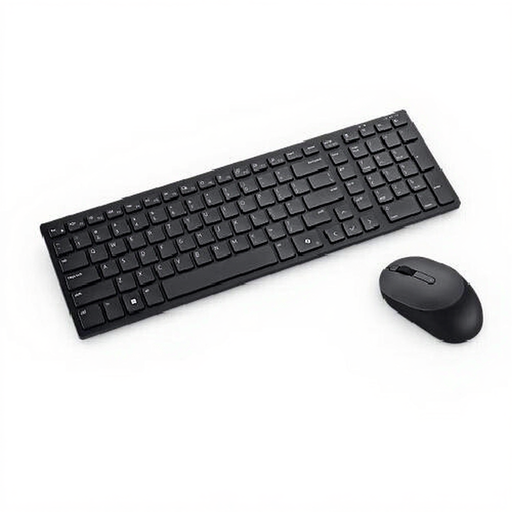
Dell Pro Compact Silent KM555 keyboard and mouse set
This set may suit anyone looking for a Belgian AZERTY keyboard with a number pad for office work.
The version has a Belgian AZERTY layout and comes with a mouse. The description mentions Bluetooth 5.1 and wireless RF connectivity; the specifications state that the keyboard is full-size.
View at Joybuy
Frequently asked questions
How can I make sure my keyboard connects to my work laptop?
Before buying, compare the connection method with your laptop and your workplace’s rules. The Trust Lyra is described as connecting via a USB receiver or Bluetooth; according to CHERRY, the CHERRY KW 7100 MINI BT is a Bluetooth model without a dongle. Also check the physical key layout of the version you choose.
Can I keep typing while a rechargeable keyboard is charging?
It depends on the model. Trust says the Lyra can be used while charging. CHERRY specifies a detachable cable for data transfer and charging for the KW 9200 MINI; don’t assume these features apply to other models.
What if I don’t like the key feel after buying online, or the keyboard breaks too soon?
For a standard online consumer purchase, you generally have a statutory cooling-off period of up to 14 days after delivery, subject to legal exceptions. Separately, a product must meet what you could reasonably expect when used normally. ACM ConsuWijzer states that if it doesn’t, the seller must offer an appropriate solution free of charge.
Does a wireless keyboard sold in the Netherlands need to have a CE mark?
CE marking requirements apply to radio equipment. The Dutch Authority for Digital Infrastructure says that devices meeting the relevant requirements receive a CE mark. Check the marking and product information for the specific version; this alone says nothing about whether an individual item complies.


